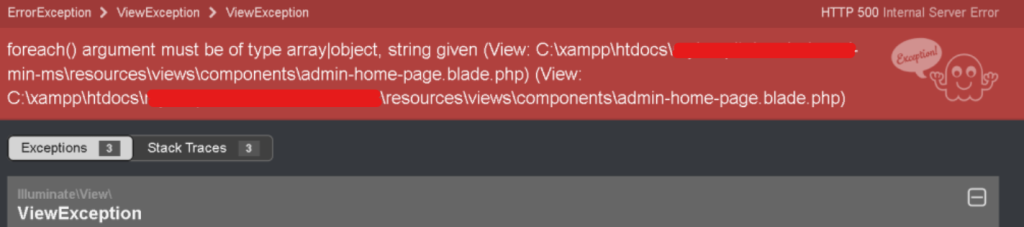
Have you ever encountered the dreaded HTTP 500 error while working with Laravel? If you’re seeing a message like “foreach() argument must be type array|object” in your Laravel project, fear not! This error might seem intimidating at first, but with the right approach, it’s entirely manageable.
Understanding the Error
The error message you’re encountering suggests that there’s an issue with the data type being passed into a foreach loop. In Laravel, the foreach loop is commonly used to iterate over arrays or objects. However, in this case, it seems like a string is being passed instead.
Identifying the Cause
- Blade Template Issue: The error message references a Blade template (
home-page.blade.php). This indicates that the issue might lie within your view file. - Data Format Mismatch: It’s possible that the data being passed to the Blade template is not in the expected format. This could be due to an error in retrieving data from the database or passing incorrect data from the controller to the view.
Troubleshooting Steps
- Check Blade Template: Open
home-page.blade.phpand inspect the foreach loop where the error is occurring. Ensure that the variable being looped through is indeed an array or an object. - Verify Data Retrieval: If the data is coming from the database, verify your database queries in the controller to ensure they are fetching the data in the correct format.
- Check Controller: Review the controller responsible for passing data to the view. Make sure that the data being passed is formatted correctly. If necessary, debug the controller to see what data is being retrieved.
- Environment Configuration: You mentioned an issue with your
.envfile, specifically regardingCLIENT_IDandCLIENT_SECRET. Ensure that these credentials are correctly configured and accessible in your application. Incorrect credentials or missing environment variables can lead to unexpected errors.
Resolving the Issue
Once you’ve identified the cause of the error, take appropriate action to resolve it:
- If the issue is with the Blade template, correct the variable being passed into the foreach loop.
- If the problem lies in data retrieval, debug your database queries and controller logic to ensure that the data is fetched and formatted correctly.
- Resolve any issues with your
.envfile, ensuring that all necessary environment variables are correctly set.
