MOTOSHARE ๐Ÿš—๐Ÿ๏ธ
Turning Idle Vehicles into Shared Rides & Earnings

From Idle to Income. From Parked to Purpose.
Earn by Sharing, Ride by Renting.
Where Owners Earn, Riders Move.
Owners Earn. Riders Move. Motoshare Connects.

With Motoshare, every parked vehicle finds a purpose. Owners earn. Renters ride.
๐Ÿš€ Everyone wins.

Start Your Journey with Motoshare

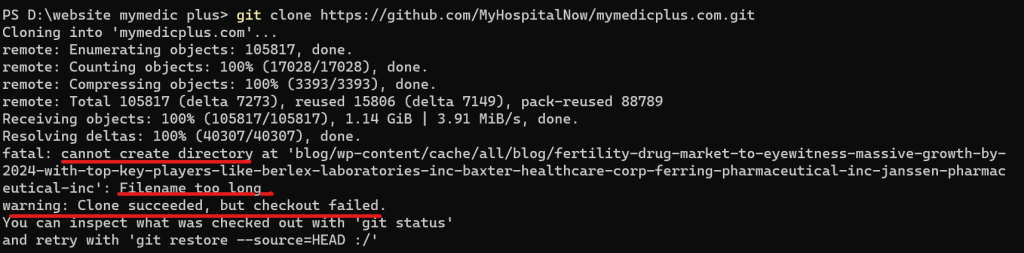
Git Error: Filename too long … Clone succeeded, but checkout failed.

Git has a limit of 4096 characters for a filename, except on Windows when Git is compiled with msys. It uses an older version of the Windows API and there’s a limit of 260 characters for a filename. The error message you’re encountering indicates that there is a problem with the length of a file or directory name in your Git repository, and it’s likely related to the path “blog/…./pharmaceutical-inc” being too long for your file system to handle.

To resolve this issue:

Shorten Directory Names: The most straightforward solution is to shorten the directory names in your repository. Try to rename the “pharmaceutical-inc” directory to something shorter, which should help you avoid the filename length limit issue.

Use a Different Filesystem: If you’re on a Unix-based system (like Linux or macOS) that enforces filename length limits, consider using a different filesystem that supports longer filenames. For example, you could use a filesystem like ext4 on Linux, which has longer filename support.

Git Configurations: You can also check your Git configurations related to path lengths. For instance, you can try running:

git config --system core.longpaths true

Another way (only for this clone):

git clone -c core.longpaths=true <repo-url>

Related Posts

The Ultimate Guide to DevOps Teams Roles and Responsibilities for IT Professionals

Introduction Many beginners entering the world of software development often fall into a common trap. They hear the term DevOps and immediately think it describes a single…

Read More

Modern DevOps Collaboration Guide for Engineering Teams

In the early days of software development, the process was linear and rigid. Developers wrote code, then tossed it over the wall to the Operations team to…

Read More

The Smart Patientโ€™s Guide to Comparing Medical Treatment Costs Globally

Making decisions about your health is rarely easy. When you or a loved one faces a medical challenge, the sheer volume of information can feel overwhelming. Suddenly,…

Read More

Compare Treatment Costs and Book Doctors Online With MyHospitalNow

Choosing the right healthcare path is often a source of immense stress. Whether you are dealing with a sudden illness, managing a chronic condition, or seeking a…

Read More

The Ultimate Guide to Version Control and SCM for DevOps Beginners

Introduction In the modern world of software development, no one builds applications in isolation. Whether you are working on a small internal tool or a massive e-commerce…

Read More

Definitive Guide to Infrastructure as Code and Cloud Automation

Introduction In the early days of corporate computing, provisioning hardware was a slow, bureaucratic process. If a development team needed a new environment to test an application,…

Read More
5 1 vote
Article Rating
Subscribe
Notify of
guest
2 Comments
Oldest
Newest Most Voted
Inline Feedbacks
View all comments
trackback

[…] git-error-filename-too-long-clone-succeeded-but-checkout-failed […]

Jake Harris
Jake Harris
1 year ago

If you have issues with long path names and anything associated with them, I recommend using Long Path Tool as it will solve most of them

2
0
Would love your thoughts, please comment.x
()
x