MOTOSHARE ๐Ÿš—๐Ÿ๏ธ
Turning Idle Vehicles into Shared Rides & Earnings

From Idle to Income. From Parked to Purpose.
Earn by Sharing, Ride by Renting.
Where Owners Earn, Riders Move.
Owners Earn. Riders Move. Motoshare Connects.

With Motoshare, every parked vehicle finds a purpose. Owners earn. Renters ride.
๐Ÿš€ Everyone wins.

Start Your Journey with Motoshare

JavaScript Switch Statement

JavaScript is a versatile programming language that offers developers a multitude of tools and techniques to solve complex problems efficiently. One such feature is the switch statement, a control flow mechanism that allows for concise and readable code when handling multiple conditional cases. In this blog post, we will explore the JavaScript switch statement, its syntax, and provide practical examples to demonstrate its usage.

Syntax:

The switch statement in JavaScript follows a specific syntax:

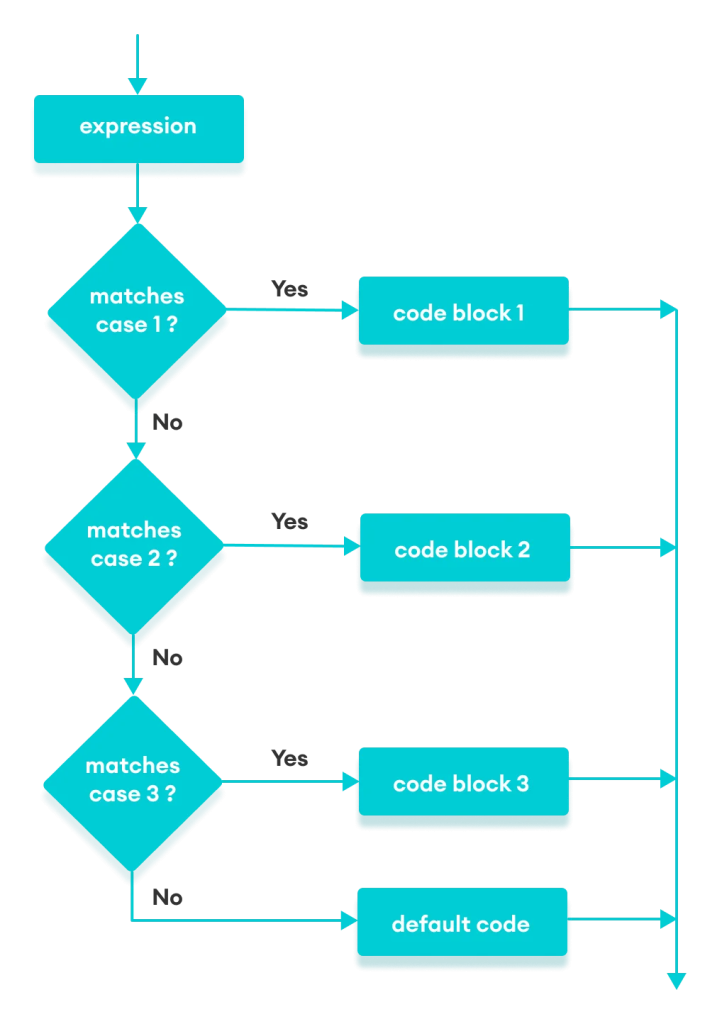
switch (expression) { case value1: // Code to execute when the expression matches value1 break; case value2: // Code to execute when the expression matches value2 break; case value3: // Code to execute when the expression matches value3 break; // … default: // Code to execute when no case matches the expression }

The switch statement begins with the keyword switch, followed by an expression enclosed in parentheses. The expression is evaluated, and its value is compared against the values in each case statement. When a match is found, the corresponding block of code executes until a break statement is encountered. If no match is found, the code within the default block executes (if present).

A simple example where we use a switch statement to handle different days of the week:

const day = new Date().getDay(); let dayName; switch (day) { case 0: dayName = “Sunday”; break; case 1: dayName = “Monday”; break; case 2: dayName = “Tuesday”; break; case 3: dayName = “Wednesday”; break; case 4: dayName = “Thursday”; break; case 5: dayName = “Friday”; break; case 6: dayName = “Saturday”; break; default: dayName = “Invalid day”; } console.log(`Today is ${dayName}.`);

In this example, the day variable holds the numeric value of the current day of the week. The switch statement matches this value against the cases, assigns the corresponding dayName, and prints it using console.log(). If the value does not match any of the cases, the default case sets dayName to “Invalid day.”

Related Posts

DevOps Study Plan for Beginners: The Ultimate Career Roadmap

Introduction Embarking on a career in DevOps is an exciting but often overwhelming journey, especially when faced with an endless array of tools and technologies. Many beginners…

Read More

Mastering the DevOps Interview: Technical and Practical Tips

Introduction Walking into a DevOps interview can feel like solving a complex puzzle where memorizing tools simply isn’t enough. Many candidates struggle because they focus on reciting…

Read More

Smart Guide to Find Professionals Near Me with Confidence

Finding reliable local service providers is not always easy. Many users face problems like fake listings, unverified professionals, unclear pricing, slow responses, and lack of trust. Whether…

Read More

AIOps Training: The Ultimate Guide to AI-Driven IT Operations

The complexity of modern IT environments has grown exponentially. As organizations shift toward hybrid multi-cloud architectures, microservices, and ephemeral containerized workloads, the traditional methods of managing infrastructure…

Read More

A Practical Guide to the Best DevOps Tools for Beginners

In the rapidly evolving world of technology, the term DevOps is often thrown around as a magic solution to software delivery problems. For those just starting, the…

Read More

A Practical Guide to Building Your First DevOps Project

Introduction Many learners enter the world of DevOps feeling overwhelmed by the sheer volume of tools and methodologies. You might have watched hours of video tutorials or…

Read More
0 0 votes
Article Rating
Subscribe
Notify of
guest
1 Comment
Oldest
Newest Most Voted
Inline Feedbacks
View all comments
trackback

[…] Javascript-switch-statement […]

1
0
Would love your thoughts, please comment.x
()
x