JSON (JavaScript Object Notation) is a lightweight data interchange format commonly used for transmitting data between a server and a web application. It is language-independent and easy for humans to read and write while also being easily parseable by machines.
JSON (JavaScript Object Notation) is a lightweight data interchange format commonly used for transmitting data between a server and a web application. It is language-independent and easy for humans to read and write while also being easily parseable by machines.
What is top use cases of json?
The top use cases of JSON include:
1. Data transmission between client and server in web applications.
2. Storing configuration data for software applications.
3. Interchanging data between different programming languages and platforms.
4. Storing and sharing structured data in a human-readable format.
What are feature of json?
Features of JSON:
- Human-readable: JSON is a human-readable format, which makes it easy to read and understand for humans. This is useful for debugging and troubleshooting, as well as for documentation.
- Lightweight: JSON is a lightweight format, which means that it is small and efficient to transmit over networks. This makes it a good choice for applications where data needs to be transferred quickly and easily.
- Language-independent: JSON is a language-independent format, which means that it can be parsed and generated in any programming language. This makes it a versatile tool for working with data in different programming languages.
- Self-describing: JSON is self-describing, which means that the data structure is defined within the JSON itself. This makes it easy to understand the data without having to refer to external documentation.
- Extensible: JSON is extensible, which means that new data types can be added to the format without breaking compatibility with existing JSON data. This makes JSON a flexible format that can be adapted to new use cases.
What is the workflow of json?
The workflow of working with JSON generally involves:
- Data Generation: JSON data is generated by encoding data structures such as arrays and objects into a string representation.
- Data Transmission: JSON data is transmitted or sent over a network using standard HTTP(S) protocols. It can be sent as part of an HTTP request or response.
- Data Parsing: JSON data is received and parsed by the receiving application. The JSON string is decoded into data structures that can be used by the application.
How json Works & Architecture?
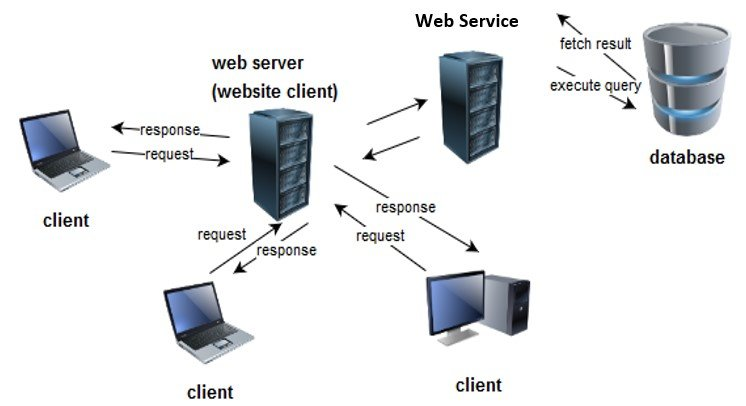
JSON (JavaScript Object Notation) is a data interchange format used to store and transmit data between a server and a client, or between different systems. It follows a simple workflow:
1. Creating JSON: The data to be transmitted is structured into a JSON format. It consists of key-value pairs, where keys are strings and values can be strings, numbers, booleans, arrays, or nested JSON objects.
2. Serialization: The JSON data is serialized, which means converting it into a string representation. This makes it easier to transmit over the network or store in a file.
3. Transmission: The serialized JSON data can be sent via HTTP requests, AJAX calls, or any other suitable method to transfer data between systems.
4. Deserialization: On the receiving end, the JSON data is deserialized, converting it back from the string representation into a usable format. This can be done using built-in functions or libraries available in different programming languages.
5. Processing: The deserialized JSON data can now be processed and used by the receiving system. This can involve extracting specific values, manipulating the data, or using it for various purposes.
6. Visualization: Finally, the processed JSON data can be presented or displayed in a user-friendly format, such as rendering it in a web application, generating reports, or displaying it in an interface.
How to Install and Configure json ?
To install and configure JSON, you don’t need to do anything specific because JSON is a data format, not a software or library that needs installation. JSON stands for JavaScript Object Notation and is widely used for storing and exchanging data. To use JSON in your programming language of choice, you typically need to import or include the JSON-related libraries or modules provided by your programming language. Most modern programming languages have built-in support for working with JSON.
Here are some general steps you can follow to work with JSON:
1. Make sure you have a programming language and editor or IDE (Integrated Development Environment) set up.
2. Check if the programming language you are using already has built-in JSON support. Most popular languages such as Python, JavaScript, Java, C#, and Ruby have native support for JSON.
3. If your programming language does not have built-in JSON support, you can search for external libraries or packages that provide JSON functionality. For example, in Python, you can use the `json` library, and in JavaScript, you can use the `JSON` object.
4. Import or include the JSON library/module in your code.
5. Use the provided functions or methods to parse, generate, and manipulate JSON data.
Step by Step Tutorials for json for hello world program
Here’s a step-by-step tutorial for creating a “Hello, World!” program using JSON:
1. Create a new file with a “.json” extension. You can use any text editor to create and edit JSON files.
2. Inside the file, start with an opening curly brace “{“, which represents the beginning of a JSON object.
3. Next, provide a key-value pair to represent the “Hello, World!” message. In JSON, keys are enclosed in double quotes and followed by a colon, and values can be of various types. For this example, we’ll use a string value. Add the following line:
"message": "Hello, World!"
4. Close the JSON object with a closing curly brace “}”. Your JSON file should now look like this
{
  "message": "Hello, World!"
}
5. Save the file with a .json extension, for example, “hello.json”.
