MOTOSHARE 🚗🏍️
Turning Idle Vehicles into Shared Rides & Earnings

From Idle to Income. From Parked to Purpose.
Earn by Sharing, Ride by Renting.
Where Owners Earn, Riders Move.
Owners Earn. Riders Move. Motoshare Connects.

With Motoshare, every parked vehicle finds a purpose. Owners earn. Renters ride.
🚀 Everyone wins.

Start Your Journey with Motoshare

flutter is not recognized 

In the command prompt returns an error saying “flutter is not recognized,” it means that the Flutter SDK is not added to your system’s PATH environment variable. The PATH variable is used to locate executables, so you need to configure it to include the path to the Flutter SDK.

Find the Flutter SDK path: Locate the directory where you have installed the Flutter SDK. The path may look something like this: C:\flutter on Windows or /Users/your-username/flutter on macOS or Linux.

Right-click on “This PC” (or “My Computer”) and select “Properties.”

Click on “Advanced system settings” on the left panel.

OR

Click ‘Windows button’ on keyboard Then search for “View Advanced System Setting”
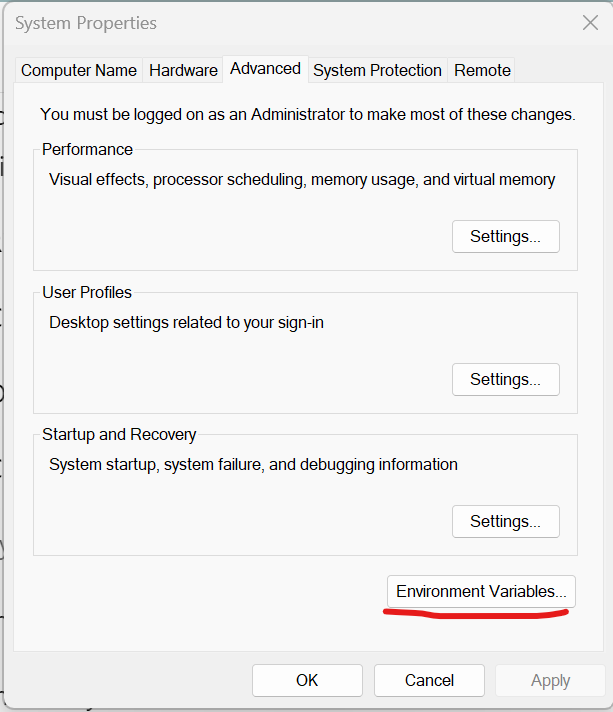
In the System Properties window, click the “Environment Variables” button at the bottom.

In the “User variables for name” section, find the “Path” variable, then click “Edit.”

Click “New” and add the path to the Flutter bin directory (e.g., C:\flutter\bin).
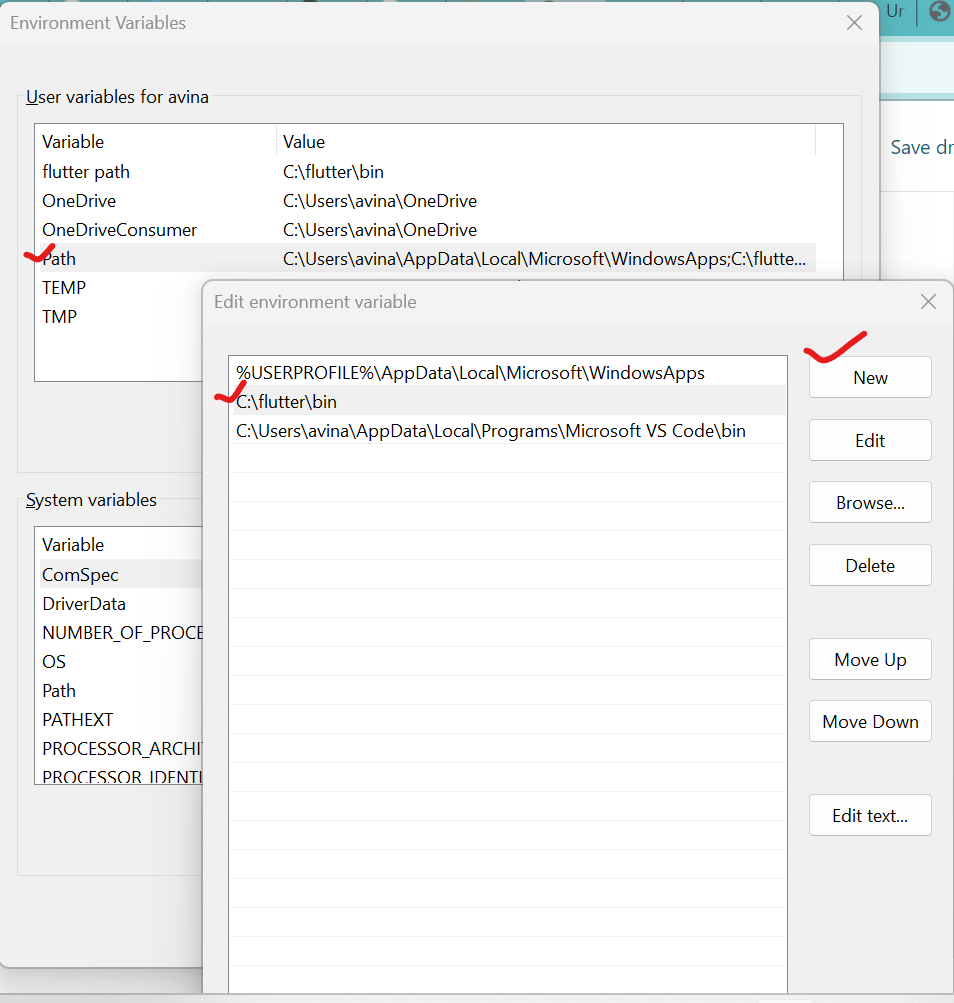
Click “OK” to save the changes.

Apply the changes: After modifying the PATH variable, you need to restart any open command prompt or terminal windows for the changes to take effect.

Verify Flutter installation: Open a new command prompt or terminal window and run flutter --version again. It should now display the Flutter version information without any errors.

Related Posts

Navigating Urology Hospitals, Specialists, and Treatment Paths: A Practical Patient Resource

Noticing changes in your urinary patterns, dealing with sudden flank discomfort, or managing ongoing pelvic pressure can be unsettling. When these issues appear, most people turn to…

Read More

How to Practice DevOps at Home: A Complete Hands-On Tutorial

Learning DevOps is much easier when you stop treating it as a list of tools to memorize. You can watch tutorials about Git, Docker, Jenkins, Kubernetes, Terraform,…

Read More

Bihar Tourism: The Ultimate Guide to Must-Visit Places, Rich Heritage & Local Life

Few destinations across the subcontinent carry the historical weight of Bihar. This is the land where wandering ascetics reshaped world philosophy, ancient scholars debated mathematics in multi-story…

Read More

Insider Guide to Upcoming Shows, Tickets & Things to Do

Beyond the iconic domes of the old city and late-night kebabs in Hazratganj, a dynamic, modern energy fuels the streets of Awadh. Today, you are just as…

Read More

Finding the Best Knee Replacement Hospitals in India: A Patient-First Guide to Choosing Care

When severe joint stiffness begins dictating your daily schedule—turning a routine walk, climbing a flight of stairs, or getting up from the dining chair into an ordeal—discussions…

Read More

Ultimate Guide to Kolkata Events: Tickets, Top Activities & What’s On

There is a distinct rhythm to life in this city, where centuries-old heritage effortlessly blends with a modern, buzzing social calendar. From intimate acoustic gigs tucked away…

Read More
0 0 votes
Article Rating
Subscribe
Notify of
guest
0 Comments
Oldest
Newest Most Voted
Inline Feedbacks
View all comments
0
Would love your thoughts, please comment.x
()
x