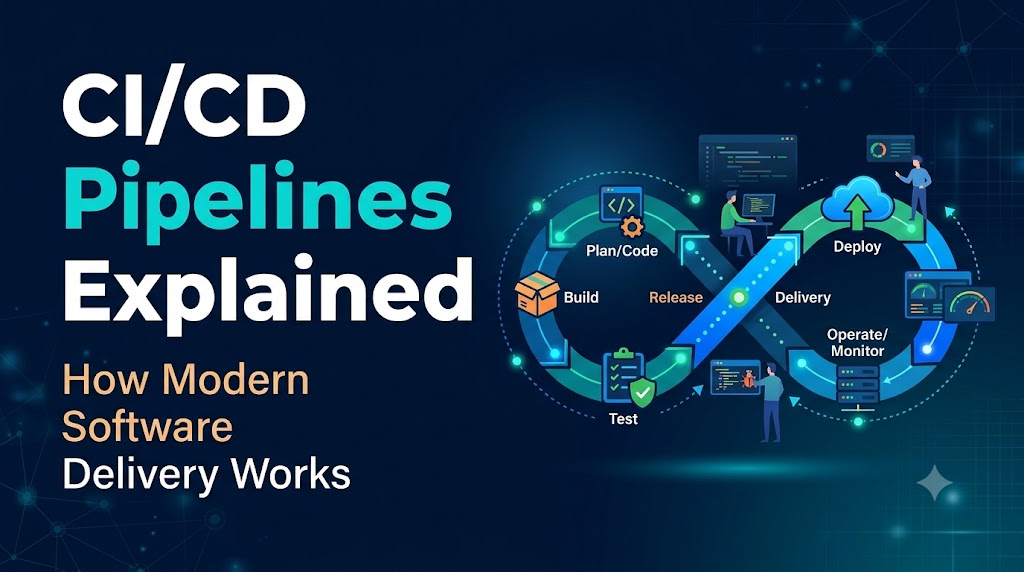
Software used to be shipped on physical media or through coordinated, late-night deployments where engineers ran shell scripts, copied binary files over SSH, and hoped database migrations wouldn’t corrupt production state. When releases happen once a quarter, they accumulate hundreds of changes, merge conflicts become nightmares, and pinpointing which commit broke a system requires hours of forensic debugging.
A CI/CD pipeline replaces that fragility with automated, repeatable engineering controls. It acts as an automated factory floor for code: every time an engineer pushes a change, a series of automated checks validates syntax, executes tests, packages artifacts, and deploys the application across target environments.
Rather than relying on human vigilance during stressful release windows, teams use pipelines to catch defects early, enforce consistent packaging, and deliver value to users in small, predictable increments.
Deconstructing CI/CD: Integration, Delivery, and Deployment
The acronym “CI/CD” combines distinct software engineering disciplines that address different halves of the delivery lifecycle.
       Continuous Integration (CI)
[ Commit ] ➔ [ Build ] ➔ [ Automated Tests ]
                                │
                                ▼
                    Continuous Delivery (CD)
         [ Artifact Packaging ] ➔ [ Staging Deploy ] ➔ [ Manual Approval ] ➔ [ Production ]
                                                                                   │
                                                                                   ▼
                                                                     Continuous Deployment (CD)
                                                                 (Fully automated to production)
Continuous Integration (CI)
Continuous Integration focuses on the developer workflow up to the generation of a validated build artifact. In a CI model:
- Developers merge their code into a shared repository trunk (often
mainor via short-lived feature branches) frequently—often multiple times per day. - Every push triggers an automated build that compiles code, installs dependencies, and runs automated test suites (unit tests, linters, static code analysis).
- The goal is immediate feedback. If developer A introduces a breaking change that conflicts with developer B’s interface, the pipeline fails within minutes, forcing an immediate fix before bad code compounds.
Continuous Delivery vs. Continuous Deployment
While both share the abbreviation “CD,” they diverge at the boundary between staging and production:
| Capability | Continuous Delivery | Continuous Deployment |
| Trigger to Staging | Automated upon passing CI | Automated upon passing CI |
| Production Gate | Manual business decision (one-click release, change control window) | Fully automated (passes all test suites, automatically goes live) |
| Target Artifact | Always kept in a deployable, production-ready state | Immediately deployed to live users upon passing tests |
| Common Use Case | Regulated industries (finance, healthcare), enterprise SaaS, embedded systems | Modern web consumer applications, cloud-native microservices with robust observability |
Continuous Delivery ensures your codebase is always technically ready to be released. You might hold the actual production rollout for marketing campaigns, regulatory reviews, or specific release windows, but the decision is purely operational, not technical.
Continuous Deployment takes human intervention completely out of the path to production. If a commit passes every lint check, security gate, integration test, and canary evaluation, it runs in production automatically.
Core Stages of an End-to-End Pipeline
Pipeline architecture changes based on whether you are running a serverless event handler, a monolithic enterprise service, or a Kubernetes-based microservice fleet. However, an enterprise-grade pipeline generally moves through five sequential phases.
Code snippet
flowchart LR
    A[1. Source Control] --> B[2. Build & Static Analysis]
    B --> C[3. Automated Testing]
    C --> D[4. Packaging & Artifacts]
    D --> E[5. Deployment & Verification]
1. Source Control & Triggering
The entry point is a version control system (VCS) such as GitHub, GitLab, or Bitbucket.
- Webhooks & Events: The VCS fires an event payload to the CI/CD orchestrator based on branch pushes, pull request updates, or git tags.
- Path Filtering: Robust pipelines only run jobs relevant to the changed code (e.g., modifying documentation under
/docsskips a multi-stage backend build).
2. Build & Static Analysis
This stage turns raw source code into runnable binaries, intermediate bytecodes, or static bundles.
- Dependency Resolution: Dependencies are fetched, ideally utilizing local caches or private package mirrors to minimize network latency and insulate against upstream package outages.
- Linters & Formatters: Verify adherence to language conventions (e.g., ESLint, Ruff, Golangci-lint).
- Static Application Security Testing (SAST): Scans the raw source code for hardcoded secrets, SQL injection vulnerabilities, or insecure method calls before the code ever executes.
3. Automated Testing
Pipeline testing must be stratified by speed and scope. If a pipeline takes 90 minutes to run, engineers will stop running it locally and bypass best practices.
- Unit Tests: Fast, isolated tests targeting pure functions and individual domain classes with mocked dependencies. These should finish in seconds to a few minutes.
- Integration Tests: Validate interactions with external systems—such as database schemas, in-memory caches, or third-party API adapters—often orchestrated via ephemeral containers.
- End-to-End (E2E) & Contract Testing: High-level validation ensuring key user journeys function across services (often tested via tools like Playwright or Pact).
4. Packaging and Artifact Storage
Once code passes tests, it must be compiled into an immutable artifact.
- Immutability Principle: Never recompile code between staging and production. Build once, sign, and promote the exact same binary or container image across all environments.
- Containerization: Generating an Open Container Initiative (OCI) image via Docker or Buildah.
- Software Bill of Materials (SBOM) & Provenance: Modern pipelines generate an SBOM and sign artifacts using cryptographic tools (such as Sigstore/Cosign) to protect against supply chain tampering.
- Registries: The compiled artifact is pushed to an artifact repository (e.g., OCI registry, Nexus, Artifactory, or cloud-managed services like AWS ECR).
5. Deployment and Verification
The artifact is deployed to target environments (dev, staging, production) using automated orchestration.
- Configuration Decoupling: Environmental variables, secrets, and feature flags are injected at runtime—never baked directly into the build artifact.
- Smoke Testing & Health Checks: The pipeline invokes synthetic probes (
/healthz, latency tests, synthetic checkout flows) to ensure the newly deployed instance is operational before redirecting customer traffic.
Anatomy of a Pipeline: GitHub Actions Example
To see how these concepts translate into infrastructure-as-code, consider this production-style GitHub Actions workflow for a containerized Node.js web service deploying to an environment via Docker:
YAML
name: Production Delivery Pipeline

on:
  push:
    branches: [ main ]
  pull_request:
    branches: [ main ]

permissions:
  contents: read
  security-events: write
  packages: write

jobs:
  validate:
    name: Lint & Unit Test
    runs-on: ubuntu-latest
    steps:
      - name: Checkout Code
        uses: actions/checkout@v4

      - name: Set up Node.js
        uses: actions/setup-node@v4
        with:
          node-version: '20'
          cache: 'npm'

      - name: Install Dependencies
        run: npm ci

      - name: Static Code Lint
        run: npm run lint

      - name: Run Unit Tests
        run: npm test -- --coverage

  security-scan:
    name: Dependency Audit
    runs-on: ubuntu-latest
    steps:
      - name: Checkout Code
        uses: actions/checkout@v4

      - name: Run Vulnerability Scanner
        uses: aquasecurity/trivy-action@master
        with:
          scan-type: 'fs'
          ignore-unfixed: true
          severity: 'CRITICAL,HIGH'
          format: 'sarif'
          output: 'trivy-results.sarif'

  build-and-package:
    name: Build OCI Image
    needs: [validate, security-scan]
    if: github.ref == 'refs/heads/main' && github.event_name == 'push'
    runs-on: ubuntu-latest
    steps:
      - name: Checkout Code
        uses: actions/checkout@v4

      - name: Set up Docker Buildx
        uses: docker/setup-buildx-action@v3

      - name: Log in to Registry
        uses: docker/login-action@v3
        with:
          registry: ghcr.io
          username: ${{ github.actor }}
          password: ${{ secrets.GITHUB_TOKEN }}

      - name: Build and Push Image
        uses: docker/build-push-action@v5
        with:
          context: .
          push: true
          tags: |
            ghcr.io/${{ github.repository }}:${{ github.sha }}
            ghcr.io/${{ github.repository }}:latest
          cache-from: type=gha
          cache-to: type=gha,mode=max

  deploy-staging:
    name: Deploy to Staging
    needs: [build-and-package]
    runs-on: ubuntu-latest
    environment:
      name: staging
      url: https://staging.example.com
    steps:
      - name: Deploy Image Tag via GitOps or Orchestrator
        run: |
          echo "Deploying version ${{ github.sha }} to staging cluster..."
          # Real-world command: kubectl set image deployment/api api=ghcr.io/${{ github.repository }}:${{ github.sha }}
Breakdown of Key Mechanisms
- Concurrency and Gates (
needs: [validate, security-scan]): The build and packaging step will never run if security scans fail or unit tests break. - Deterministic Installs (
npm ci): Using clean-install commands prevents subtle drift between local lockfiles and server dependencies. - Immutability via Git SHA: Images are tagged with the specific commit SHA (
${{ github.sha }}) alongsidelatest. This ensures you can trace every running container back to the exact line of code that spawned it. - Environment Isolation: Secrets and approvals are scoped strictly using the
environment:context, ensuring non-main branches cannot access production credentials.
Pipelines vs. Pipeline Tools: Avoiding Common Confusion
A frequent point of confusion is treating a CI/CD tool as equivalent to a CI/CD pipeline.
- A CI/CD Pipeline is an architectural pattern, a set of defined stages, and a continuous delivery discipline. It represents what needs to happen to a piece of code before it is safe for users.
- A CI/CD Tool is the execution engine that runs your scripts, provides runners, and coordinates jobs.
+----------------------------------------------------------------------------------+
| CI/CD Pipeline (Architectural Process)                                           |
| Code Review ➔ Build ➔ Unit Tests ➔ Security Scan ➔ Containerize ➔ Canary Deploy    |
+----------------------------------------------------------------------------------+
                                        │
                         Executes via selected tooling:
                                        │
 ┌──────────────────────┬──────────────────────┬──────────────────────┐
 │ GitHub Actions       │ GitLab CI/CD         │ ArgoCD + Tekton      │
 │ (Cloud runner SaaS)  │ (Integrated DevOps)  │ (Kubernetes GitOps)  │
 └──────────────────────┴──────────────────────┴──────────────────────┘
Selecting a tool does not mean you have a robust pipeline. If your Jenkins or GitLab runner simply executes an unversioned bash script that builds an un-tested binary and pushes it to an un-monitored VM, you have automated your releases, but you have not built an effective CI/CD practice.
Production Deployment Strategies and Rollbacks
Deploying an application is not simply copying files over; how you cut over network traffic determines whether your users experience outages during releases.
1. Rolling Deployments
In a rolling deployment, an orchestrator (such as Kubernetes or an AWS ECS service) incrementally replaces old application instances with new ones. Traffic is routed to the new instances only after they pass health checks.
- Pros: Zero downtime; requires no duplicate infrastructure.
- Cons: During rollout, versions $N$ and $N+1$ run concurrently, requiring your database schema and internal APIs to maintain backwards compatibility.
2. Blue-Green Deployments
Two identical physical or virtual environments exist: Blue (currently live) and Green (idle).
- The pipeline deploys the new release into Green.
- Smoke tests run against Green in isolation.
- Once verified, the load balancer or router switches incoming traffic from Blue to Green.
- Rollback: Instantaneous. If error rates surge, the router directs traffic back to Blue.
3. Canary Releases
The new version is deployed alongside the old version, but only receives a small slice of live user traffic (e.g., 2% to 5%).
- The pipeline monitors telemetry—evaluating HTTP 5xx rates, response latency (p95/p99), and system metrics.
- If error budgets remain intact, traffic automatically increments (10%, 25%, 50%, 100%).
- If anomalies are detected, the pipeline aborts the rollout and drains traffic from the canary pods.
Engineering Challenges and Best Practices
Building a pipeline is straightforward; maintaining a fast, secure, and reliable pipeline across multiple development teams requires proactive engineering discipline.
Taming Flaky Tests
The fastest way to destroy trust in a CI/CD pipeline is to tolerate flaky tests—tests that randomly pass or fail without any code changes.
- The Risk: Developers quickly develop “build blindness,” re-running failed jobs repeatedly until they pass, completely ignoring genuine regression failures.
- The Remedy: Quarantine flaky tests out of the critical path immediately into an isolated job. Enforce strict timeouts and mandate that tests never rely on external production network resources or unsynchronized concurrency sleep timers.
Secrets Management and Pipeline Security
Pipelines are high-value targets for attackers because they possess privileged credentials to cloud infrastructure and production clusters.
- Never use hardcoded API keys: Leverage OpenID Connect (OIDC) between your pipeline provider (GitHub Actions, GitLab) and your cloud provider (AWS, Azure, GCP). This eliminates long-lived access keys in favor of short-lived, cryptographically verified tokens.
- Ephemeral Runners: Execute pipeline jobs inside isolated, single-use container runners or VMs that are destroyed immediately after job completion to prevent cross-job credential theft.
- Least Privilege: A build job that compiles frontend code does not need permissions to deploy to production Kubernetes namespaces. Restrict runner IAM roles strictly per job step.
Optimizing Pipeline Execution Time
If a pull request takes 45 minutes to validate, developer cadence stalls.
- Parallelize independent workloads: Run unit tests, linting, and security audits concurrently rather than sequentially.
- Intelligent Caching: Cache package manager dependencies (
/node_modules,~/.m2,~/.cache/go-build) and Docker build layers using modern cache backends. - Fail Fast: Place the fastest, highest-probability failure checks (linters, formatters, unit tests) at the absolute beginning of your pipeline, saving heavier integration checks for later.
Frequently Asked Questions
Can you have Continuous Delivery without automated testing?
Technically, an automated pipeline can deploy code without tests, but doing so contradicts the foundation of the methodology. Without comprehensive automated testing, you are simply automating the delivery of undetected defects into production environments faster. Automated validation is what provides the confidence required to release frequently.
How does GitOps relate to CI/CD?
GitOps is a specific implementation of Continuous Delivery designed primarily for cloud-native architectures. In traditional CI/CD, the pipeline pushes changes directly into the cluster (Push model). In GitOps (using tools like ArgoCD or Flux), the cluster hosts an agent that continuously watches a Git repository containing declarative manifests, automatically pulling and reconciling discrepancies between Git and the live infrastructure (Pull model).
What is the ideal execution time for a CI/CD pipeline?
For pull request validation (CI), feedback should ideally return within 5 to 10 minutes. Once feedback exceeds 15 minutes, developers lose focus and switch context. Full deployment pipelines that include end-to-end testing, container publishing, and canary analysis often take longer, but the core integration feedback loop must remain rapid.
Is a CI/CD pipeline suitable for legacy monoliths?
Yes. While microservices naturally fit decoupled pipelines, monolithic applications often gain the highest immediate benefit from CI/CD. Automating the complex, manual build and packaging steps of a legacy monolith drastically reduces release risk, uncovers brittle integration issues, and frees development teams from manual release overhead.
Conclusion
Building an effective CI/CD pipeline is less about selecting the latest orchestration tool and more about establishing predictable, automated guardrails that turn production deployments into routine, low-risk events. The most sustainable approach is incremental: secure your integration loop with fast, reliable automated tests, enforce artifact immutability, and separate application secrets from code before advancing toward automated progressive rollouts. When code validation, security scanning, and deployment verification are codified directly into your workflow, engineering teams spend less time triaging delivery failures and more time shipping resilient software to users.
