MOTOSHARE 🚗🏍️
Turning Idle Vehicles into Shared Rides & Earnings

From Idle to Income. From Parked to Purpose.
Earn by Sharing, Ride by Renting.
Where Owners Earn, Riders Move.
Owners Earn. Riders Move. Motoshare Connects.

With Motoshare, every parked vehicle finds a purpose. Owners earn. Renters ride.
🚀 Everyone wins.

Start Your Journey with Motoshare

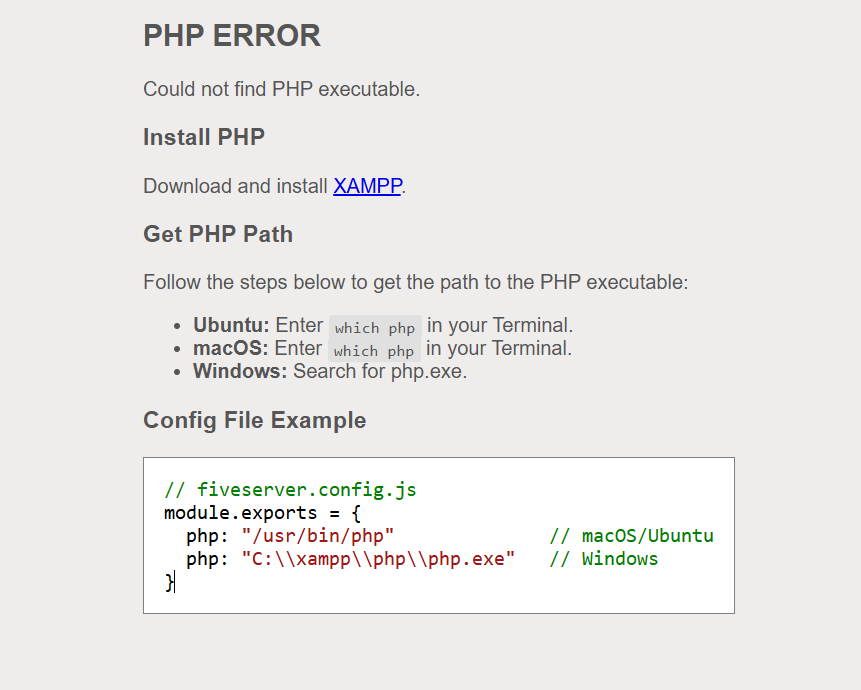
Fixing the “Could not find PHP executable” Error in Live Server on VS Code

this is a common issue and easy to fix! This guide will walk you through the step-by-step solution to get your PHP files running in the browser.


🔍 Why This Error Happens

The error means that Live Server (Five Server) can’t find the PHP executable (php.exe on Windows) to run .php files. This is because:

  • PHP is not installed.
  • The path to PHP is not set in VS Code settings.
  • Your system doesn’t know where to find php.

✅ How to Fix It (Step-by-Step)

✅ Step 1: Install PHP (If Not Already Installed)

🔸 For Windows:

Install XAMPP from the official website:
👉 https://www.apachefriends.org/download.html

After installation, the PHP executable will usually be at:

C:\xampp\php\php.exe

🔸 For Ubuntu:

Open terminal and run:

sudo apt update
sudo apt install php

🔸 For macOS:

Use Homebrew:

brew install php

✅ Step 2: Get the Path to Your PHP Executable

Depending on your OS:

OSCommand or Path
WindowsC:\xampp\php\php.exe
UbuntuRun which php in terminal
macOSRun which php in terminal

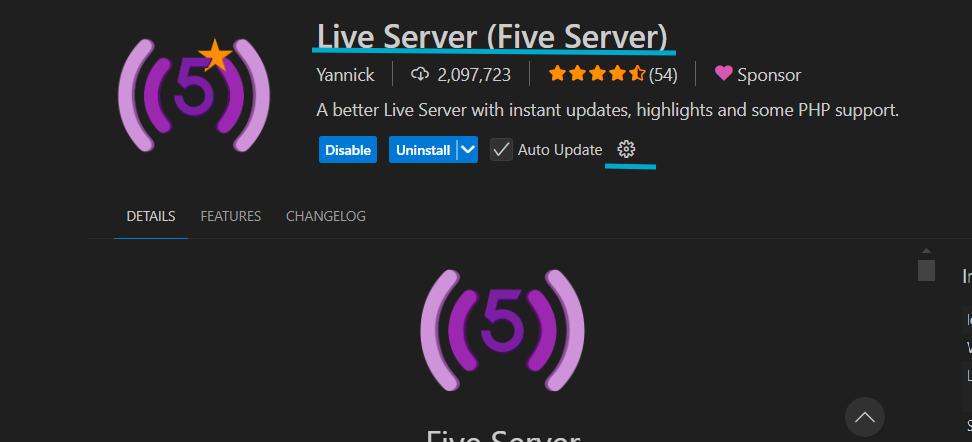
✅ Step 3: Configure PHP Path in VS Code

  1. Open VS Code.
  2. Press Ctrl + Shift + P (or Cmd + Shift + P on macOS) to open the command palette.
  3. Type and select:
    “Preferences: Open Settings (UI)”
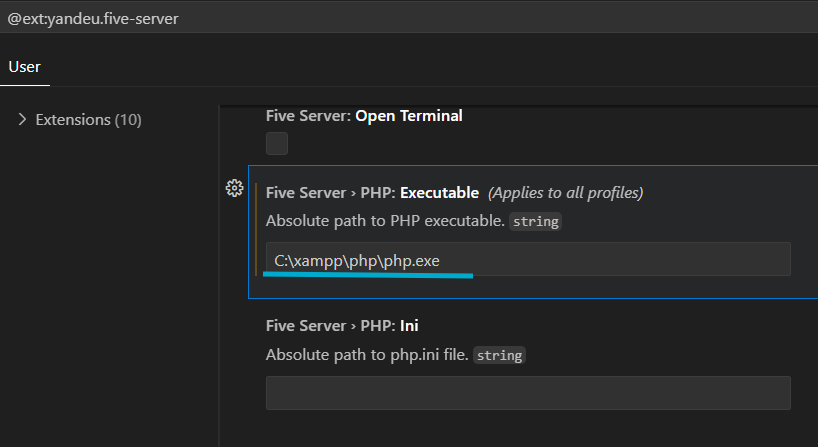
  1. In the search bar, type:
    Five Server > PHP: Executable
  2. You’ll see an option:
    “Absolute path to PHP executable. string”
  3. Paste your PHP path here:
    • For Windows (XAMPP):
C:\xampp\php\php.exe
  • For Ubuntu/macOS:
    Output of which php (e.g., /usr/bin/php)

Click Apply to All Profiles (if needed) and Save.

Now Run Your PHP File

  • Open any .php file.
  • Click “Go Live” at the bottom of VS Code.
  • Your browser should now render the PHP output successfully! 🎉

Related Posts

The Ultimate Certified FinOps Manager Roadmap: From Engineer to Cloud Economist

Introduction The Certified FinOps Manager program is a specialized professional track designed to bridge the gap between cloud engineering, finance, and procurement. As enterprises scale their cloud…

Read More

Mastering Cloud Value: The Ultimate Guide to the Certified FinOps Engineer

Introduction The Certified FinOps Engineer is designed for professionals who want to manage cloud cost, usage, governance, and business accountability in modern cloud environments. It is especially…

Read More

Mastering Cloud Unit Economics: A Complete Guide to the Certified FinOps Architect Path

Introduction As cloud environments grow in complexity, the need for structured financial management has moved from a “nice-to-have” to a core operational requirement. This guide provides a…

Read More

Elevating Data Pipelines: The Complete Guide to CDOM – Certified DataOps Manager Certification

Introduction The CDOM – Certified DataOps Manager is a professional designation designed for individuals who aim to bridge the gap between data engineering, operations, and business strategy….

Read More

Mastering the AI Lifecycle: The Ultimate Guide to the Certified MLOps Manager Certification

Introduction The Certified MLOps Manager program is designed for professionals who want to bridge the gap between machine learning development and operational excellence. This guide is crafted…

Read More

Certified MLOps Architect: A Comprehensive Guide to Mastering AI Infrastructure and Career Growth

Introduction The transition from traditional software development to machine learning requires more than just knowing how to build a model. It demands a robust architectural framework that…

Read More
0 0 votes
Article Rating
Subscribe
Notify of
guest
0 Comments
Oldest
Newest Most Voted
Inline Feedbacks
View all comments
0
Would love your thoughts, please comment.x
()
x