MOTOSHARE ๐Ÿš—๐Ÿ๏ธ
Turning Idle Vehicles into Shared Rides & Earnings

From Idle to Income. From Parked to Purpose.
Earn by Sharing, Ride by Renting.
Where Owners Earn, Riders Move.
Owners Earn. Riders Move. Motoshare Connects.

With Motoshare, every parked vehicle finds a purpose. Owners earn. Renters ride.
๐Ÿš€ Everyone wins.

Start Your Journey with Motoshare

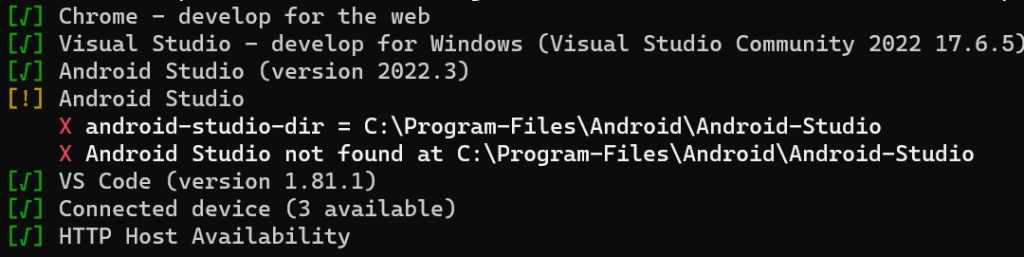
Flutter Doctor Error: android-studio-dir =

Android Studio
X android-studio-dir = C:\Program-Files\Android\Android-Studio
X Android Studio not found at C:\Program-Files\Android\Android-Studio

When configuring Flutter with Android Studio, you may have encountered a situation where you attempt to fix a problem using the following command:

flutter config --android-studio-dir = C:\Program Files\Android\Android Studio

The intention behind this command is to set the Android Studio directory for Flutter. However, if you observe closely, an issue arises due to those pesky empty spaces in the directory path, which breaks the tree structure. This seemingly simple problem can lead to considerable frustration.

Fortunately, there’s a straightforward solution to this problem. Instead of wrestling with spaces and complex directory paths, you can reset the default Android Studio directory by executing the following command:

flutter config --android-studio-dir=""

This command essentially sets the Android Studio directory to an empty string, which tells Flutter to use its default path. By doing so, you sidestep the issue of empty spaces interfering with your configuration. When you set the Android Studio directory to an empty string as shown in the command above, Flutter understands that it should rely on its built-in logic to locate Android Studio. This default behavior accounts for various system configurations, including those with spaces in directory paths, ensuring a hassle-free development experience.

Related Posts

Engineering Excellence: How Modern Enterprises Scale, Modernize, and Evolve

Introduction In the current digital landscape, organizations rely heavily on software platforms, cloud infrastructure, artificial intelligence, and automated workflows to maintain a competitive edge. Yet, implementing isolated…

Read More

How to Select the Ideal Development and Search Optimization Partner for Your Enterprise

A corporate website serves as much more than a digital brochure or an online business card. Today, it functions as the central anchor of a brand’s online…

Read More

Mastering Modern Data Operations: A Comprehensive Guide to Pipeline Reliability, Tools, and Skills

Introduction Every modern enterprise depends on data to steer strategic decisions, power consumer-facing software, and train machine-learning models. Yet, as companies rapidly adopt cloud platforms, real-time streaming…

Read More

Discovering Amaravati: A Complete Guide to Culture, Sights, and Local Events

Where ancient history, spiritual roots, the steady flow of the Krishna River, and growing modern development intersect, you find Amaravati. Whether you call the area home or…

Read More

Discovering Chennai: A Guide to Local Happenings, Landmarks and City Life

Chennai is a bustling coastal hub where ancient traditions sit right alongside a fast-evolving modern lifestyle. From centuries-old shrines in Mylapore and British-era historical monuments to thriving…

Read More

Architecting the Digital Foundation for Next-Generation Gaming Operations

Technology has long surpassed its early days as a mere support function; today, it is the beating heart of every modern casino and iGaming enterprise. Digital environments…

Read More
0 0 votes
Article Rating
Subscribe
Notify of
guest
1 Comment
Oldest
Newest Most Voted
Inline Feedbacks
View all comments
trackback

[…] flutter-doctor-error-android-studio-dir […]

1
0
Would love your thoughts, please comment.x
()
x