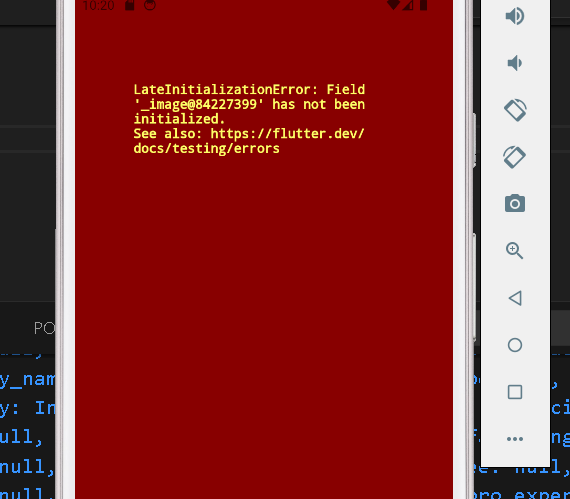
The LateInitializationError in Flutter typically occurs when trying to access a variable that was declared with the “late” keyword but was not initialized before its first use. This error indicates a violation of the late initialization contract, where a late variable must be initialized before it is accessed.
Causes of the Error:
- Failure to Initialize: Forgetting to initialize a late variable before accessing it is the primary cause of this error.
- Asynchronous Operations: When dealing with asynchronous operations or state changes, there may be timing issues where the variable is accessed before it’s initialized.
- Incorrect Scope: Declaring a late variable within a scope that prevents it from being initialized properly can lead to this error.
- Null Safety: In Dart 2.12 and above, with null safety enabled, late variables must be initialized either at their declaration or in the constructor.
Implications of the Error: Encountering the LateInitializationError can result in application crashes or unexpected behavior, depending on how the uninitialized variable is being used. Users may experience app freezes or unresponsive screens, leading to a poor user experience.
Resolving the Error: Here are some strategies to resolve the LateInitializationError in Flutter:
Initialize the Variable: Ensure that all late variables are properly initialized before their first use. If necessary, initialize them in the constructor or other appropriate lifecycle methods.
late String _name;
void initState() {
  super.initState();
  _name = 'Flutter';
}
Check for Null: If the variable can legitimately be null, consider using a nullable type instead of late, and handle null cases appropriately in your code.
String? _name;
Use FutureBuilder or StreamBuilder: If the variable depends on asynchronous data, consider using FutureBuilder or StreamBuilder widgets to handle asynchronous initialization.
late Future<String> _nameFuture;
@override
void initState() {
  super.initState();
  _nameFuture = _fetchName();
}

Future<String> _fetchName() async {
  // Fetch data asynchronously
}
Review Variable Scope: Ensure that the late variable is declared in a scope where it can be properly initialized. Avoid declaring late variables within conditional statements or loops where initialization may be skipped. The LateInitializationError in Flutter can be frustrating but is easily preventable with careful variable initialization and scope management. By understanding its causes and following best practices, Flutter developers can write more robust and reliable applications.
