MOTOSHARE 🚗🏍️
Turning Idle Vehicles into Shared Rides & Earnings

From Idle to Income. From Parked to Purpose.
Earn by Sharing, Ride by Renting.
Where Owners Earn, Riders Move.
Owners Earn. Riders Move. Motoshare Connects.

With Motoshare, every parked vehicle finds a purpose. Owners earn. Renters ride.
🚀 Everyone wins.

Start Your Journey with Motoshare

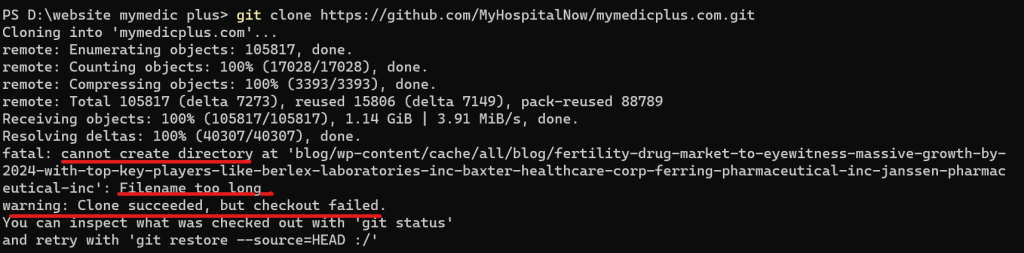
Git Error: Filename too long … Clone succeeded, but checkout failed.

Git has a limit of 4096 characters for a filename, except on Windows when Git is compiled with msys. It uses an older version of the Windows API and there’s a limit of 260 characters for a filename. The error message you’re encountering indicates that there is a problem with the length of a file or directory name in your Git repository, and it’s likely related to the path “blog/…./pharmaceutical-inc” being too long for your file system to handle.

To resolve this issue:

Shorten Directory Names: The most straightforward solution is to shorten the directory names in your repository. Try to rename the “pharmaceutical-inc” directory to something shorter, which should help you avoid the filename length limit issue.

Use a Different Filesystem: If you’re on a Unix-based system (like Linux or macOS) that enforces filename length limits, consider using a different filesystem that supports longer filenames. For example, you could use a filesystem like ext4 on Linux, which has longer filename support.

Git Configurations: You can also check your Git configurations related to path lengths. For instance, you can try running:

git config --system core.longpaths true

Another way (only for this clone):

git clone -c core.longpaths=true <repo-url>

Related Posts

Complete Guide to Certified DevOps Professional (CDP)

Introduction The Certified DevOps Professional (CDP) certification is an essential credential for engineers and professionals aspiring to enhance their skills in DevOps, automation, and continuous delivery. With…

Complete Guide to Certified DevOps Professional

Introduction The Certified DevOps Professional (CDE) certification is one of the most sought-after credentials for professionals in the DevOps field. As DevOps practices are increasingly adopted by…

Complete Guide to Certified DevOps Engineer (CDE)

Introduction The Certified DevOps Engineer (CDE) certification is a globally recognized credential designed for professionals who want to excel in DevOps practices and methodologies. DevOps engineers are…

Certified DevOps Manager: Accelerate Your Career Growth

Introduction In today’s fast-paced tech industry, the role of a DevOps Manager has become crucial for aligning development and operations teams. With the demand for continuous delivery,…

Certified DevOps Architect Skills for Modern Delivery

Introduction Release pipelines break when teams scale fast, because every team builds automation differently and nobody owns the end-to-end system design. As a result, teams ship slower,…

Certified DevOps Professional: Boost Your Skills and Career

Introduction In today’s fast-paced software development landscape, businesses are increasingly seeking ways to deliver high-quality products faster and more efficiently. However, many organizations struggle to bridge the…

5 1 vote
Article Rating
Subscribe
Notify of
guest
2 Comments
Oldest
Newest Most Voted
Inline Feedbacks
View all comments
trackback

[…] git-error-filename-too-long-clone-succeeded-but-checkout-failed […]

Jake Harris
Jake Harris
10 months ago

If you have issues with long path names and anything associated with them, I recommend using Long Path Tool as it will solve most of them

2
0
Would love your thoughts, please comment.x
()
x