In today’s digital era, creating and expressing your artistic vision has become more accessible than ever. WizBrand’s Mini Paint Tools Online provide a user-friendly and feature-rich platform for unleashing your creativity. we will explore the exciting world of WizBrand’s Mini Paint Tools and guide you through the process of using them to create stunning digital artwork.
Getting Started with WizBrand’s Mini Paint Tools Online: To embark on your artistic journey, follow these steps to access and utilize the Mini Paint Tools:
Open your web browser and navigate to the official WizBrand website (www.wizbrand.com).
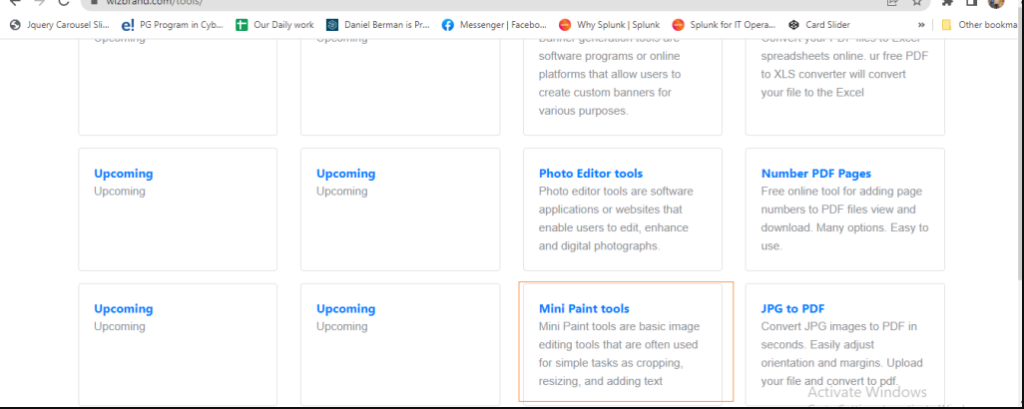
Explore the Tools Section: Look for the section on the website specifically dedicated to WizBrand’s tools. It might be labeled as “Tools” or “Artistic Tools.” Click on this section to access the available tools.
Select the Mini Paint Tools: Within the tools section, locate the Mini Paint Tools or a similar tool specifically designed for digital painting. Click on it to launch the Mini Paint Tools application.
What is Function and Feature of Mini Paint Tool ?
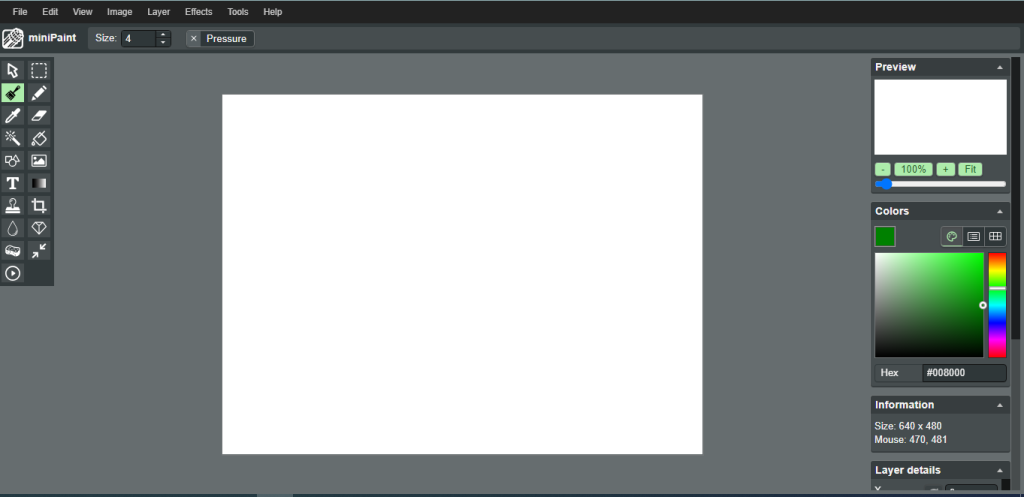
Once you have accessed the Mini Paint Tools, take a moment to explore the interface and become acquainted with its features. The interface typically consists of the following components:
a. Canvas: The main area where you can create your artwork. It represents the digital “canvas” on which you will paint.
b. Tools Palette: A selection of digital brushes, pens, pencils, and other artistic tools that you can use to create your artwork. The tools palette may be located on the side or at the bottom of the interface.
c. Color Palette: A collection of colors that you can choose from to apply to your artwork. The color palette allows you to select and mix various colors to achieve your desired artistic effect.
d. Layers Panel: A panel that allows you to organize your artwork into separate layers. Layers provide flexibility and control over different elements of your artwork.
Start creating your artwork. Follow these steps to bring your imagination to life:
a. Choose a Brush or Tool: Select a brush or tool from the tools palette that suits your artistic vision. Experiment with different brushes to achieve the desired texture, style, and stroke.
b. Select Colors: Use the color palette to choose the colors you want to apply to your artwork. You can select primary colors or mix them to create custom shades and hues.
c. Paint on the Canvas: With your brush and colors selected, start painting on the canvas. Express your creativity, experiment with different techniques, and let your imagination guide your strokes.
d. Utilize Layers: As you progress with your artwork, consider utilizing layers to separate different elements or make adjustments more easily. Layers allow you to work on specific parts of your artwork without affecting the rest.
e. Save and Export: Once you are satisfied with your artwork, save your creation. The Mini Paint Tools usually offer options to save your artwork in various formats, such as PNG or JPEG, allowing you to showcase and share your masterpiece with the world.
These are useful links
