MOTOSHARE 🚗🏍️
Turning Idle Vehicles into Shared Rides & Earnings

From Idle to Income. From Parked to Purpose.
Earn by Sharing, Ride by Renting.
Where Owners Earn, Riders Move.
Owners Earn. Riders Move. Motoshare Connects.

With Motoshare, every parked vehicle finds a purpose. Owners earn. Renters ride.
🚀 Everyone wins.

Start Your Journey with Motoshare

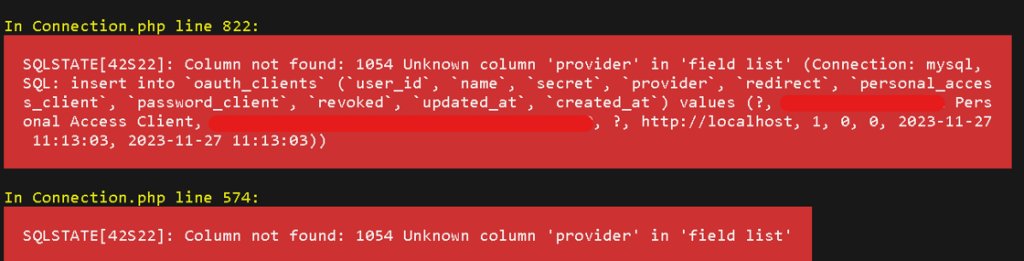
Resolving SQLSTATE[42S22] Error in Laravel Passport Upgrade

Laravel Passport, a powerful OAuth2 server for Laravel, is widely used to authenticate users and authorize access to APIs. However, upgrading from an older version of Laravel to a newer one, as in the case of upgrading from Laravel 5.7 to 10.10, can introduce compatibility issues. One such issue is the SQLSTATE[42S22] error, specifically related to the “unknown column ‘provider’ in ‘field list'” in the oauth_clients table.

Solution: To resolve the SQLSTATE[42S22] error and address the missing ‘provider’ column, follow these steps:

  1. Update Database Schema: Laravel Passport now supports multiple guard user providers, requiring the addition of a ‘provider’ column to the oauth_clients table. Use the following Laravel migration snippet to add the ‘provider’ column:
use Illuminate\Database\Migrations\Migration;
use Illuminate\Database\Schema\Blueprint;
use Illuminate\Support\Facades\Schema;

class AddProviderToOauthClientsTable extends Migration
{
    public function up()
    {
        Schema::table('oauth_clients', function (Blueprint $table) {
            $table->string('provider')->after('secret')->nullable();
        });
    }

    public function down()
    {
        Schema::table('oauth_clients', function (Blueprint $table) {
            $table->dropColumn('provider');
        });
    }
}

Run the migration using the following Artisan command:

php artisan migrate

This adds the ‘provider’ column to the oauth_clients table.

Manually Update Database (if necessary): If you haven’t published the Passport migrations before, you might need to manually add the ‘provider’ column to your database table. Execute the appropriate SQL query to alter the oauth_clients table:

ALTER TABLE oauth_clients ADD COLUMN provider VARCHAR(255) AFTER secret;

Related Posts

Certified DevSecOps Manager: Ultimate Career and Learning Guide

IntroductionIn the modern technology landscape, software delivery is faster and more complex than ever, making security a top priority. Organizations now demand professionals who can integrate development,…

A Professional Path to Certified DevSecOps Engineer

The way software is built has changed forever. In the past, security was a final gate that code had to pass through before going live. Today, that…

The Guide to Certified DevSecOps Architect Certification

In today’s world, software is the heart of every business. But speed without safety is a risk no one can afford. For many years, we treated security…

Master Observability Engineering (MOE) : A Step-by-Step Career Guide

The landscape of software development has shifted beneath our feet. A decade ago, we could manage a handful of servers with simple scripts. Today, we are dealing…

A Comprehensive Guide to HashiCorp Terraform Training

Hashicorp Terraform is a tool that allows people to manage infrastructure using code. Instead of clicking buttons in a cloud console, engineers write files that describe what…

Complete Guide to Kubernetes Security for Professionals

In the world of infrastructure, there is a massive difference between keeping a service running and keeping it safe. For years, we focused on “uptime.” But today,…

0 0 votes
Article Rating
Subscribe
Notify of
guest
3 Comments
Oldest
Newest Most Voted
Inline Feedbacks
View all comments
trackback

[…] Resolving SQLSTATE[42S22] Error in Laravel Passport Upgrade […]

trackback

[…] Resolving SQLSTATE[42S22] Error in Laravel Passport Upgrade […]

trackback

[…] Resolving SQLSTATE[42S22] Error in Laravel Passport Upgrade […]

3
0
Would love your thoughts, please comment.x
()
x