Error
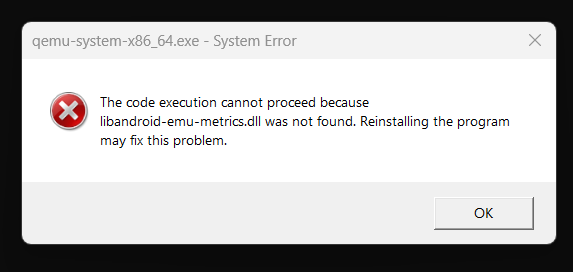
The “libandroid-emu-metrics.dll not found” error typically occurs when your Android Emulator is unable to find the required DLL file to run properly. This issue is often related to the Intel Hardware Accelerated Execution Manager (HAXM), which is crucial for the smooth functioning of the Android Emulator.
Why Does This Happen?
This error usually surfaces due to one of the following reasons:
Missing or Corrupted DLL File: The specific DLL file required by the Android Emulator is missing or has become corrupted.
Outdated HAXM Installation: The Intel HAXM version installed on your machine might be outdated or improperly configured.
Incomplete Android SDK Installation: Sometimes, the Android SDK installation can be incomplete or missing certain components.
Step-by-Step Solution
Verify Your Android SDK Folder:
Navigate to your Android SDK folder. Typically, this is located in C:\Users\\AppData\Local\Android\Sdk on Windows.
Ensure that the extras\intel\Hardware_Accelerated_Execution_Manager folder exists.
Install or Update Intel HAXM:
In your Android SDK folder, go to extras\intel\Hardware_Accelerated_Execution_Manager.
Run the intelhaxm-android.exe file to install or update Intel HAXM.
Check Your SDK Manager:
Open Android Studio.
Go to Tools > SDK Manager.
Under the SDK Tools tab, ensure that “Intel x86 Emulator Accelerator (HAXM installer)” is checked.
If it’s not installed, check the box and click Apply to install it.
Reinstall the Emulator:
If the above steps don’t resolve the issue, consider uninstalling and reinstalling the Android Emulator.
In Android Studio, go to Tools > AVD Manager.
Delete the existing virtual devices and create a new one to ensure a fresh setup.
Restart Your Machine:
Restart your computer after installing or updating HAXM to ensure that all changes are applied correctly.
Additional Tips
Check for Windows Updates: Sometimes, ensuring your Windows OS is up to date can resolve compatibility issues.
Use Correct BIOS Settings: Ensure that Intel Virtualization Technology is enabled in your BIOS settings.
Consult Android Studio Logs: The logs can provide more specific details about the error, which can be helpful in troubleshooting.
By following these steps, you should be able to resolve the “libandroid-emu-metrics.dll not found” error and get back to developing your Android applications without further interruptions. If you continue to face issues, consider consulting the Android Developer Community for additional support.
More topics on Bug fixing:

[…] the ‘type ‘Null’ is not a subtype of type ‘String” Error in Flutter Solving the “libandroid-emu-metrics.dll Not Found” Error in Android Development Resolving “Flutter: Target file ‘lib/main.dart’ not found” Issue […]
[…] the ‘type ‘Null’ is not a subtype of type ‘String” Error in Flutter Solving the “libandroid-emu-metrics.dll Not Found” Error in Android Development Resolving “Flutter: Target file ‘lib/main.dart’ not found” Issue […]
[…] the ‘type ‘Null’ is not a subtype of type ‘String” Error in Flutter Solving the “libandroid-emu-metrics.dll Not Found” Error in Android Development Resolving “Flutter: Target file ‘lib/main.dart’ not found” Issue […]
[…] the ‘type ‘Null’ is not a subtype of type ‘String” Error in Flutter Solving the “libandroid-emu-metrics.dll Not Found” Error in Android Development Resolving “Flutter: Target file ‘lib/main.dart’ not found” Issue […]