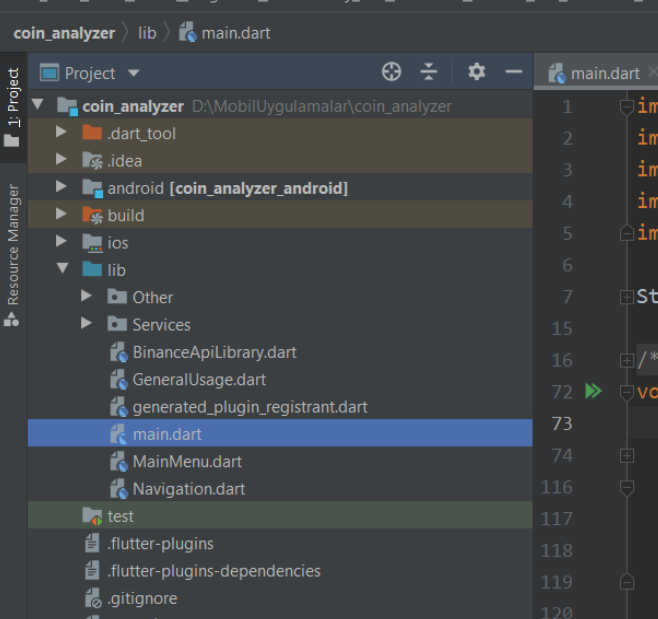
Flutter developers may encounter the error message “Target file ‘lib/main.dart’ not found” while attempting to run their Flutter application. This error indicates that the main.dart file, which serves as the entry point for the Flutter app, cannot be located in the specified directory.
Solution: When faced with the “Target file ‘lib/main.dart’ not found” issue, there are several troubleshooting steps you can take to resolve it effectively.
1. Check main.dart File Presence: Ensure that the main.dart file is present in the lib directory of your Flutter project. If the file is missing, you can create a new main.dart file and place it in the lib directory. Here’s a basic example of a main.dart file.
import 'package:flutter/material.dart';

void main() {
  runApp(MyApp());
}

class MyApp extends StatelessWidget {
  @override
  Widget build(BuildContext context) {
    return MaterialApp(
      home: Scaffold(
        appBar: AppBar(title: Text('My App')),
        body: Center(child: Text('Hello World')),
      ),
    );
  }
}
2. Verify launch.json Configuration: Check the launch.json file located in your project’s .vscode directory. Ensure that the file path specified in the “program” property accurately points to the main.dart file. Here’s an example of how the configuration should look.
{
  "version": "0.2.0",
  "configurations": [
    {
      "name": "Flutter",
      "request": "launch",
      "type": "dart",
      "program": "${workspaceFolder}/lib/main.dart"
    }
  ]
}
3. Create a New Flutter Project: If the issue persists and you suspect there may be configuration problems with your current project, consider creating a new Flutter project and copying your existing code over to the new project. This can help isolate any issues with the project configuration.

[…] in Flutter Solving the “libandroid-emu-metrics.dll Not Found” Error in Android Development Resolving “Flutter: Target file ‘lib/main.dart’ not found” Issue Troubleshooting Laravel: “laravel.EMERGENCY: Unable to create configured logger. Using […]
[…] in Flutter Solving the “libandroid-emu-metrics.dll Not Found” Error in Android Development Resolving “Flutter: Target file ‘lib/main.dart’ not found” Issue Troubleshooting Laravel: “laravel.EMERGENCY: Unable to create configured logger. Using […]
[…] in Flutter Solving the “libandroid-emu-metrics.dll Not Found” Error in Android Development Resolving “Flutter: Target file ‘lib/main.dart’ not found” Issue Troubleshooting Laravel: “laravel.EMERGENCY: Unable to create configured logger. Using […]
[…] in Flutter Solving the “libandroid-emu-metrics.dll Not Found” Error in Android Development Resolving “Flutter: Target file ‘lib/main.dart’ not found” Issue Troubleshooting Laravel: “laravel.EMERGENCY: Unable to create configured logger. Using […]
[…] in Flutter Solving the “libandroid-emu-metrics.dll Not Found” Error in Android Development Resolving “Flutter: Target file ‘lib/main.dart’ not found” Issue Troubleshooting Laravel: “laravel.EMERGENCY: Unable to create configured logger. Using […]