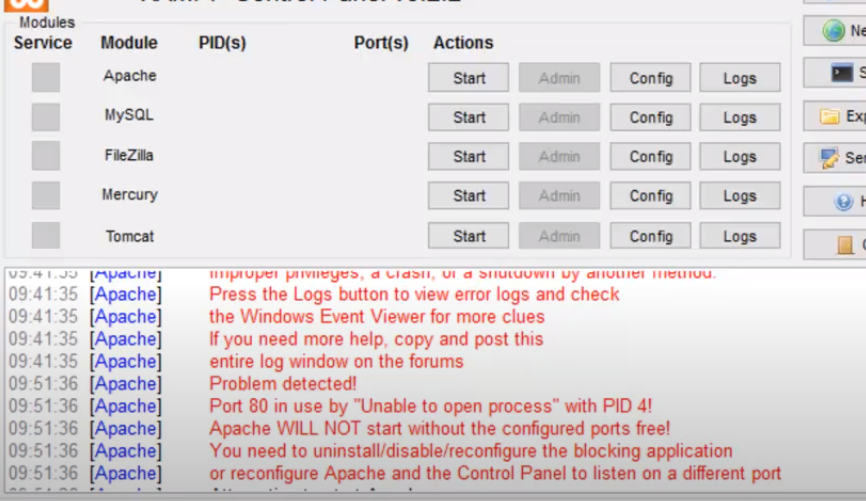
To resolve a port conflict in XAMPP, follow these steps:
Open CMD as administrator, run “net stop was /y” command.
Open the Run dialog (Win+R), type “services.msc” to access the Services management console. Locate and stop the “World Wide Web Publishing Service” and “Web Deployment Agent Service”, and disable them to prevent future conflicts.
Finally, start Apache in XAMPP for uninterrupted web development.
About this Issue :
XAMPP is a popular software package that provides a local development environment for web applications. However, one common issue that users encounter when running XAMPP is a port conflict on port 80. This conflict prevents the Apache web server from starting and displays an error message similar to “Unable to open process” with PID 4
- Understanding the Port Conflict: When XAMPP’s Apache web server starts, it attempts to bind to port 80, which is the default port for HTTP traffic. However, if another process is already using port 80, such as the Windows operating system process with PID 4 (System), a conflict occurs. As a result, XAMPP cannot open the necessary port, and the Apache service fails to start.
- Identifying the Process with PID 4: To resolve the port conflict, it is crucial to identify the process that is using PID 4. Here’s how you can do it: a. Open the Command Prompt with administrative privileges. b. Execute the following command:
netstat -ano | findstr :80c. Look for the entry with the local address0.0.0.0:80and note the corresponding PID in the last column.
Resolving the Port Conflict: Once you have identified the process with PID 4, you can take one of the following approaches to resolve the port conflict:
a. Stop the Conflicting Process:
- Open the Task Manager by pressing
Ctrl + Shift + Esc. - Switch to the “Processes” tab.
- Locate the process with the PID noted earlier.
- Right-click on the process and select “End Task” or “End Process Tree”.
- Confirm the action if prompted.
- Restart XAMPP and check if the port conflict is resolved.
Change Apache’s Port:
- Navigate to the XAMPP installation directory (typically
C:\xamppon Windows). - Open the
httpd.conffile located in theapache\confdirectory. - Search for the line containing
Listen 80. - Replace
80with an alternative port number (e.g.,8080). - Save the file and restart the Apache service in XAMPP.
- Access your web application using the new port number (e.g.,
http://localhost:8080).
