MOTOSHARE ๐Ÿš—๐Ÿ๏ธ
Turning Idle Vehicles into Shared Rides & Earnings

From Idle to Income. From Parked to Purpose.
Earn by Sharing, Ride by Renting.
Where Owners Earn, Riders Move.
Owners Earn. Riders Move. Motoshare Connects.

With Motoshare, every parked vehicle finds a purpose. Owners earn. Renters ride.
๐Ÿš€ Everyone wins.

Start Your Journey with Motoshare

Flutter: Conditional Statements If-Else

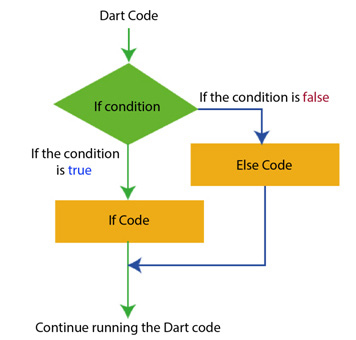
The if-else statement is a fundamental construct in programming that allows you to execute different blocks of code based on specific conditions. In Flutter, if-else statements are used extensively to control the flow of your application’s logic and user interface.

Syntax of If-Else Statements in Dart (Flutter’s Programming Language):

The syntax of an if-else statement in Dart is as follows.

if (condition) {
  // Code to execute if the condition is true
} else {
  // Code to execute if the condition is false
}

In this syntax:

  • condition is a boolean expression that evaluates to either true or false.
  • The code block inside the if statement is executed if the condition is true.
  • The code block inside the else statement is executed if the condition is false.

Example: Using If-Else Statements in Flutter Widgets:

Let’s consider a simple example where we want to display a message based on whether a user is logged in or not. We can achieve this using if-else statements in Flutter widgets.

import 'package:flutter/material.dart';

class HomePage extends StatelessWidget {
  final bool isLoggedIn = true;

  @override
  Widget build(BuildContext context) {
    return Scaffold(
      appBar: AppBar(
        title: Text('Conditional Statements in Flutter'),
      ),
      body: Center(
        child: isLoggedIn
            ? Text('Welcome, User!')
            : Text('Please log in to continue.'),
      ),
    );
  }
}

void main() {
  runApp(MaterialApp(
    home: HomePage(),
  ));
}

We define a boolean variable isLoggedIn that determines whether the user is logged in.

Inside the build method of the HomePage widget, we use an if-else statement to conditionally display different messages based on the value of isLoggedIn.

If isLoggedIn is true, we display a welcome message. Otherwise, we prompt the user to log in.

Related Posts

DevOps and Agile: How They Work Together to Transform Software Delivery

When a product team manages to plan sprint cycles smoothly, gather valuable customer feedback, and write clean code, everything feels under control. Yet, friction often emerges right…

Read More

A Comprehensive Bhopal Travel Guide: Sights, Culture, and Event Planning

When planning a getaway across central India, few destinations match the layered character and easygoing pace of Madhya Pradesh’s capital. Bhopal is an intriguing urban landscape where…

Read More

Examining Professional Standards in Spinal Surgery and Rehabilitation

Back or neck discomfort has a unique way of disrupting daily life, making even the simplest movements feel challenging. Because the spine is an intricate framework supporting…

Read More

Guide to Evaluating Top Aviation Academies for Airline Pilot Training

Stepping into the world of aviation is a thrilling venture, yet your entire professional trajectory depends heavily on the training ground you choose. Becoming a competent aviator…

Read More

Key Factors in Finding the Best Orthopedic Hospital for Your Needs

Living with chronic joint stiffness, a sudden sports injury, or persistent back discomfort can disrupt every part of your daily routine. When physical discomfort begins limiting your…

Read More

Exploring the Evolution of Telehealth and Digital Medical Advice

Medicine has continually adapted to changing lifestyles, and today, digital technology is revolutionizing how individuals connect with health guidance. From scheduling virtual appointments to checking health notes…

Read More
5 2 votes
Article Rating
Subscribe
Notify of
guest
0 Comments
Oldest
Newest Most Voted
Inline Feedbacks
View all comments
0
Would love your thoughts, please comment.x
()
x