
MOTOSHARE 🚗🏍️
Turning Idle Vehicles into Shared Rides & Earnings

From Idle to Income. From Parked to Purpose.
Earn by Sharing, Ride by Renting.
Where Owners Earn, Riders Move.
Owners Earn. Riders Move. Motoshare Connects.

With Motoshare, every parked vehicle finds a purpose. Owners earn. Renters ride.
🚀 Everyone wins.

Start Your Journey with Motoshare

Flutter error: cmdline-tools component is missing

I am getting error “cmdline-tools component is missing” after installing Flutter and Android Studio… I added the Android SDK.

The solution for me was opening Android Studio and going to SDK Manager, switch to the SDK Tools tab and check Android SDK Command-line Tools (latest).
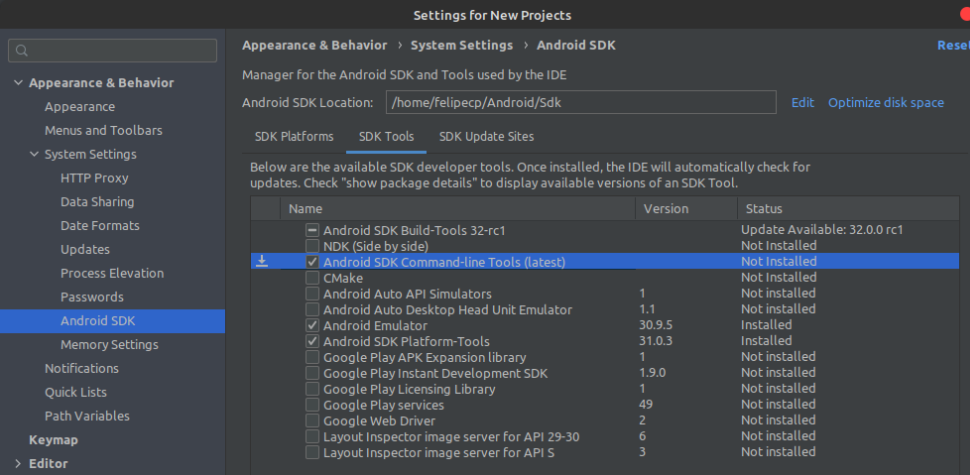
OR

Open your command-line interface or terminal on your computer.

Navigate to the directory where your Android SDK is installed. The path could vary depending on your operating system and how you installed the SDK.

Once you’re in the SDK directory, run the following command:

path/to/sdkmanager --install "cmdline-tools;latest"

Make sure to replace path/to/sdkmanager with the correct path to the sdkmanager executable on your system.

  1. The sdkmanager command will download and install the latest version of the cmdline-tools component.
  2. After the installation is complete, you should have the necessary cmdline-tools component available on your system.
  3. Verify the installation by running the sdkmanager command without any parameters. This will display a list of available packages, and you should see cmdline-tools in the list.

Remember that you might need administrative privileges or superuser access to install the component, depending on your operating system and SDK installation location.

Once you have installed the cmdline-tools component, you should be able to use Android SDK tools from the command line as expected. For more information and details on using the command-line tools, you can refer to the official Android Developer documentation at https://developer.android.com/studio/command-line.

Related Posts

Secrets Management in CI/CD: Complete Security Guide & Best Practices

Continuous Integration and Continuous Delivery (CI/CD) pipelines are the backbone of modern software engineering. They automate code compilation, run test suites, assemble container images, and provision infrastructure…

Read More

Modernizing the Workplace: A Practical Guide to Employee Attendance Management Software

Every growing organization eventually encounters the operational friction that comes with tracking working hours. What begins as a manageable routine—perhaps an informal logbook at the front desk,…

Read More

How an AI News Aggregator Transforms the Way We Discover, Understand, and Track Global Information

The modern news consumer is faced with an unprecedented volume of information. Every minute, thousands of digital outlets, wire services, specialized trade publications, and independent platforms publish…

Read More

The Complete Guide to Automated Testing in CI/CD Pipelines

Software teams frequently encounter a familiar bottleneck right before release day: code is written, features are declared complete, and everything stops while someone runs through a lengthy…

Read More

Restaurants Near Me: The Practical Guide to Smarter Dining and Discovery

Deciding where to eat used to be a spontaneous decision based on foot traffic or a friend’s recommendation. Today, dining out plays a central role in everyday…

Read More

CI/CD Best Practices for Beginners: From Code Commit to Production Release

Introduction Manual builds and deployments frequently trap development teams in a cycle of human error, environment drift, and high-stress releases—such as a Friday production outage caused by…

Read More
0 0 votes
Article Rating
Subscribe
Notify of
guest
0 Comments
Oldest
Newest Most Voted
0
Would love your thoughts, please comment.x
()
x