MOTOSHARE 🚗🏍️
Turning Idle Vehicles into Shared Rides & Earnings

From Idle to Income. From Parked to Purpose.
Earn by Sharing, Ride by Renting.
Where Owners Earn, Riders Move.
Owners Earn. Riders Move. Motoshare Connects.

With Motoshare, every parked vehicle finds a purpose. Owners earn. Renters ride.
🚀 Everyone wins.

Start Your Journey with Motoshare

How to solve error “FAILURE:Build failed with an exception” in android studio?

The “FAILURE: Build failed with an exception” error in Android Studio is a generic message that indicates there was an issue during the build process of your Android project. This error can be caused by various factors, such as configuration errors, dependency conflicts, or issues with the project files.

In Android Studio, navigate to the “Build” or “Messages” window to view the full build output. This window contains detailed information about the build process, including any error messages and stack traces. Analyze the output to understand the cause of the failure. Gradle is the build system used by Android Studio. Sometimes, issues can arise due to inconsistencies between project files and Gradle configurations. To resolve this, go to File > Sync Project with Gradle Files or click the “Sync Project” button in the toolbar. This action ensures that your project files are in sync with the Gradle build system.
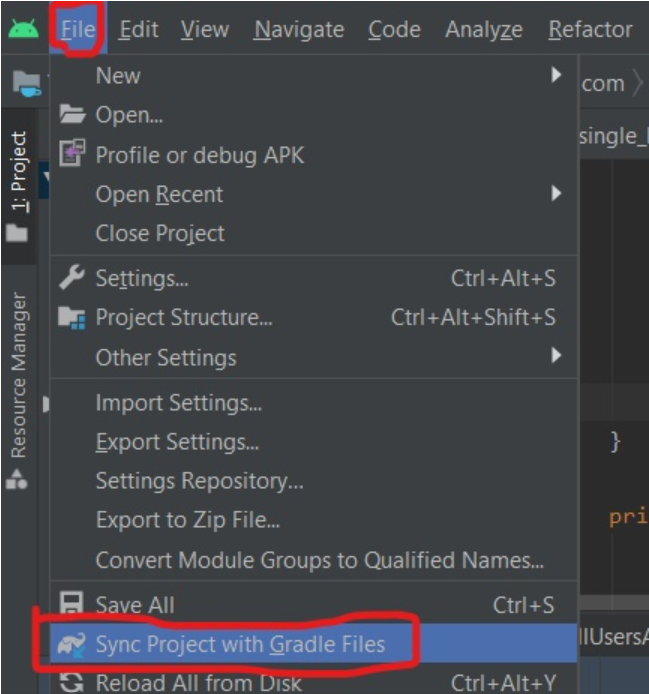
Conflicting dependencies or outdated library versions can cause build failures. Review your project’s build.gradle files and ensure that all dependencies are compatible with each other and up to date. You can use the “Gradle” tab in Android Studio to navigate to the specific build.gradle files.

Sometimes, build artifacts or caches can become corrupted, leading to build failures. Go to Build > Clean Project and then Build > Rebuild Project to clean the project and rebuild it from scratch. This action will regenerate all the build artifacts.

If you are using Android Studio 3.0 or above, consider disabling Instant Run during debugging, as it can sometimes cause build issues. Go to File > Settings > Build, Execution, Deployment > Instant Run and uncheck the “Enable Instant Run” option.
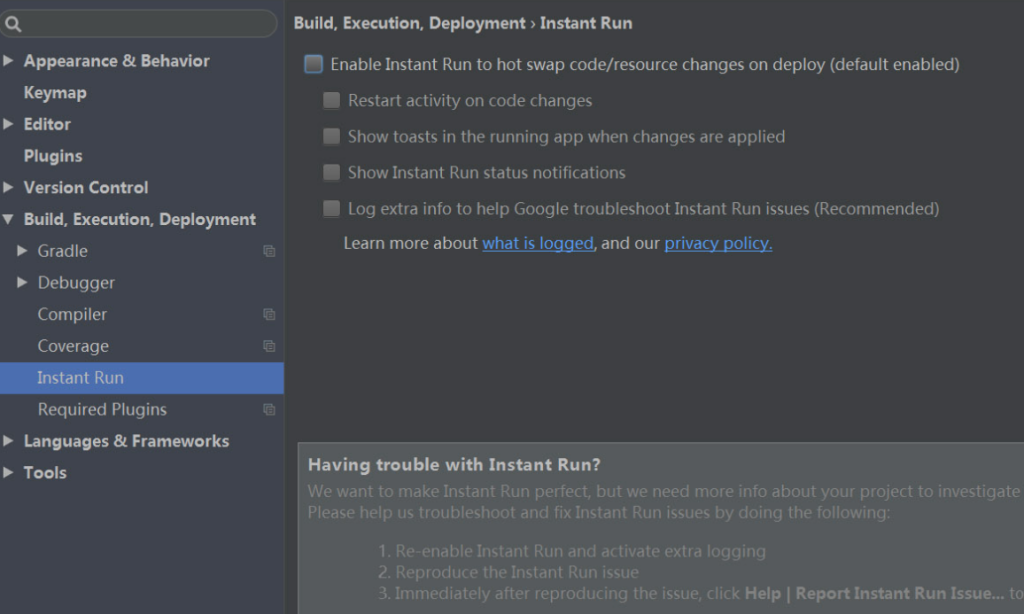
Verify that you have installed the correct SDK versions and API levels required by your project. You can do this in the SDK Manager within Android Studio.

If you have enabled R8 for code obfuscation, review the configurations in the proguard-rules.pro or android/app/build.gradle files. Incorrect configurations can cause build failures. Make sure you are using the latest version of Android Studio and Gradle. Updates often come with bug fixes and improvements that may resolve build-related issues.

Related Posts

GuestPostAI for Smarter Guest Post Creation and Publishing

Search Engine Optimization (SEO) evolves constantly, yet one fundamental truth remains unchanged: high-quality backlinks are the backbone of search visibility. Among all link-building tactics, guest posting continues…

Read More

Top All-in-One Digital Marketing Platform: Why WizBrand is Built for Modern Teams

In the modern hyper-competitive online landscape, running a successful online business requires managing dozens of moving parts. Marketers often find themselves constantly switching between separate software platforms…

Read More

Automated Payment Reconciliation Software: Streamline Your Finances

In today’s fast-paced digital economy, businesses of all sizes live and die by their cash flow. Yet, thousands of enterprises, startups, and service providers continue to grapple…

Read More

Streamlining Generative AI: The Ultimate Guide to Modern AI Prompt Management

Generative artificial intelligence has swiftly transitioned from a futuristic experiment into the foundational backbone of contemporary business operations, software engineering, and creative industries. Whether you rely on…

Read More

Top Free Content Publishing Platforms: Boost Your SEO & Backlinks

In today’s fast-moving digital landscape, creating exceptional content is only half the battle. Whether you’re a passionate blogger, a startup founder, or an experienced marketer, getting your…

Read More

Master Your Links: How URLSNOW Simplifies URL Health & Campaign Tracking

In today’s hyper-connected digital landscape, links are the digital circulatory system of the internet. Every blog post, email newsletter, social media campaign, affiliate promo, and landing page…

Read More
0 0 votes
Article Rating
Subscribe
Notify of
guest
0 Comments
Oldest
Newest Most Voted
Inline Feedbacks
View all comments
0
Would love your thoughts, please comment.x
()
x