MOTOSHARE ๐Ÿš—๐Ÿ๏ธ
Turning Idle Vehicles into Shared Rides & Earnings

From Idle to Income. From Parked to Purpose.
Earn by Sharing, Ride by Renting.
Where Owners Earn, Riders Move.
Owners Earn. Riders Move. Motoshare Connects.

With Motoshare, every parked vehicle finds a purpose. Owners earn. Renters ride.
๐Ÿš€ Everyone wins.

Start Your Journey with Motoshare

Compress Google Drive Photos by Approx. 50% Without Deleting Anything

Managing your Google Drive storage can sometimes be a challenge, especially when photos and videos take up significant space. The good news is that you can compress your photos and videos to free up storage without deleting anything. Hereโ€™s a simple step-by-step guide to help you:

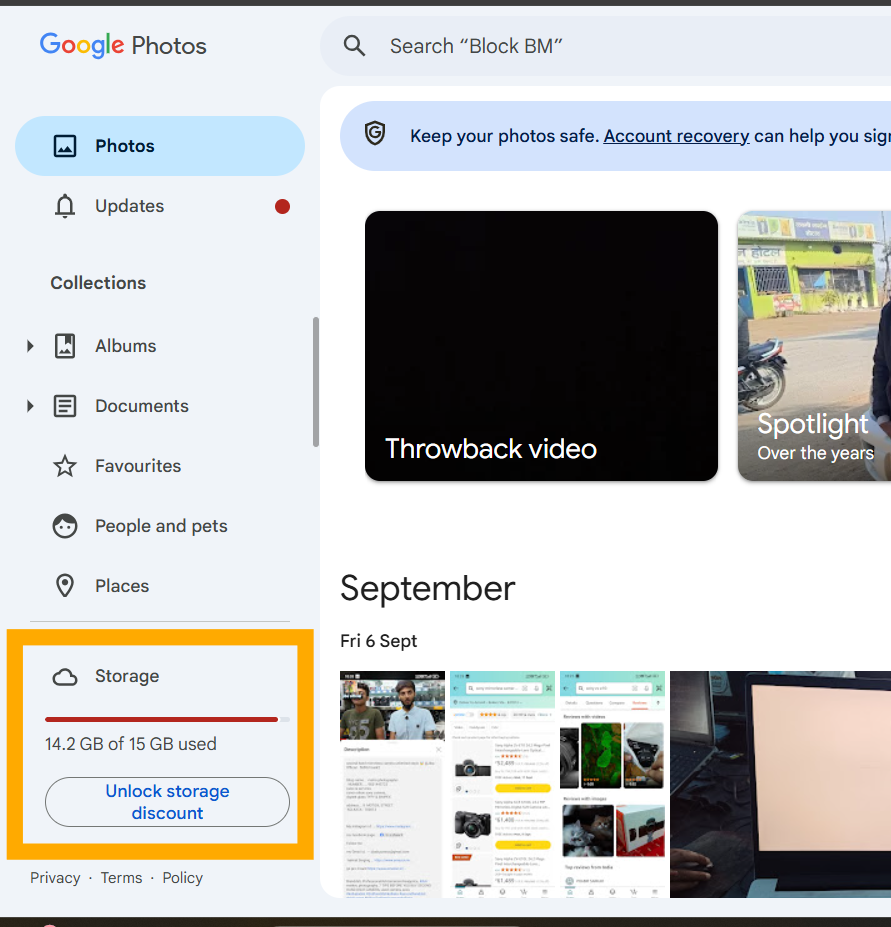
Step 1: Visit Google Photos

Go to photos.google.com.
Step 2: Access the Storage Option

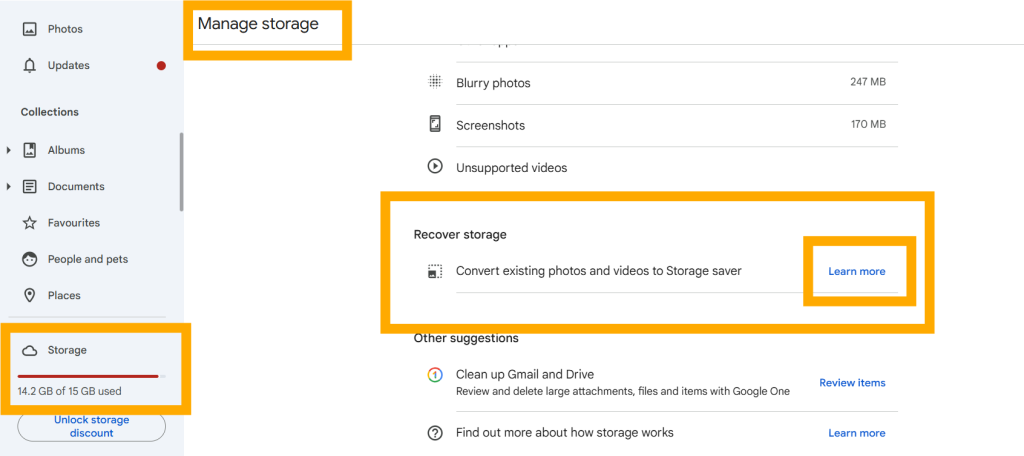
Click on the Storage option. This will redirect you to the Manage storage page.

Step 3: Navigate to “Recover Storage”

On the Manage storage page, find and select the Recover storage option.

Step 4: Learn More About Compression

Click on the Learn more button under the “Recover storage” section.
Step 5: Confirm Your Decision

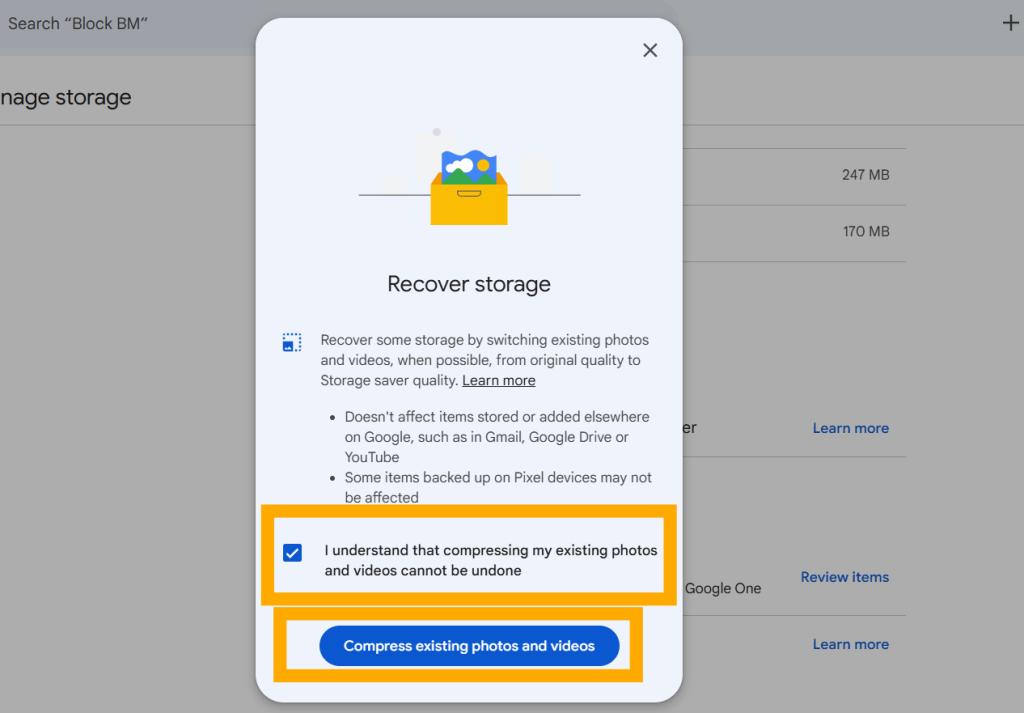
Check the box that says:
“I understand that compressing my existing photos and videos cannot be undone.”
This is an important step as compression is irreversible.
Step 6: Compress Your Photos and Videos

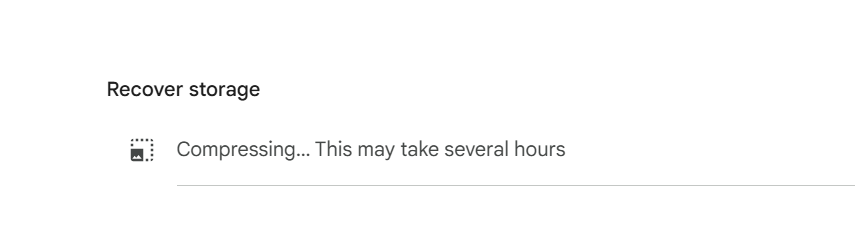
Click on the Compress existing photos and videos button. The compression process will begin, and your photos and videos will be resized to take up less space.

What Happens Next?

Once the process is complete, your photos and videos will still be accessible, but they will take up approximately 50% less space on your Google Drive. This is a great way to optimize storage without losing your precious memories.

Start now and free up space on your Google Drive effortlessly!

Related Posts

Restaurants Near Me: The Practical Guide to Smarter Dining and Discovery

Deciding where to eat used to be a spontaneous decision based on foot traffic or a friend’s recommendation. Today, dining out plays a central role in everyday…

Read More

CI/CD Best Practices for Beginners: From Code Commit to Production Release

Introduction Manual builds and deployments frequently trap development teams in a cycle of human error, environment drift, and high-stress releasesโ€”such as a Friday production outage caused by…

Read More

MCC MNC Lookup Guide: Understanding PLMN Codes & Telecom Data

Every time a smartphone connects to a cell tower, sends an SMS, or negotiates a roaming handshake across international borders, an automated protocol verifies the exact identity…

Read More

CI/CD Tools Comparison: Jenkins vs GitLab vs GitHub Actions

Every software team eventually faces the deployment crossroads: developers need immediate feedback on pull requests, QA requires isolated test environments, and platform engineers must enforce strict security…

Read More

Restaurant Reservation Management: How to Improve Table Turnover and the Guest Experience

Introduction A successful restaurant experience begins long before the first dish reaches the table. It starts when a guest searches for a place to eat, checks availability,…

Read More

Front-of-House Mastery: How Modern Restaurants Optimize Table Turns and Guest Flow

On a bustling Friday evening, a restaurantโ€™s dining room can feel like a high-wire balancing act. Walk-ins crowd around the host stand, two booked parties arrive fifteen…

Read More
0 0 votes
Article Rating
Subscribe
Notify of
guest
0 Comments
Oldest
Newest Most Voted
0
Would love your thoughts, please comment.x
()
x