Photography is a medium of visual storytelling, capturing moments, emotions, and scenes. To bring out the full potential of a photograph, post-processing is often essential. In the digital age, we’re fortunate to have a wide array of photo editing tools at our disposal. One such powerful tool that has gained popularity among photographers and enthusiasts is Darkroom JS.
Darkroom JS is an open-source, JavaScript-based photo editing tool that allows users to enhance and manipulate their images directly within a web browser. It offers a range of features and filters that can transform ordinary photos into stunning visual masterpieces.
What is Function and feature of Darkroom JS PhotoEditor tool
Darkroom JS boasts an intuitive and user-friendly interface, making it accessible to both beginners and experienced photographers. Its minimalistic design ensures a clutter-free workspace. Darkroom JS provides essential photo editing tools such as cropping, rotating, and resizing, allowing users to fine-tune the composition of their images. The tool offers a wide range of filters and effects to apply to your photos. From vintage looks to modern styles, you can easily experiment and find the perfect mood for your images. Darkroom JS provides precise controls for adjusting exposure, brightness, contrast, saturation, and color temperature. These adjustments enable you to correct exposure issues and enhance color balance. For users with a keen eye for detail, the histogram and levels tools are invaluable. They help in analyzing and adjusting the distribution of tones and colors in an image. Need to apply the same edits to multiple photos? Darkroom JS allows for batch editing, saving you valuable time.
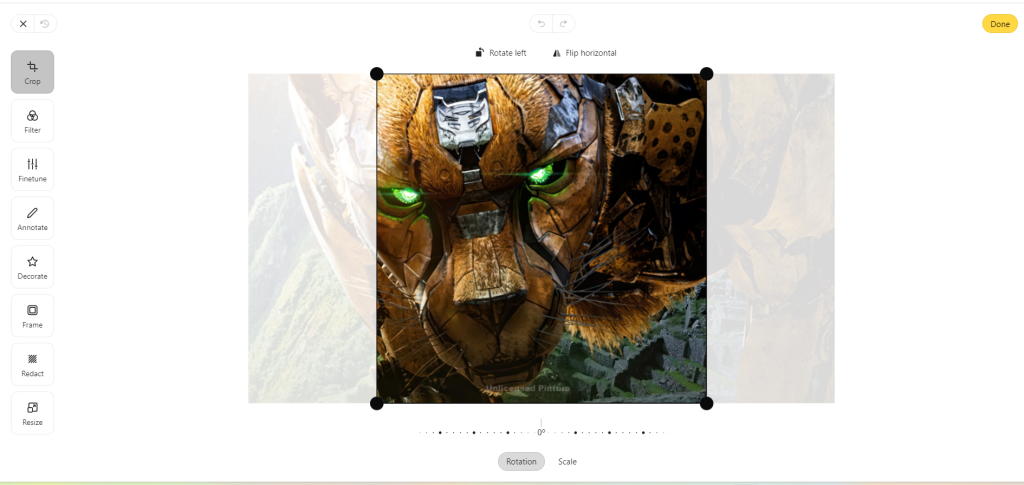
One of the standout features of Darkroom JS is its non-destructive editing capability. You can make changes to your image without permanently altering the original, ensuring you can always revert to the unedited version. Efficiency is key in photography, and Darkroom JS offers keyboard shortcuts to streamline your editing process. Once you’ve perfected your image, Darkroom JS provides various export options, including common formats like JPEG and PNG.
Darkroom JS runs directly in your web browser, eliminating the need for downloads or installations. This accessibility is a significant advantage for those who want to edit photos from different devices. Being an open-source project, Darkroom JS benefits from a thriving community of developers and users. You can find tutorials, plugins, and support from the community. The tool is actively maintained, which means you can expect regular updates and improvements, ensuring it stays compatible with modern web technologies.
How Wizbrand‘s Darkroom JS PhotoEditor tool would help?
It’s important to note that the specific features and benefits of “Wizbrand’s Darkroom JS PhotoEditor” would depend on the tool’s design and functionality. If you have access to this tool, I recommend exploring its official website or documentation for detailed information on how it can assist photographers and photo enthusiasts in editing and enhancing their images. Darkroom JS may offer a wide range of advanced editing features such as exposure adjustments, color correction, white balance control, and more. This allows users to fine-tune and enhance their photos to achieve the desired visual effects. A photo editor like Darkroom JS typically includes a library of filters and effects that users can apply to their photos. This is useful for adding creative touches or achieving specific artistic styles in your images.
