AndroidX is an open-source project used in Android app development to make it easier to manage dependencies and provide a consistent and up-to-date set of libraries. Flutter has been migrating to AndroidX for compatibility reasons.
Update Flutter and Dart, Ensure that you are using the latest versions of Flutter and Dart by running the following commands in your project directory.
flutter upgrade
Migrating to AndroidX involves updating your project’s dependencies to use AndroidX-compatible versions. You can do this by running the following command in your project directory.
flutter create .
This command will regenerate your project files and update your Android dependencies to use AndroidX. Review and resolve any conflicts or errors that may arise during this process. Make sure that all of your project’s dependencies in the pubspec.yaml file are up to date and compatible with AndroidX. Check the official documentation or repositories of each package for AndroidX compatibility information. After updating your project and dependencies, run the following commands to clean your project and rebuild it,
flutter clean
flutter build apk
Examine your Android project’s Gradle files, specifically build.gradle and gradle-wrapper.properties, to ensure they are correctly configured for AndroidX. Make sure the compileSdkVersion and targetSdkVersion are set appropriately. If you are using Android Studio, open your Flutter project, and Android Studio should prompt you to sync your Gradle files. Follow any prompts to resolve issues or errors. Finally, try generating the APK again by running,
flutter build apk
If there are still issues, carefully review the error messages and logs to identify and resolve any remaining AndroidX-related problems. After generating the APK successfully, test it on your device or emulator to ensure that your app functions as expected.

The notice is essentially telling you that your Flutter app is not currently using AndroidX, but it’s recommending that you migrate to AndroidX to prevent potential build failures and ensure that your app remains compatible with the latest Android devices and libraries.
To address this notice and migrate your app to AndroidX, you can follow these steps:
- Navigate to the Android folder of your Flutter project: This is typically located within your Flutter project directory, under the ‘android’ folder.
- Open the
gradle.propertiesfile: This file contains configuration properties for your Android project. - Paste the following code into the
gradle.propertiesfile:
android.useAndroidX=true
android.enableJetifier=true
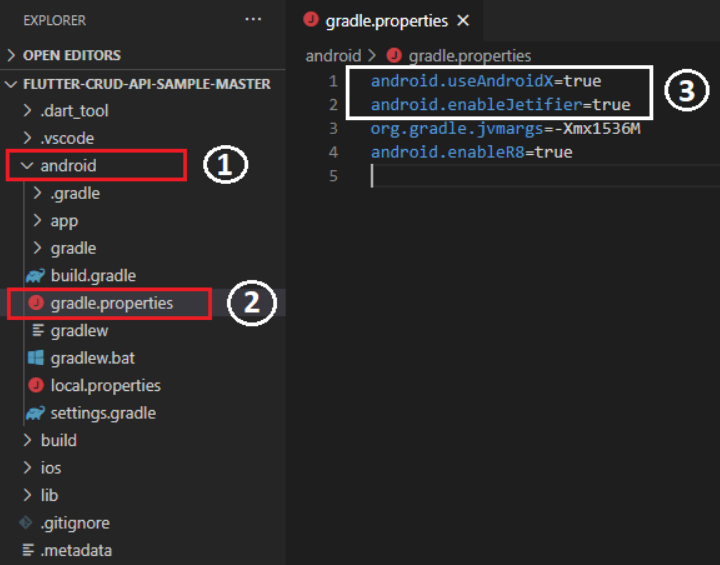
android.useAndroidX=true: This property tells the Android Gradle plugin to use AndroidX libraries in your project.
android.enableJetifier=true: This property enables the Jetifier tool, which automatically migrates existing support library references to AndroidX equivalents during the build process.
