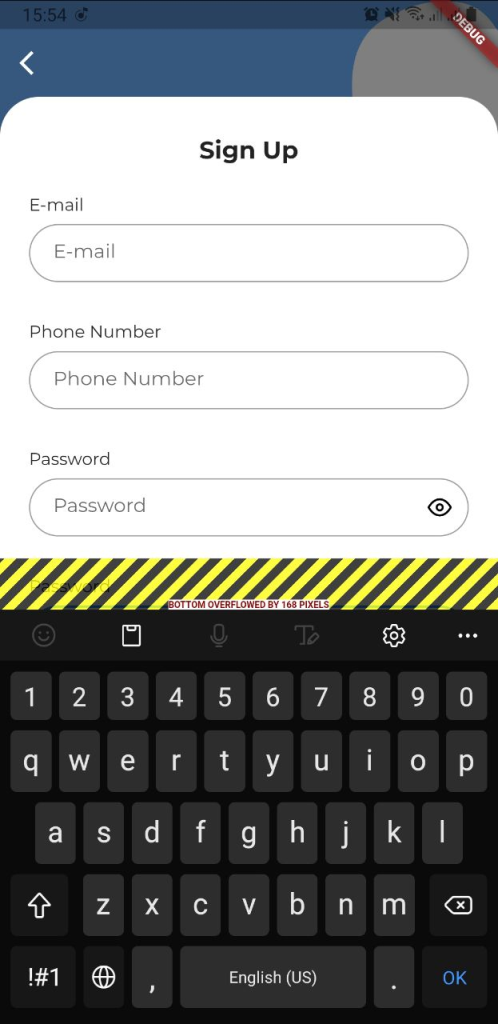
Overflow errors are common in Flutter, especially when you have a Column widget with many child widgets that can’t fit on the screen when the keyboard is opened.
Understanding the Issue
The problem arises when you have a widget tree with numerous widgets inside a Column, and these widgets cannot fully display when the soft keyboard is launched. This can result in pixel overflow errors, making your app’s UI look broken and disrupting user interactions.
import 'package:flutter/material.dart';

void main() {
  runApp(const MyApp());
}

class MyApp extends StatelessWidget {
  const MyApp({Key? key}) : super(key: key);

  @override
  Widget build(BuildContext context) {
    return MaterialApp(
      title: 'Flutter Demo',
      theme: ThemeData(
        primarySwatch: Colors.blue,
      ),
      home: Scaffold(
        body: Padding(
          padding: const EdgeInsets.all(16.0),
          child: Column(
            mainAxisAlignment: MainAxisAlignment.center,
            mainAxisSize: MainAxisSize.max,
            children: [
              // ... Many widgets here
            ],
          ),
        ),
      ),
    );
  }
}
The Solution
The solution to this overflow error is to make the entire widget, or in our case, the Column, scrollable. We can achieve this by wrapping the Column in a SingleChildScrollView. Additionally, we can wrap the SingleChildScrollView with a Center widget to keep the UI centered. This approach ensures that users can scroll through the content when the keyboard is open, preventing pixel overflow errors.
Updated Code with the Solution
import 'package:flutter/material.dart';

void main() {
  runApp(const MyApp());
}

class MyApp extends StatelessWidget {
  const MyApp({Key? key}) : super(key: key);

  @override
  Widget build(BuildContext context) {
    return MaterialApp(
      title: 'Flutter Demo',
      theme: ThemeData(
        primarySwatch: Colors.blue,
      ),
      home: Scaffold(
        body: Padding(
          padding: const EdgeInsets.all(16.0),
          child: Center(
            child: SingleChildScrollView(
              child: Column(
                mainAxisAlignment: MainAxisAlignment.center,
                mainAxisSize: MainAxisSize.max,
                children: [
                  // ... Widgets go here
                ],
              ),
            ),
          ),
        ),
      ),
    );
  }
}
By making these adjustments, your Flutter app’s UI will remain intact even when the keyboard is launched. Users can comfortably scroll through the content, and pixel overflow errors will be a thing of the past.

[…] Flutter overflow error while Launching the Keyboard […]