Error
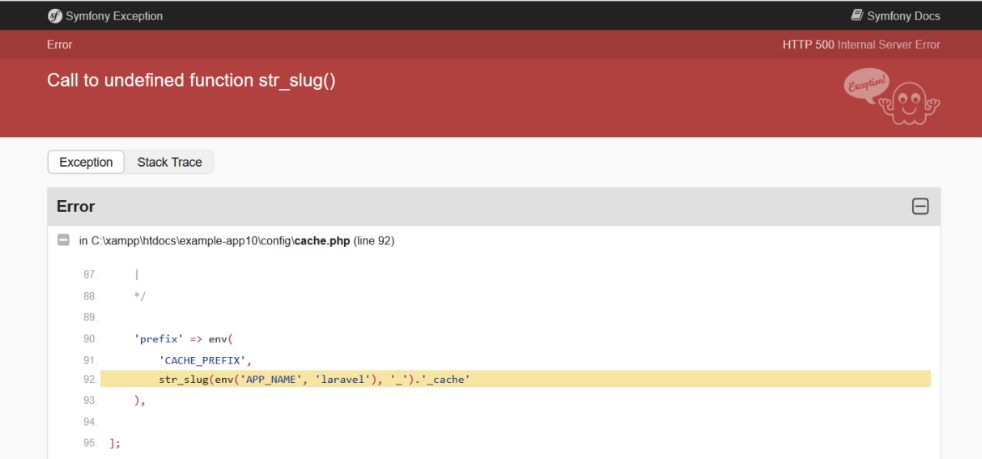
C:\xampp\htdocs\example-app10\vendor\laravel\framework\src\Illuminate\Foundation\Application.php:261
Encountering errors during Laravel development can be challenging, and one such error is the one pointing to line 261 in the Application.php The error message you’re seeing is vague and doesn’t provide specific details about the problem. However, errors in the Application.php file typically indicate issues related to the Laravel application’s configuration or bootstrap process.
Possible Causes
Composer Autoload Issue:
The Composer autoloader may not have been properly generated or is not up-to-date.
Dependencies might not be correctly installed.
Configuration Cache Stale:
The configuration cache might be outdated or corrupt.
Environment Configuration:
Incorrect environment configuration or missing variables.
Ensure that your Composer dependencies are up-to-date and that the autoloader is correctly generated. Run the following commands in your project’s root directory:
composer install
composer dump-autoload
This ensures that all dependencies are installed and the Composer autoloader is up-to-date.
Laravel caches configuration files to improve performance. If the cache becomes stale or corrupt, it can lead to errors. Run the following command to clear the configuration cache:
php artisan config:clear
Review your environment configuration in the .env file. Ensure that all required variables are set correctly. Verify database connections, cache, and session configurations. Make sure the file is not missing any entries.
Check the Laravel logs for more detailed error messages. The logs are usually located in the storage/logs directory. Look for any entries that might provide more information about the issue.
Enable Laravel debugging by setting the APP_DEBUG variable to true in your .env file. This will give you more detailed error messages if Laravel encounters an issue.
APP_DEBUG=true
OR
Go to config\cache.php file and update latest laravel cache.php file
<?php

use Illuminate\Support\Str;

return [

    /*
    |--------------------------------------------------------------------------
    | Default Cache Store
    |--------------------------------------------------------------------------
    |
    | This option controls the default cache connection that gets used while
    | using this caching library. This connection is used when another is
    | not explicitly specified when executing a given caching function.
    |
    */

    'default' => env('CACHE_DRIVER', 'file'),

    /*
    |--------------------------------------------------------------------------
    | Cache Stores
    |--------------------------------------------------------------------------
    |
    | Here you may define all of the cache "stores" for your application as
    | well as their drivers. You may even define multiple stores for the
    | same cache driver to group types of items stored in your caches.
    |
    | Supported drivers: "apc", "array", "database", "file",
    |         "memcached", "redis", "dynamodb", "octane", "null"
    |
    */

    'stores' => [

        'apc' => [
            'driver' => 'apc',
        ],

        'array' => [
            'driver' => 'array',
            'serialize' => false,
        ],

        'database' => [
            'driver' => 'database',
            'table' => 'cache',
            'connection' => null,
            'lock_connection' => null,
        ],

        'file' => [
            'driver' => 'file',
            'path' => storage_path('framework/cache/data'),
            'lock_path' => storage_path('framework/cache/data'),
        ],

        'memcached' => [
            'driver' => 'memcached',
            'persistent_id' => env('MEMCACHED_PERSISTENT_ID'),
            'sasl' => [
                env('MEMCACHED_USERNAME'),
                env('MEMCACHED_PASSWORD'),
            ],
            'options' => [
                // Memcached::OPT_CONNECT_TIMEOUT => 2000,
            ],
            'servers' => [
                [
                    'host' => env('MEMCACHED_HOST', '127.0.0.1'),
                    'port' => env('MEMCACHED_PORT', 11211),
                    'weight' => 100,
                ],
            ],
        ],

        'redis' => [
            'driver' => 'redis',
            'connection' => 'cache',
            'lock_connection' => 'default',
        ],

        'dynamodb' => [
            'driver' => 'dynamodb',
            'key' => env('AWS_ACCESS_KEY_ID'),
            'secret' => env('AWS_SECRET_ACCESS_KEY'),
            'region' => env('AWS_DEFAULT_REGION', 'us-east-1'),
            'table' => env('DYNAMODB_CACHE_TABLE', 'cache'),
            'endpoint' => env('DYNAMODB_ENDPOINT'),
        ],

        'octane' => [
            'driver' => 'octane',
        ],

    ],

    /*
    |--------------------------------------------------------------------------
    | Cache Key Prefix
    |--------------------------------------------------------------------------
    |
    | When utilizing the APC, database, memcached, Redis, or DynamoDB cache
    | stores there might be other applications using the same cache. For
    | that reason, you may prefix every cache key to avoid collisions.
    |
    */

    'prefix' => env('CACHE_PREFIX', Str::slug(env('APP_NAME', 'laravel'), '_').'_cache_'),

];