The evolution of the internet has fundamentally changed the way we interact with images. Whether it’s for personal use, professional projects, or website optimization, image formats have a significant impact on load times, quality, and overall user experience. One such transformation in the image world is the shift from JPG to WebP. WebP is a modern image format developed by Google. It’s designed to provide both high-quality and smaller file sizes compared to traditional formats like JPG and PNG. WebP images use advanced compression techniques, making them an excellent choice for web developers and content creators looking to optimize their websites’ performance.
The key advantages of WebP
- Smaller File Sizes: WebP images are significantly smaller than JPG and PNG files while maintaining similar or even better image quality. Smaller files mean faster load times, a crucial factor in improving website speed and user experience.
- Lossless and Lossy Compression: WebP supports both lossless and lossy compression, giving users the flexibility to choose between image quality and file size. This versatility is especially useful for a wide range of applications.
- Support for Transparency: WebP supports transparent backgrounds, making it suitable for images with soft edges or transparency requirements.
- Wide Browser Support: Major web browsers, including Chrome, Firefox, Edge, and Opera, have adopted WebP as a supported image format. This ensures compatibility across a broad range of platforms.
What is Function and feature of JPG to WebP Converter Tool
A JPG to WebP converter tool is software or an online service that specializes in transforming JPEG (JPG) image files into the WebP image format. WebP is an image format developed by Google, known for its superior compression capabilities and support for both lossless and lossy compression. The primary function of a JPG to WebP converter tool is to convert JPEG images into the WebP format. This conversion allows you to take advantage of WebP’s smaller file sizes and improved compression efficiency. Most converter tools provide options to control the level of compression applied during the conversion. Users can often choose between lossless and lossy compression modes, as well as adjust the compression quality to find the right balance between image quality and file size.
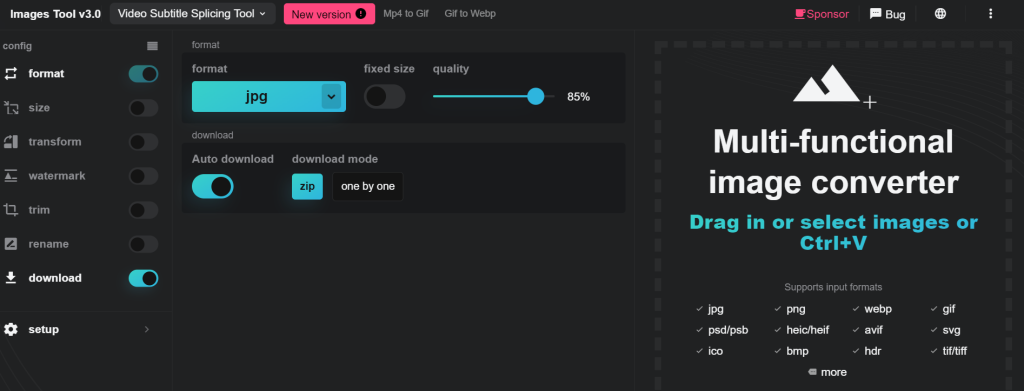
Converter tools allow users to resize images during the conversion process. This feature is valuable when you need images in specific dimensions for web design or other purposes. WebP supports images with transparent backgrounds. A good converter tool should preserve transparency if the source JPEG images have transparent areas.
Converter tools typically offer customization options, such as adjusting the compression level or quality, setting output dimensions, and selecting the type of conversion (lossless or lossy). Some tools provide a preview feature that allows users to see the effects of different compression settings in real-time before finalizing the conversion. Many converter tools support a drag-and-drop interface, allowing users to simply drag their JPG files into the tool for quick and easy conversion. The primary goal of converting to WebP is to reduce file sizes while maintaining image quality. Converter tools should achieve significant file size reduction compared to the original JPG files. Converted WebP images should be compatible with major web browsers like Chrome, Firefox, Edge, and Opera, which have adopted WebP as a supported format.
How Wizbrand‘s JPG to WebP Converter Tool would help?
Wizbrand’s tool would offer a straightforward and efficient way to convert JPEG images to the WebP format. This conversion process would help users take advantage of WebP’s superior compression capabilities. The tool would ensure that the converted WebP images have smaller file sizes compared to the original JPEGs while maintaining acceptable image quality. This reduction in file size is crucial for improving website loading times and overall user experience. The tool would likely offer customization options to allow users to control the level of compression applied during the conversion. Users could choose between lossless and lossy compression modes and adjust the compression quality to meet their specific needs.
