Introduction
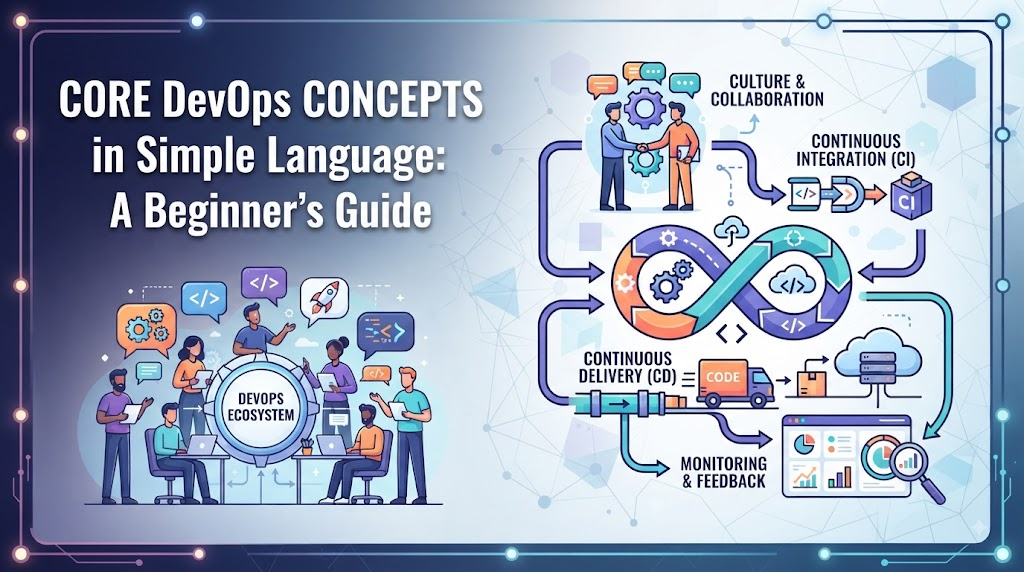
Understanding core DevOps concepts is far more important than simply memorizing a list of tools. Tools change rapidly over time, but the underlying engineering principles that govern efficient software delivery remain constant. When you grasp why a practice exists, picking up any specific technology becomes a straightforward task. DevOps is not a single software package you install, nor is it merely a job title. It represents a continuous combination of culture, collaboration, engineering practices, process automation, and shared responsibility. It brings technical teams together to deliver value to users rapidly and safely. Beginners often encounter terms such as CI/CD, Infrastructure as Code, containers, monitoring, orchestration, and DevSecOps without understanding how they connect. Seeing these terms in isolation makes the field seem overwhelmingly complex. Learning how these moving parts fit into a single workflow provides the clarity needed to build a successful technical career. To build a solid foundation, learning platforms like DevOpsSchool offer structured guidance that connects theoretical concepts with practical application. Master the principles first, and the tools will naturally fall into place.
What Is DevOps?
DevOps is a operational philosophy that bridges the traditional gap between software development teams and operational IT personnel. Historically, developers wrote code and handed it off to operations teams to run in production. This division often created friction, delayed releases, and caused operational instability. DevOps brings development, quality assurance, security, and operations together into a cohesive workflow. It emphasizes cross-functional collaboration, aggressive automation of repetitive tasks, constant feedback, and continuous improvement across the entire software delivery lifecycle. The primary goal of DevOps is to shorten the system development lifecycle while delivering features, fixes, and updates frequently and reliably. It transforms software delivery from a high-risk, periodic event into a predictable, routine process. Think of software delivery like a modern automotive assembly line. Instead of building a car entirely by hand in isolated workshops, the assembly line uses standardized parts, automated quality checks, and continuous movement. If a defect is found at one station, the line halts, the issue is fixed immediately, and the design is updated to prevent that error from ever happening again.
Why DevOps Matters
Traditional software development often meant releasing updates once or twice a year. These massive releases were stressful, prone to bugs, and required complex manual effort to deploy. DevOps changes this dynamic by breaking work into smaller, manageable increments that flow smoothly into production environments.
- Faster software delivery: Small, incremental updates can be tested and released in hours or days rather than months.
- Better collaboration: Breaking down organizational silos aligns development and operations around shared outcomes.
- Reliable deployments: Automated testing and standard deployment pipelines dramatically reduce human error during releases.
- Faster feedback: Immediate visibility into code quality and production performance allows teams to fix issues quickly.
- Reduced manual work: Automating build, test, and infrastructure tasks frees engineers to focus on higher-value work.
- Improved operational visibility: Comprehensive logging and metrics help teams understand system health in real time.
- Better customer experience: End users receive feature updates and bug fixes continuously without long waiting periods.
DevOps is not simply about deploying software faster. Speed without stability leads to system outages and unhappy users. The true purpose of DevOps is achieving a sustainable balance between rapid innovation and rock-solid system reliability.
Core DevOps Concepts at a Glance
| DevOps Concept | Simple Meaning | Real-World Example |
| Collaboration | Shared responsibility between teams | Developers and ops sitting in joint planning meetings |
| Automation | Using scripts/tools to replace manual work | Automatically running tests whenever code is saved |
| CI (Continuous Integration) | Frequently merging code updates into a shared repo | Merging code multiple times a day with automated builds |
| Continuous Delivery | Keeping code ready for deployment at any time | Automatically packaging code and pushing it to test servers |
| Continuous Deployment | Automatically releasing changes directly to production | Code passing all automated tests going live without intervention |
| Infrastructure as Code | Defining server setups using code files | Creating cloud servers using configuration scripts |
| Configuration Management | Automatically maintaining consistent server settings | Ensuring 50 servers have identical security patches |
| Containers | Packaging software with all its required dependencies | Running an app inside a lightweight, predictable package |
| Orchestration | Managing and scaling multiple container instances | Automatically restarting crashed application containers |
| Monitoring | Tracking active system metrics and resource health | Receiving an alert when server CPU usage exceeds 90% |
| Observability | Understanding internal system state from external outputs | Tracing a slow database request across multiple services |
| DevSecOps | Integrating security checks into every delivery stage | Scanning source code for credentials before building |
| SRE | Applying software engineering to operational problems | Managing system uptime using defined error budgets |
| Continuous Improvement | Regularly refining processes and fixing root causes | Holding blameless post-mortems after system outages |
DevOps Culture and Collaboration
Culture is the foundation of any successful DevOps transformation. Tools and automation cannot fix an organization where development and operations teams work against each other. A healthy DevOps culture replaces finger-pointing with shared responsibility for application performance and stability. Cross-functional teams work best when communication is open, transparent, and continuous. Developers must care about operational stability, while operations engineers must understand application architecture and development workflows. Knowledge sharing prevents critical system details from being isolated within single individuals. Blameless collaboration is essential to building high-performing engineering organizations. When system failures occur, teams focus on identifying process weaknesses rather than assigning personal blame. This psychological safety encourages engineers to innovate, automate, and report mistakes early. Simply putting developers and operations personnel in the same department does not create a DevOps culture. Real cultural shift occurs when incentives align, communication flows freely, and both groups share responsibility for code quality and system availability.
Automation in DevOps
Automation is the engine that drives modern software delivery workflows. By replacing manual, repetitive tasks with reliable software scripts, engineering teams eliminate human error and accelerate the path from code creation to production release.
- Build automation: Compiling source code and assembling binary packages without manual commands.
- Testing automation: Executing unit, integration, and security checks automatically on every code change.
- Deployment automation: Moving application packages across environments using standardized software pipelines.
- Infrastructure automation: Provisioning servers, networks, and storage through configuration files.
- Configuration automation: Maintaining software versions, user access, and system settings consistently across fleets.
- Security automation: Running static analysis and dependency scans automatically during build phases.
- Monitoring automation: Generating alerts and triggering self-healing actions when performance degrades.
Teams should automate repetitive, time-consuming, or error-prone tasks. Conversely, dynamic decision-making, exploratory testing, and complex architectural design should remain human-driven activities.
For example, manually copying files via SSH to a production server on release night is slow and dangerous. Automating that process through a deployment pipeline ensures every server receives the exact same files within seconds, eliminating costly human mistakes.
Version Control and Git
Version control is the ultimate foundation of modern software engineering and DevOps. It provides a tracking system for changes made to codebases, configuration files, and infrastructure definitions over time.
- Version control: A system that records changes to files so specific versions can be recalled later.
- Git: The industry-standard distributed version control system used worldwide.
- Repository: A storage location containing all project files and their complete revision history.
- Commit: A saved snapshot of changes made to the files in a repository.
- Branch: An isolated line of development used to work on features without affecting the main codebase.
- Merge: The process of combining changes from one branch into another.
- Pull request: A proposal to merge code changes, accompanied by peer review and automated testing.
Without version control, team collaboration becomes chaotic. Version control allows multiple engineers to work on the same project simultaneously without overwriting each other’s contributions. It provides auditability, rollback capabilities, and absolute clarity on historical changes.
Standard Version Control Workflow
Code Change → Commit → Review → Merge → Build → Test → Deploy
Continuous Integration
Continuous Integration (CI) is the practice of merging all developer working copies into a shared mainline repository multiple times a day. Each merge triggers an automated build and test sequence to verify code stability immediately. Regular integration prevents the problem known as “integration hell,” where developers work in isolation for weeks only to find their changes collide disasterously when merged. Frequent integration keeps the codebase healthy and reduces merge conflicts significantly. Automated builds compile the software, while automated test suites run to confirm that new additions have not broken existing functionality. Early defect detection allows engineers to fix issues minutes after writing the code, when context is still fresh in their minds. When a developer pushes new code into a shared Git repository, the CI server detects the change automatically. It checks out the code, compiles it, executes test suites, and provides instant feedback to the engineer regarding pass or fail status.
Continuous Delivery
Continuous Delivery expands upon Continuous Integration by ensuring that the codebase is always in a deployable state. In a Continuous Delivery workflow, every code change that passes automated testing is automatically packaged and prepared for release. While deployment to production remains a manual decision, the preparation work is fully automated. This ensures that pushing code to live users can happen at any time with minimal risk and effort. Continuous Integration focuses on validating that new code builds and passes initial tests. Continuous Delivery goes further by deploying that validated code to staging or testing environments, running acceptance tests, and ensuring full release readiness.
Continuous Deployment
Continuous Deployment takes automation one step further by automatically releasing every change that passes the testing pipeline directly into production environments without manual intervention or approval steps. This practice requires exceptional test coverage, mature automated quality checks, and robust production monitoring. If a defect slips through, automated pipelines must be capable of rolling back changes immediately to preserve system stability.Automated production releases demand sophisticated deployment strategies to minimize user impact. While high-risk for teams lacking automated testing, mature engineering organizations rely on Continuous Deployment to deliver value continuously.
CI vs. Continuous Delivery vs. Continuous Deployment
| Practice | Main Idea | Manual Intervention |
| Continuous Integration | Automatically compile and test code on every single merge. | None (Automated validation) |
| Continuous Delivery | Automatically prepare and stage code for production release. | Yes (Manual release approval) |
| Continuous Deployment | Automatically release validated changes directly to production users. | None (Fully automated pipeline) |
CI/CD Pipelines
A CI/CD pipeline is an automated sequence of steps through which code passes from development to production. It acts as the backbone of modern DevOps operations, guaranteeing that every change undergoes identical testing and verification.
Standard CI/CD Pipeline Flow
Source Code
↓
Build
↓
Unit Tests
↓
Security Checks
↓
Package
↓
Deploy to Test
↓
Validation
↓
Production
Pipelines introduce consistency and speed into software delivery. By converting manual operational checklists into executable code workflows, teams establish repeatable, transparent, and reliable release paths.
Infrastructure as Code
Infrastructure as Code (IaC) is the practice of managing and provisioning compute infrastructure using machine-readable definition files rather than manual software interfaces or cloud console clicks. Treating infrastructure like application code allows teams to apply software development best practices to operations. IaC configuration files are stored in Git, versioned, code-reviewed, and deployed using automated pipelines. This approach guarantees absolute environment consistency across development, staging, and production setups. Recreating an entire cloud data center becomes as simple as executing a validated infrastructure configuration script. Tools such as Terraform, AWS CloudFormation, and Pulumi allow engineers to declare desired infrastructure states in code. Manually configuring servers leads to configuration drift, human mistakes, and untrackable changes, whereas IaC provides absolute repeatability.
Configuration Management
Configuration Management deals with maintaining server operating systems, software packages, configuration files, and system settings in a known, consistent state across an entire fleet. Automated configuration tools manage user accounts, apply operating system patches, update security settings, and ensure services are running correctly. This eliminates the need to log into individual servers manually. Tools like Ansible, Chef, and Puppet provide consistent automated management. Without configuration management, servers drift over time due to ad-hoc manual changes, creating unique “snowflake” systems that are fragile and difficult to troubleshoot.
Containers and Docker
Containers are lightweight, standalone, executable packages that include everything needed to run an application: code, runtime, system tools, system libraries, and settings. By bundling application code together with its underlying dependencies, containers eliminate the common “it works on my machine” problem. An application running inside a container behaves identically on a developer’s laptop, a testing server, and a cloud cluster. Containers provide isolation and portability while sharing the host system’s operating system kernel. This makes them significantly lighter and faster to start than traditional virtual machines. Docker popularized container technology by providing simple CLI tools and standardized image formats. While Docker is the most famous tool in this space, it is simply an implementation of broader containerization standards. Think of software containers like standard intermodal shipping containers. Just as standardized metal boxes allow ships, trains, and trucks to move cargo without worrying about what is inside, software containers allow infrastructure platforms to run applications without worrying about internal code dependencies.
Kubernetes and Container Orchestration
When organizations run hundreds or thousands of application containers, managing individual instances manually becomes impossible. Container orchestration systems automate the deployment, management, scaling, and networking of containerized applications. Orchestration platforms handle container scheduling across physical machines, scale container instances based on traffic, execute self-healing health checks, manage load balancing, and support rolling software updates without downtime. Kubernetes is the industry-standard open-source platform for container orchestration. It acts as a cluster operating system, ensuring declared application states match live environment realities. While Kubernetes is exceptionally powerful for complex containerized workloads, it is not required for every environment. Smaller applications or simple architectures often run efficiently on managed container services without the overhead of full cluster management.
Cloud Computing and DevOps
Cloud computing provides on-demand access to compute power, storage, databases, networking, and software services over the internet with pay-as-you-go pricing.
Cloud platforms expose API endpoints for every service, making them naturally suited for automation. Instead of waiting weeks for physical hardware to arrive, DevOps pipelines can provision virtual infrastructure in seconds using code.
Cloud platforms make infrastructure automation easy, but simply migrating workloads to the cloud does not automatically create a DevOps culture. Cloud technology is an enabler; DevOps is the practice that utilizes that enabler effectively.
Monitoring and Observability
Monitoring and observability are complementary practices designed to give engineering teams visibility into application performance, availability, and system health.
- Metrics: Numerical values measured over time, such as CPU usage, memory utilization, and request counts.
- Logs: Timestamped text records of discrete events emitted by applications or operating systems.
- Traces: End-to-end operational paths of individual requests as they travel across distributed system services.
- Alerts: Automated notifications sent to engineering teams when metrics breach predefined operational thresholds.
- Dashboards: Visual displays showing aggregated system performance indicators in real time.
Monitoring tells you when a system is failing by tracking predefined metrics. Observability allows you to infer why a system is failing by analyzing the rich outputs (metrics, logs, and traces) it emits.
For example, monitoring might alert you that user response times are spiking on an e-commerce website. Observability allows engineers to trace a specific slow request through load balancers, application services, and database queries to pinpoint a locked database table as the root cause.
DevSecOps
DevSecOps is the integration of security practices, tools, and testing into every phase of the DevOps software delivery lifecycle, rather than treating security as a final review before production release.
- Secure coding: Writing application code following practices that prevent vulnerability creation.
- Dependency scanning: Checking open-source libraries for known security vulnerabilities automatically.
- Secrets management: Keeping API keys, passwords, and tokens out of source code repositories.
- Vulnerability scanning: Testing application packages and operating systems for security weaknesses.
- Infrastructure security: Ensuring cloud access policies and network rules follow strict security standards.
- Container security: Verifying container base images are free of compromised packages.
- Compliance checks: Automating regulatory adherence verification inside deployment pipelines.
Traditional security reviews acted as a late-stage bottleneck that delayed releases. DevSecOps shifts security left (earlier in the lifecycle), allowing developers to identify and fix security flaws while actively writing code.
Site Reliability Engineering
Site Reliability Engineering (SRE) is a discipline that applies software engineering approaches to solve IT operational and infrastructure problems. Developed at Google, SRE complements DevOps principles.
- Reliability: Ensuring systems meet operational performance standards under variable loads.
- Availability: Measuring the percentage of time services remain functional and accessible.
- Automation: Writing software code to eliminate repetitive operational tasks (known as “toil”).
- Service-Level Objectives (SLOs): Target goals for service performance agreed upon with business stakeholders.
- Error budgets: The acceptable amount of system unreliability allocated for rapid feature delivery.
- Incident response: Standardized procedures for managing, resolving, and learning from system outages.
A popular phrasing states that Class SRE implements Interface DevOps. DevOps defines the philosophy and core principles of modern collaboration, while SRE provides concrete engineering practices and metrics to execute that philosophy reliably.
Infrastructure and Application Testing
Comprehensive automated testing is critical to maintaining high software quality within rapid delivery pipelines. Testing must occur across application code and infrastructure definitions alike.
- Unit testing: Validating individual code functions in isolation.
- Integration testing: Verifying that different application modules work together correctly.
- API testing: Checking communication interfaces between services for correct data exchange.
- End-to-end testing: Testing complete user workflows from interface to backend databases.
- Infrastructure testing: Verifying server configurations, ports, and network policies function as intended.
- Security testing: Running automated scans to identify code and configuration vulnerabilities.
- Performance testing: Evaluating system behavior, responsiveness, and stability under heavy traffic loads.
Without automated testing, deployment pipelines cannot validate code safety. Automated suites act as safety nets, giving teams confidence to release software changes frequently.
Deployment Strategies
Deployment strategies determine how new software versions replace existing live systems without interrupting user access or introducing operational risk.
- Rolling deployment: Gradually replacing instances of the old software version with the new version across server fleets.
- Blue-green deployment: Maintaining two identical environments; switching active user traffic from the old version (Blue) to the new version (Green) instantly.
- Canary deployment: Rolling out changes to a small subset of live users first to measure system stability before full deployment.
- Feature flags: Wrapping new features in conditional code blocks that allow them to be toggled on or off instantly in production.
Deployment Strategy Comparison
| Strategy | Simple Explanation | Main Benefit |
| Rolling | Updates servers sequentially in small batches. | Zero downtime without needing extra hardware resources. |
| Blue-Green | Switches traffic between two identical production setups. | Instant rollback capability if issues appear. |
| Canary | Releases updates to a tiny percentage of live users first. | Lowers exposure risk by testing on live traffic safely. |
| Feature Flags | Decouples code deployment from feature release using code toggles. | Allows control over feature exposure without redeploying code. |
DevOps Feedback Loops
Feedback loops provide engineering teams with immediate information regarding code quality, application stability, and user satisfaction. Short feedback loops allow teams to address issues quickly.
- Developer feedback: Instant IDE alerts on syntax errors and code quality issues.
- Test feedback: Automated test suite results delivered minutes after pushing code updates.
- Pipeline feedback: Real-time visibility into build, packaging, and deployment status.
- Monitoring feedback: Production alerts notifying engineers of performance anomalies immediately.
- Customer feedback: Direct usage metrics revealing how users interact with new software features.
- Incident feedback: Post-mortem analysis explaining why system failures occurred in live environments.
Long feedback loops allow defects to compound, making them expensive to fix later. Short feedback loops identify issues immediately, significantly lowering software development costs.
Continuous Improvement
Continuous improvement is the ongoing effort to refine processes, eliminate operational bottlenecks, reduce technical debt, and increase delivery efficiency over time.
Teams practice continuous improvement by measuring delivery metrics, analyzing system incidents, experimenting with new techniques, and automating manual tasks systematically.
DevOps is not a one-time project with a fixed completion date. It is an evolving engineering culture focused on learning, adapting, and refining software delivery practices continuously.
Real-World DevOps Workflow Example
To understand how these concepts operate together, examine how a modern team processes a new feature request from start to finish.
Scenario: A developer needs to release an updated payment gateway integration for an e-commerce platform.
- Step 1: Development: The engineer writes the payment code locally on a dedicated feature branch.
- Step 2: Version Control: The developer commits the code to Git and pushes the feature branch to a shared repository.
- Step 3: Code Review: Peer engineers inspect the proposed changes via a pull request to ensure high code quality.
- Step 4: CI Pipeline: The CI server triggers automatically, compiling the application and executing unit test suites.
- Step 5: Testing: Automated integration and API tests verify that the new payment code works smoothly with existing services.
- Step 6: Security Validation: Automated scanners inspect the code for credentials, open-source vulnerabilities, and security flaws.
- Step 7: Infrastructure: Infrastructure as Code scripts provision isolated staging environments matching production parameters.
- Step 8: Deployment: The pipeline deploys the packaged application into production using a canary deployment strategy.
- Step 9: Monitoring: Observability tools track real-time error rates, transaction speeds, and server logs for the new feature.
- Step 10: Feedback: Operational metrics confirm success, full traffic switches over, and the team reviews performance data.
Every core concept—from Git and CI/CD to security, infrastructure, containers, and monitoring—functions as a unified ecosystem to deliver value safely.
Common DevOps Beginner Mistakes
Many beginners struggle when entering the DevOps domain due to common misconceptions and improper learning approaches.
- Learning tools without concepts: Memorizing tool syntax without understanding underlying operational goals.
- Trying to learn everything at once: Becoming overwhelmed by attempting to master every tool listed on industry diagrams.
- Ignoring Linux: Skipping foundational operating system concepts that power cloud environments.
- Ignoring networking: Failing to understand fundamental IP, DNS, routing, and HTTP principles.
- Skipping Git: Attempting advanced automation without solid version control knowledge.
- Copy-pasting commands: Running scripts without understanding how they alter system states.
- Building unrealistic projects: Spending time on complex architectures without mastering basic delivery workflows.
- Ignoring security: Treating security as an afterthought rather than integrating it into delivery pipelines.
- Ignoring monitoring: Building deployment pipelines while ignoring post-release system health.
- Focusing only on certifications: Prioritizing paper credentials over practical, hands-on engineering skills.
- Treating DevOps as only CI/CD: Believing that building a single pipeline means DevOps implementation is complete.
Focus on mastering Linux, basic networking, Git, and fundamental scripting before diving into complex orchestration platforms. Understanding core workflows provides long-term career value.
Core DevOps Skills Checklist
A well-rounded foundation requires competence across several fundamental technical areas:
- Linux operating system navigation, file permissions, and process management
- Computer networking fundamentals (DNS, HTTP/HTTPS, TCP/IP, Firewalls)
- Git version control workflows (Branching, Merging, Pull Requests)
- Shell scripting (Bash/Python) for repetitive task automation
- CI/CD pipeline design and automation concepts
- Automated software testing principles
- Infrastructure as Code fundamentals
- Automated configuration management principles
- Container basics (Building images, running containers)
- Cloud computing essentials (Compute, Storage, Identity access)
- Basic container orchestration concepts
- System health monitoring and alerting concepts
- Distributed system observability (Metrics, Logs, Traces)
- DevSecOps integration and security basics
- Incident management and blameless post-mortem concepts
- System architecture and workflow documentation
- Basic system troubleshooting methodologies
- Process automation principles
How the DevOps Concepts Connect
DevOps concepts form an interconnected continuous feedback loop rather than a linear, single-use checklist.
Plan
↓
Code
↓
Build
↓
Test
↓
Secure
↓
Package
↓
Provision Infrastructure
↓
Deploy
↓
Monitor
↓
Learn
↓
Improve
This circular loop demonstrates that operations feeds directly back into planning. Software development and system management inform one another continuously to improve software quality.
Career Value of Understanding Core DevOps Concepts
Understanding fundamental concepts protects your career against technology shifts. Specific software packages come and go, but underlying principles of automated delivery and system reliability remain constant across all modern engineering roles.
| Role | Most Important DevOps Concepts |
| DevOps Engineer | CI/CD pipelines, Infrastructure as Code, Automation, Delivery workflows |
| SRE | Observability, Incident response, Reliability engineering, Error budgets |
| Cloud Engineer | Cloud architectures, Infrastructure automation, Network configuration |
| Platform Engineer | Developer tooling, Internal platform interfaces, Container management |
| Developer | Version control, Automated unit testing, CI integration, Container basics |
| Security Engineer | Automated vulnerability checks, Secrets management, DevSecOps pipelines |
| QA Engineer | Test automation integration, Deployment pipeline validation |
| Engineering Manager | Team collaboration, Feedback loops, Delivery metrics, Culture |
DevOps Learning Roadmap
Follow this structured roadmap to build a sustainable, hands-on understanding of the field without getting overwhelmed.
Linux
↓
Networking
↓
Git
↓
Shell Scripting
↓
CI/CD
↓
Cloud Fundamentals
↓
Infrastructure as Code
↓
Containers
↓
Kubernetes
↓
Monitoring & Observability
↓
DevSecOps
↓
Real-World Projects
Stage Details
- Linux: Master core command-line tools, file system structure, processes, and permissions.
- Networking: Learn how data travels across local networks and the internet securely.
- Git: Gain fluency in tracking code revisions, branching strategies, and collaborative reviews.
- Shell Scripting: Automate basic operating system tasks using Bash or Python scripts.
- CI/CD: Build basic automated pipelines that compile, test, and package application code.
- Cloud Fundamentals: Learn to provision virtual machines, cloud networking, and storage buckets.
- Infrastructure as Code: Write code scripts to automate your cloud infrastructure setups.
- Containers: Package software applications along with all dependencies into lightweight container images.
- Kubernetes: Learn the principles of scaling and orchestrating container fleets.
- Monitoring & Observability: Set up metrics dashboards, log collection, and performance tracking.
- DevSecOps: Integrate security tools and secrets management into automated pipelines.
- Real-World Projects: Tie all concepts together by building complete deployment pipelines from scratch.
Frequently Asked Questions
What are the core concepts of DevOps?
The core concepts of DevOps include continuous collaboration, process automation, Continuous Integration (CI), Continuous Delivery (CD), Infrastructure as Code (IaC), containerization, system monitoring, observability, integrated security (DevSecOps), and continuous improvement.
Is DevOps a tool or a methodology?
DevOps is a operational philosophy and methodology. It is a combination of cultural practices, processes, and engineering approaches supported by various software tools. No single tool constitutes DevOps on its own.
What should a DevOps beginner learn first?
A beginner should start by learning Linux operating system basics, fundamental networking principles, Git version control, and basic shell scripting before attempting to master complex automation or orchestration tools.
Why is Git important in DevOps?
Git serves as the single source of truth for application code, configuration files, and infrastructure definitions. It enables collaborative development, automated testing triggers, change auditing, and quick rollbacks.
What is CI/CD in simple language?
CI/CD stands for Continuous Integration and Continuous Delivery/Deployment. It is the practice of automatically building, testing, packaging, and releasing software changes frequently and reliably through standardized automated pipelines.
What is Infrastructure as Code?
Infrastructure as Code (IaC) is the practice of defining, provisioning, and managing IT infrastructure using code configuration files instead of performing manual setups through cloud dashboards or physical commands.
Why are containers used in DevOps?
Containers package application code together with all its runtime dependencies into a single lightweight image. This guarantees that software runs identically across local development, testing, and live production environments.
Do I need Kubernetes to learn DevOps?
No, you do not need Kubernetes to learn core DevOps fundamentals. Kubernetes is a powerful tool for complex container orchestration, but beginners should master Linux, Git, CI/CD, and basic containers before learning Kubernetes.
What is the role of cloud computing in DevOps?
Cloud platforms provide flexible, API-driven infrastructure that can be provisioned and managed automatically using code. This flexibility accelerates automation, deployment speed, and resource scaling.
What is the difference between monitoring and observability?
Monitoring tracks predefined metrics to inform you when a system is experiencing a problem. Observability analyzes system logs, metrics, and distributed traces to help you diagnose why an unexpected failure occurred.
What is DevSecOps?
DevSecOps is the practice of integrating automated security checks, dependency scanning, and compliance policies into every phase of the software delivery lifecycle from the start, rather than applying security manually at the end.
How long does it take to understand DevOps fundamentals?
Consistently studying core concepts while practicing hands-on exercises generally allows motivated beginners to build a solid foundational understanding of DevOps principles within three to six months.
Final Thoughts
Mastering DevOps begins with a clear understanding of the principles that govern modern software engineering, long before diving into complex toolchains. Focusing on how code moves smoothly from local development to live production, how infrastructure is provisioned as code, how running systems are monitored, and how security is integrated at every step will build an enduring foundation for your technical career.
