MOTOSHARE ๐Ÿš—๐Ÿ๏ธ
Turning Idle Vehicles into Shared Rides & Earnings

From Idle to Income. From Parked to Purpose.
Earn by Sharing, Ride by Renting.
Where Owners Earn, Riders Move.
Owners Earn. Riders Move. Motoshare Connects.

With Motoshare, every parked vehicle finds a purpose. Owners earn. Renters ride.
๐Ÿš€ Everyone wins.

Start Your Journey with Motoshare

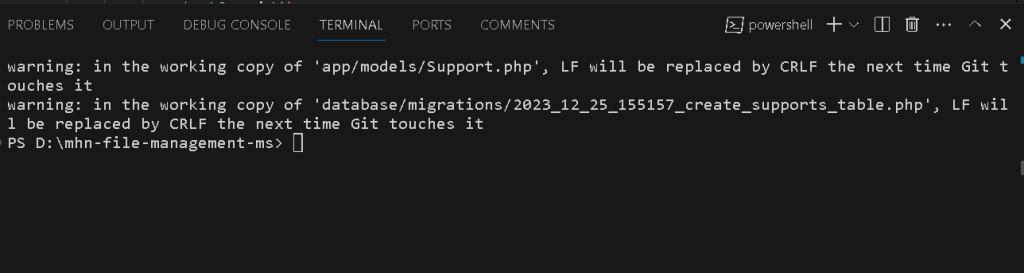
Git Error: LF will be replaced by CRLF Warning

Git is a widely used version control system that allows developers to collaborate on projects efficiently. While working with Git, you might encounter warnings related to line endings, such as “LF will be replaced by CRLF.” In this blog post, The warning message indicates that Git has detected a difference in line endings (LF – Line Feed and CRLF – Carriage Return + Line Feed) between the local working copy of your files and the expected line endings in the Git repository. This discrepancy can occur when working in a cross-platform environment where different operating systems use different conventions for line endings.

Configure Git to Handle Line Endings: Git provides configuration options to handle line endings, and it’s essential to set them appropriately for your development environment.

Use the following commands to configure Git to handle line endings:

git config --global core.autocrlf input
git config --global core.eol lf

core.autocrlf input: This configuration ensures that Git automatically converts CRLF to LF on commit but leaves LF endings unchanged.

core.eol lf: This sets the default line ending style to LF.

Normalize Existing Files: After configuring Git, it’s advisable to normalize existing files in your repository. This ensures that all files have consistent line endings.

Use the following command to normalize existing files:

git rm --cached -r .
git reset --hard

git rm --cached -r .: This removes all files from the staging area.

git reset --hard: This resets the working directory to the last commit, effectively normalizing the line endings.

Recommit and Push Changes:

After configuring line endings, recommit your changes and push them to the remote repository.

git add .
git commit -m "Fix line endings"
git push origin <branch-name>

More topics:

1How to download and installer php and How to add path in apace and vhost
2How to make a partition in Windows 11 from C drive
3How to do file-level commenting
4Uncaught Error: Syntax error, unrecognized expression: #
5Error: Argument 1 passed to App\โ€ฆ\UploadQuoteRequestFileTestOnly() must be as instance of Illuminate\Http\Request
6List of My Blogs of Oct
7Responsive Layout using Media Queries
8Flutter Error: Fix this issue by adding โ€ฆcompileSdkVersion 33
9Flutter: SDK Version solving failed
10Flutter Project Creating issue (is not a valid Dart package name)
11Flutter: Please correct the pubspec.yaml file at :\Users\โ€ฆ\pubspec.yaml
12Error: MainActivity.java is not on the classpath of project app, only syntax errors are reported
13showing Error on phpMyAdmin โ€œNo space left on deviceโ€
14How to use various types of comments
15Error: HTTP 500 Internal Serverโ€Illuminate\Http\Resources\Json\Resourceโ€ not found
16Error: Call to undefined function str_slug()
17write of 2225 bytes failed with errno=28 no space left on device
18What is use of @yield @extend @section in Laravel
19Resolving FatalError: Trait โ€œIlluminate\Foundation\Auth\AuthenticatesUsersโ€ not found
20Error: โ€œObject of class GuzzleHttp\Psr7\Response could not be converted to stringโ€Error:
21401 Unauthorized response
22Resolving Laravel Passport and GuzzleHTTP Version Conflict
23Managing Outdated Dependencies in Laravel with Composer
24Resolving Composer Dependency Conflict: Laravel Passport and GuzzleHTTP
25Resolving PHPUnit Dependency Conflict: PHP Version Mismatch
26Updating Laravel TrustProxies Middleware after Framework Version Upgrade
27Troubleshooting Laravel: โ€œlaravel.EMERGENCY: Unable to create configured logger. Using emergency logger.โ€
28Resolving SQLSTATE[42S22]: Column not found: 1054 Unknown column โ€˜providerโ€™ in โ€˜fieldโ€™
29Error: In order to use the Auth::routes() method, please install the laravel/ui package
30Resolving SQLSTATE[42S22] Error in Laravel Passport Upgrade

Related Posts

Core DevOps Concepts in Simple Language: A Beginnerโ€™s Guide

Introduction Understanding core DevOps concepts is far more important than simply memorizing a list of tools. Tools change rapidly over time, but the underlying engineering principles that…

Read More

DevOps Bootcamp Guide: Curriculum, Tools, Projects, and Career Tips

Introduction A DevOps bootcamp is an intensive and structured learning program designed to help individuals transition into modern technology roles. Many beginners, developers, system administrators, and working…

Read More

Searching for Free or Paid Legal Advice Near You in India: What to Know

Experiencing a legal crisis or needing formal paperwork reviewed can quickly become overwhelming. Whether you are dealing with a sudden police inquiry, securing a real estate title,…

Read More

Global Dental Tourism: A Comprehensive Guide to Treatments, Costs, and Safe Care Abroad

Introduction In recent years, an increasing number of individuals have looked beyond their local borders to address their dental health needs. This widespread practice, commonly referred to…

Read More

The Definitive Handbook to Exploring and Enjoying Bangaloreโ€™s Dynamic Cultural Scene

Introduction Bangalore, widely celebrated as both the Garden City and the tech capital of India, pulses with an extraordinary creative vitality. Far beyond its shimmering corporate parks…

Read More

Top-Rated Chartered Accountant Near Me for Tax, Audit & Compliance

Introduction Mastering todayโ€™s complex financial and regulatory environment requires far more than basic bookkeeping, demanding expert guidance to avoid costly compliance missteps, manage tax liabilities, and ensure…

Read More
0 0 votes
Article Rating
Subscribe
Notify of
guest
0 Comments
Oldest
Newest Most Voted
Inline Feedbacks
View all comments
0
Would love your thoughts, please comment.x
()
x