Introduction
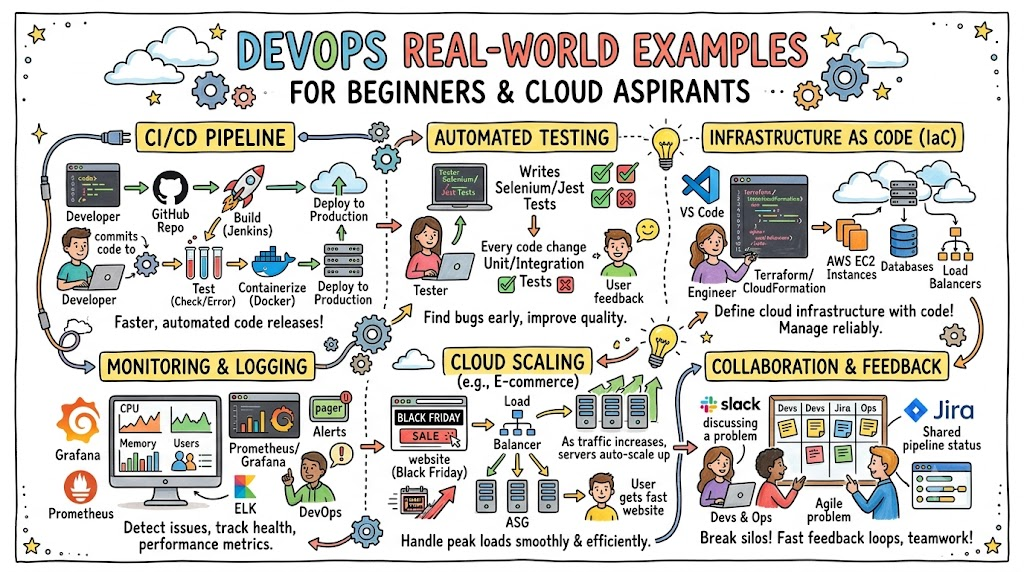
Learning DevOps often feels abstract to beginners. When you start your learning journey, you are frequently bombarded with complex terms, architectural diagrams, and an endless list of software tools. You hear about continuous delivery, infrastructure orchestration, container networks, and observability matrices. However, without seeing how these concepts function inside an actual software company, the entire ecosystem can feel like an overwhelming collection of theories.
Practical examples radically improve learning. When you shift your focus from simply reading tool documentation to studying how engineering teams solve daily deployment roadblocks, the concepts click. Real engineering workflows show you how code moves from a developer’s local laptop to a production environment serving millions of active users.
Today, companies across the globe depend on DevOps practices to survive. In the traditional IT setup, software developers wrote code and handed it over to a separate operations team for deployment. This separation created friction, delayed releases, and caused frequent system downtime. By breaking down these organizational silos, teams deploy software faster, maintain high system stability, and identify bugs before they impact end users.
If you want to transition from a theoretical learner to a confident professional who understands the mechanics of modern IT, studying practical implementation is your best path forward. Platforms like DevOpsSchool offer comprehensive training programs designed to teach you these exact methods through hands-on labs and real-world engineering projects, ensuring you gain the practical confidence required in today’s job market.
Why Learning Real DevOps Examples Matters
Closing the Gap Between Theory and Production
Reading a guide about a tool is entirely different from running that tool under heavy production loads. In a textbook, a deployment script works perfectly on the first try. In a production environment, you encounter network latencies, permission issues, API rate limits, and conflicting software dependencies. Studying real scenarios helps you anticipate these friction points.
Building Troubleshooting Confidence
When an application crashes at 2:00 AM, a professional cannot rely on basic tutorials. Understanding how real systems are structured allows you to trace errors logically. You learn where logs are stored, how traffic flows through load balancers, and how configuration changes impact live databases. This analytical approach transforms you from someone who merely copies commands into a true problem solver.
Acquiring Workplace Preparedness
Hiring managers do not look for candidates who have only memorized definitions. They look for engineers who understand workflows. When you study practical case studies, you learn how to discuss deployment blockers, code review strategies, rollback mechanics, and monitoring setups. This knowledge makes you stand out during technical interviews and allows you to contribute to engineering teams on day one.
What Makes a Good DevOps Real-World Example?
A high-quality learning example does not simply tell you to install a tool. It must mirror the actual challenges faced by software organizations. Every effective case study requires three core components:
- A Concrete Problem: A specific challenge that slows down software delivery, causes system downtime, or increases operational infrastructure costs.
- A Practical Workflow: A step-by-step sequence of automated actions, tool configurations, and team collaborations implemented to resolve the roadblock.
- A Measurable Improvement: Clear data demonstrating how the solution optimized the system, such as reducing deployment times from hours to minutes, lowering error rates, or minimizing cloud spend.
Overview Table: DevOps Real-World Examples
| Example | Problem Solved | DevOps Practice Used |
| CI/CD Pipeline Automation | Slow manual deployments, human errors, missing test execution | Continuous Integration & Continuous Deployment |
| Docker Consistency | “Works on my machine” syndrome, conflicting libraries across servers | Containerization |
| Kubernetes Scaling | Manual container tracking, container crashes, traffic management | Container Orchestration |
| Cloud Auto-Scaling | Server crashes during flash sales, high costs during idle hours | Elastic Infrastructure Architecture |
| Infrastructure as Code | Config drift, slow environments provisioning, manual UI clicks | Programmable Infrastructure (IaC) |
| Monitoring and Alerts | Unknown system outages, relying on customers to report downtime | Proactive Observability & Alerting |
| Faster Incident Recovery | Prolonged production outages during broken software updates | Automated Rollbacks & Zero-Downtime Deployment |
| Security Automation | Vulnerable open-source packages deployed to production environments | DevSecOps Automated Vulnerability Scanning |
| Log Centralization | Hunting through dozens of individual servers to find error traces | Centralized Log Management & Aggregation |
| Cost Optimization | Unused development environments draining corporate budgets | Automated Resource Scheduling & Lifecycle Management |
Example #1: CI/CD Pipeline Automation
The Manual Deployment Problem
An e-commerce engineering team with ten developers relied entirely on manual deployments. When a developer completed a feature, they compiled the application locally, ran a few manual tests, and uploaded the files to a remote production server via FTP.
This approach caused frequent production outages. Developers regularly forgot to run tests, uploaded incomplete code files, or accidentally overwrote changes made by their peers. A single deployment required four hours of manual checking, and updates were restricted to late-night weekends to avoid user disruption.
[Developer Code] ──> [Manual FTP Upload] ──> [Production Server (Breaks Due to Missing Files)]
The Automated Solution
The organization introduced an automated Continuous Integration and Continuous Deployment (CI/CD) pipeline using Jenkins and GitHub Actions. They configured a workflow triggered automatically whenever a developer pushed code to the main repository branch.
[Code Push] ──> [Automated Build] ──> [Run Unit Tests] ──> [Security Check] ──> [Auto Deploy]
The Step-by-Step Workflow
- A engineer pushes new code changes to the GitHub repository.
- A GitHub Actions runner detects the push and launches an ephemeral Linux container.
- The runner downloads the code, sets up the application runtime environment, and installs project dependencies.
- The system executes hundreds of automated unit and integration tests. If any test fails, the pipeline stops immediately and notifies the developer via Slack.
- Once all tests pass, the code is packaged into a deployable artifact.
- The pipeline securely logs into the target server infrastructure, transfers the new artifact, replaces the outdated version, and restarts the application service smoothly.
Practical Learning Lesson
Automation removes human error from the delivery lifecycle. By building a reliable CI/CD pipeline, the team reduced deployment times from four hours to less than seven minutes, allowing them to release software updates confidently multiple times per day.
Example #2: Docker for Application Consistency
The Environment Mismatch Problem
A software startup developed a Python-based web application. On the developer’s laptop, which ran macOS with Python 3.11, the application functioned flawlessly. However, when deployed to the production server running Ubuntu Linux with Python 3.8, the application immediately crashed with syntax errors and missing package dependencies.
The development and operations teams spent two days arguing over configuration details. The operations team blamed the code quality, while the development team insisted the production server was configured incorrectly. This “works on my machine” dispute stalled product delivery.
The Containerized Solution
The team adopted Docker to package the application alongside its exact runtime environment, including the OS libraries, configuration files, and Python dependencies.
┌────────────────────────────────────────────────────────┐
│                   Docker Container                     │
│  ┌──────────────────────┐    ┌──────────────────────┐  │
│  │     App Code         │    │  Python 3.11 Runtime │  │
│  └──────────────────────┘    └──────────────────────┘  │
│  ┌──────────────────────┐    ┌──────────────────────┐  │
│  │   OS Dependencies    │    │ Environment Config   │  │
│  └──────────────────────┘    └──────────────────────┘  │
└────────────────────────────────────────────────────────┘
The Step-by-Step Workflow
- The developer writes a declarative text configuration file known as a
Dockerfile. - This file specifies a base operating system layer, the exact language runtime version, required system packages, environment variables, and application startup commands.
- The developer runs a build command to create an immutable Docker image.
- This image is verified locally and uploaded to a secure container registry.
- The production server downloads this exact container image and runs it. Because the internal environment of the container is identical on both the laptop and the server, the application runs without modification.
Practical Learning Lesson
Containers isolate your application code from underlying infrastructure variations. Once you package an application inside a container image, it will execute identically across local developer laptops, staging platforms, and cloud production grids.
Example #3: Kubernetes for Scaling Applications
The Traffic Spikes Problem
An online ticketing platform hosted their containerized application on a single cloud virtual machine. During normal business hours, the server experienced steady, manageable user traffic. However, when tickets for a popular music festival went on sale, hundreds of thousands of users rushed to the platform simultaneously.
The lone server ran out of memory and CPU capacity, leading to internal server errors and dropping connections for eager buyers. The system administrators tried to manually launch extra servers and configure load balancers, but the manual process took over thirty minutes—long after the system had already crashed.
The Container Orchestration Solution
The platform migrated their application containers to a Kubernetes cluster to manage resource allocation, health checks, and horizontal scaling automatically.
                       ┌──> [ Pod A (App Container) ]
[Inbound Traffic] ───> │──> [ Pod B (App Container) ] (Auto-scaled by Kubernetes)
                       └──> [ Pod C (App Container) ]
The Step-by-Step Workflow
- The operations team sets up a Kubernetes deployment configuration specifying target memory and CPU usage thresholds.
- A Horizontal Pod Autoscaler (HPA) continuously monitors the resource utilization metrics of the active application containers.
- When sudden ticket sales drive CPU usage beyond 70%, Kubernetes detects the trend within seconds.
- The cluster automatically provisions multiple new instances (Pods) of the container application across available compute nodes.
- An integrated Kubernetes Service resource detects these new instances and updates the network load balancer to distribute incoming traffic evenly across all active containers.
- When ticket demand subsides, Kubernetes terminates the extra containers to save infrastructure costs.
Practical Learning Lesson
Manual scaling cannot keep up with erratic modern user demands. Kubernetes automates container lifecycle management, routing, and scaling, ensuring your applications remain highly available even under extreme traffic loads.
Example #4: Cloud Auto-Scaling in AWS/Azure
The Sudden Traffic Growth Problem
A media platform hosted its content delivery systems on standard cloud virtual machines. During major breaking news events, traffic to their articles increased tenfold within minutes.
If they kept twenty virtual machines running 24/7 to handle these random traffic spikes, their monthly cloud hosting bill would skyrocket, wasting budget during quiet hours. Conversely, running only two servers caused the website to crash whenever news went viral.
The Elastic Cloud Architecture Solution
The infrastructure team configured automated cloud auto-scaling groups tied directly to network load balancers on AWS or Azure.
[Normal Load: 2 Servers] ────(Traffic Spike)────> [Peak Load: 10 Servers Auto-Provisioned]
The Step-by-Step Workflow
- The infrastructure architecture is designed with a minimum limit of two cloud virtual servers and a maximum capacity of ten.
- A cloud load balancer intercepts all incoming web traffic and routes it to the running servers.
- Cloud watch metrics monitor aggregate metrics like network bandwidth or average CPU consumption across the active servers.
- When a breaking news cycle triggers a traffic spike, the cloud platform registers a prolonged CPU breach above the target metric.
- The cloud provider’s auto-scaling mechanism launches new virtual server instances based on a pre-configured operating system gold image.
- The load balancer automatically registers these new servers, immediately routing a portion of the incoming traffic to them to maintain smooth application performance.
Practical Learning Lesson
Cloud computing is designed around systemic elasticity. Combining auto-scaling policies with load balancing allows your infrastructure to expand to meet unexpected user demand and shrink automatically when demand drops, protecting both performance and budget.
Example #5: Infrastructure as Code with Terraform
The Manual Infrastructure Setup Problem
A financial software firm needed to maintain three separate operational environments: Development, Staging, and Production. Originally, system administrators set up these networks manually by clicking through the cloud provider’s web console interface.
This manual process led to configurations that did not match across environments. The Staging environment had different firewall rules than Production, while Development ran a slightly older version of the managed database. These subtle differences meant that bugs discovered in Staging were impossible to recreate in Development, slowing down QA processes.
[Console Clicks] ──> Dev (Group A Rules) ──> Staging (Group B Rules) ──> Prod (Group C Rules)
The Infrastructure as Code Solution
The infrastructure team eliminated manual console configuration entirely by adopting Terraform to define their global network topology, security firewalls, and cloud servers using declarative configuration code.
[Terraform Code File] ───┬──> Provisions Dev Environment (Exact Match)
                         ├──> Provisions Staging Environment (Exact Match)
                         └──> Provisions Production Environment (Exact Match)
The Step-by-Step Workflow
- An infrastructure engineer writes a text file describing the desired target state of the infrastructure (VPCs, subnets, firewall rules, databases).
- The code file is committed to a git repository, allowing the team to peer-review structural changes before applying them.
- The engineer executes a Terraform plan command, which compares the declared state in code with the actual components active in the cloud account.
- When approved, the Terraform apply command interacts with cloud APIs to provision or modify infrastructure resources precisely as written.
- To spin up an identical Staging or Production environment, the engineer simply runs the same code using different environment variable files.
Practical Learning Lesson
Infrastructure as Code removes human error and environment drift. When you manage your physical and cloud hardware footprints as software code, you can version control, review, track, and reproduce entire data centers reliably in minutes.
Example #6: Monitoring with Prometheus and Grafana
The Slow Issue Detection Problem
A logistics firm ran a distributed network of microservices handling tracking data. Occasionally, the processing application would slow down, causing delayed tracking updates for end users.
Because they lacked comprehensive monitoring, the company relied on angry customer support emails to realize something was broken. Once alerted, engineering teams had to log into individual servers one by one, manually running commands to guess which microservice was malfunctioning. It routinely took five hours to locate the source of an issue.
The Proactive Observability Solution
The operations group deployed a unified monitoring stack combining Prometheus to scrape internal time-series metrics and Grafana to visualize system health.
[Microservices] ──(Metrics Scraped)──> [Prometheus Database] ──(Visualized)──> [Grafana Dashboard]
The Step-by-Step Workflow
- Developers insert light instrumentation metrics code into each microservice to track application performance counters, error rates, and response durations.
- A Prometheus server polls these microservice endpoints at regular intervals, saving the performance metrics inside an optimized time-series database.
- Grafana connects to Prometheus as a data source, rendering visual, real-time charts displaying request volumes, server loads, and error charts.
- The team configures an explicit Prometheus alert rule: if the application returns a 5xx server error rate above 2% for more than two minutes, fire a warning.
- If triggered, the alerting engine immediately dispatches an automated page payload to the on-call engineer’s device via PagerDuty or Slack, containing direct links to relevant metric dashboards.
Practical Learning Lesson
You cannot fix what you do not measure. Implementing centralized time-series tracking and automated alerts changes your engineering posture from reactive troubleshooting to proactive infrastructure management, helping you catch problems before they impact your users.
Example #7: Faster Incident Recovery
The Production Outage Problem
A fintech developer pushed a new feature update to production intended to speed up checkout workflows. Unfortunately, the update introduced a silent database connection leak that was missed during manual testing.
Within twenty minutes of deployment, the production database ran out of available connections, causing the entire checkout system to crash. The engineering team panicked and tried to fix the code directly on the production servers, which accidentally corrupted configuration settings and extended the total outage to three hours.
The Automated Rollback Solution
The application delivery platform implemented a green-blue deployment model paired with automated pipeline rollback capabilities.
[Traffic] ───> [ Load Balancer ]
                     │
                     ├──> [ Blue Environment (Old Version 1.0 - Stable) ]
                     └──> [ Green Environment (New Version 1.1 - Active Connection Leak) ]
                          (System detects errors ──> Instantly flips traffic back to Blue)
The Step-by-Step Workflow
- The company keeps two identical application environments active: Blue (running current stable version 1.0) and Green (hosting target version 1.1).
- Incoming customer traffic is routed to the Green environment via a central load balancer.
- Automated health monitors track live system error codes and API latency indicators for five minutes post-deployment.
- As database connection errors spike, the automated system flags the deployment as unhealthy.
- The monitoring system triggers a webhook that communicates with the load balancer, immediately rerouting all user traffic back to the safe Blue environment running version 1.0.
- The entire traffic rollback is completed in seconds without dropping user sessions, giving developers a safe, offline environment to debug version 1.1.
Practical Learning Lesson
Outages are a reality of running software at scale. Designing your systems for rapid, automated rollbacks minimizes your Mean Time to Resolution (MTTR), insulating your customers from service interruptions when broken updates slip through.
Example #8: Security Automation in CI/CD
The Vulnerability Detection Problem
A social media application relied heavily on various third-party open-source software libraries. A developer unknowingly imported an outdated version of a standard helper package that contained a critical, publicly documented remote code execution vulnerability.
Because security evaluations were done manually during a single audit every six months, this security flaw went unnoticed. Malicious actors exploited the loophole a month later, accessing customer profiles and causing major compliance headaches for the company.
The DevSecOps Solution
The security team integrated automated security vulnerability scanning checks directly into the primary software development lifecycle pipeline.
[Code Commit] ──> [Dependency Scan (Snyk/Trivy)] ──> [Security Alert / Block Build]
The Step-by-Step Workflow
- A developer adds an external open-source library dependency package to their project code file.
- The developer commits the modified dependency code tracking file to the central git repository.
- The CI/CD pipeline initializes and executes an automated Software Composition Analysis (SCA) tool such as Snyk or Trivy.
- The security scanning tool parses the package manifest file and compares the exact library versions against a global database of known vulnerabilities.
- If the scanner discovers a critical security threat with no patch applied, it fails the build step, prevents deployment, and creates an alert.
- The pipeline outputs an actionable error message outlining the vulnerability details along with instructions on how to upgrade to a safe package version.
Practical Learning Lesson
Security should be baked into your development workflow from the start, not treated as an afterthought. Shifting security left by automating code and dependency scans inside your delivery pipeline allows you to find and fix vulnerabilities long before your application reaches production.
Example #9: Log Centralization
The Debugging Production Issues Problem
A healthcare provider operated a cluster of twenty independent microservices scattered across fifteen different virtual servers. Users started reporting a random issue where their appointment records failed to save.
To find the cause, developers had to manually SSH into all fifteen servers, locate the application logs directory, and run grep text searches through dozens of massive text files. Because the logs lacked timestamp synchronization, stitching together the sequence of events across services took days.
The Log Aggregation Solution
The systems architecture group introduced a centralized logging pipeline using an ELK Stack (Elasticsearch, Logstash, Kibana) alongside lightweight Fluentbit shipping agents.
[Server 1 Logs] ──┐
[Server 2 Logs] ──┼─> [ Fluentbit Agent ] ─> [ Elasticsearch Storage ] ─> [ Kibana UI Search ]
[Server 3 Logs] ──┘
The Step-by-Step Workflow
- A logging agent daemon runs as a background process on every application server node in the infrastructure.
- The agent monitors local log paths, captures new log lines in real time, converts them into clean JSON structures, and appends metadata like the host server name.
- The captured log streams are pushed over the network to a central Elasticsearch processing cluster.
- Developers append a unique “Correlation ID” to every incoming user request at the API gateway layer. As services call one another, this ID is passed along down the line.
- When a bug occurs, an engineer types the unique correlation ID into the Kibana web search interface.
- The dashboard instantly surfaces every log message across all servers and microservices related to that specific user interaction, sorted chronologically.
Practical Learning Lesson
Distributed microservice applications are incredibly difficult to debug using traditional methods. Centralizing your logs into a searchable database gives you a single source of truth, helping you trace complex, multi-service bugs in a fraction of the time.
Example #10: Cost Optimization Through Automation
The Cloud Overspending Problem
A software enterprise scaled up its product engineering division, resulting in fifty developers spinning up individual cloud virtual instances and test databases to try out new features.
Unfortunately, developers regularly forgot to destroy these temporary environments after completing their work. Dozens of high-performance database engines and virtual machines were left running completely idle overnight and over long holiday weekends. This oversight wasted thousands of dollars in cloud infrastructure charges every month.
The Automated Resource Management Solution
The cloud operations team introduced automated cleanup policies and resource scheduling scripts across all experimental sandbox accounts.
                              ┌──> [ 9:00 AM: Auto-Start Development Servers ]
[ Cloud Lifecycle Scheduler ] │
                              └──> [ 7:00 PM: Auto-Stop Development Servers (Save Costs) ]
The Step-by-Step Workflow
- The company establishes an explicit tagging policy: every non-production cloud asset must carry an owner tag and an environment classification tag.
- An automated serverless cleanup script runs on a daily cron schedule at 7:00 PM every evening.
- The script scans the cloud environment looking for development and staging resources.
- If a development instance is running past 7:00 PM, the automated script safely shuts down the server to stop runtime billing accumulation.
- At 9:00 AM the next morning, a corresponding startup script powers the development instances back on so engineers can begin their workday.
- Any resource found without an identification tag is flagged as unmanaged and safely terminated after a 24-hour warning period.
Practical Learning Lesson
Cloud environments can scale indefinitely, which means your bills can too if left unchecked. Implementing automated resource lifecycles and scheduling policies lets you cut out waste, ensuring you only pay for cloud resources when they are actually driving business value.
Real-World Example: Team Without DevOps Practices
To truly appreciate the value of these workflows, let’s look at a typical day for a traditional team that has not adopted DevOps practices.
[Write Code] ──> [Manual Hand-off] ──> [Siloed Testing] ──> [Manual Deploy Clicks] ──> [Outage]
Slow and Risky Software Releases
Features take weeks to move from code completion to production. Developers work in isolation for months, bundling hundreds of unrelated code changes into massive, risky quarterly releases. Because nobody knows how these changes will interact, every release day is stressful and error-prone.
Fragmented Team Communication
When an outage happens, teams protect their own interests instead of collaborating. The development group claims the application ran fine in their local setup, while the operations team insists the code is full of resource leaks. Valuable time is wasted trading blame while customers experience a broken system.
Endless Firefighting Mode
Engineers spend their time manually executing repetitive tasks like configuring individual servers, applying hotfixes directly to production, and manually parsing log files. Team members face burnout from late-night emergency calls, leaving them little time to build scalable, resilient systems.
Real-World Example: Team Using DevOps Successfully
Now let’s contrast that with an engineering team running a fully matured, automated DevOps operational model.
[Continuous Code Sync] ──> [Auto CI Pipeline] ──> [GitOps Deploy] ──> [Real-time Dashboards]
Reliable, Low-Stress Shipments
Developers commit small, incremental code updates to the main repository multiple times a day. Every change triggers an automated pipeline that builds, tests, and validates the code in minutes. Deployments become routine, low-risk events that happen during regular business hours without impacting users.
Shared Operational Responsibility
Developers and operations engineers collaborate using shared dashboards and clear metrics. If a production bug slips through, the team works together to find the root cause, write an automated test to catch it next time, and update their shared infrastructure definitions.
Focus on Engineering and Innovation
With routine tasks like infrastructure provisioning, code testing, container scaling, and log shipping completely automated, engineers can focus on what matters most: writing high-quality code and building features that move the business forward.
Common Beginner Misunderstandings
- DevOps is Just a Toolset: Many learners assume that mastering DevOps simply means learning how to run Jenkins, Docker, or Terraform. In reality, tools are just a means to an end. True DevOps is a cultural shift focused on automation, collaboration, and improving delivery workflows.
- Automation Solves Every Single Problem: Automating a broken, chaotic manual process just leaves you with a faster, automated broken process. You must optimize and simplify your software delivery steps before writing automation scripts.
- Real Projects Are Too Complex to Build: Beginners often get intimidated by large production architectures and avoid hands-on practice. However, every enterprise system is just a collection of smaller components. You can learn these exact concepts by building simple, small-scale versions of these workflows at home.
- Only Tech Giants Need DevOps: It is a myth that only massive companies like Netflix, Amazon, or Google benefit from DevOps. Smaller startups and mid-sized enterprises actually gain the most from automation, allowing small teams to manage complex infrastructure efficiently.
Best Practices for Learning DevOps Through Real Examples
Rebuild Examples Hands-On
Do not just read case studies or watch video walkthroughs passively. Open your code editor, install Docker on your machine, configure a basic GitHub Actions pipeline, and write your first Terraform file. True engineering skills are built through hands-on practice.
Prioritize Workflows Over Tools
Instead of trying to learn every single tool in the industry, focus on the underlying workflows. Once you understand the core concepts of container orchestration, transitioning from Kubernetes to an alternative orchestrator becomes straightforward. The design principles remain consistent.
Learn to Troubleshoot System Failures
When your test pipeline fails or your container throws an error, do not delete your project and start over. Treat failures as learning opportunities. Read through the log output, find the root cause, and fix the configuration error. Troubleshooting is what separates senior engineers from beginners.
Start Small and Iterate
Do not try to build a massive, multi-region microservice architecture on day one. Start with a simple milestone: containerize a single static HTML page using Docker. Once that works, write a local script to deploy it. Gradually add monitoring, scaling, and security elements over time.
Role of DevOpsSchool in Practical Learning
Mastering these workflows requires moving beyond basic syntax tutorials and working with real engineering environments. DevOpsSchool helps close this gap by offering structured, expert-led training programs focused entirely on hands-on implementation.
Their curriculum skips empty theory to focus on realistic workplace challenges. Students work directly with production-grade setups, building automated CI/CD pipelines, configuring container clusters, managing cloud infrastructure via code, and designing centralized monitoring setups.
By guiding learners through these practical scenarios, the platform helps you build a strong portfolio of projects and develop the analytical troubleshooting mindset required by modern engineering teams.
Career Importance of Practical DevOps Knowledge
Modern Specialized Engineering Roles
- DevOps Engineer: Focuses on designing, building, and maintaining automated software delivery pipelines, improving developer tools, and keeping environments consistent.
- Cloud Engineer: Specializes in architecting, securing, and optimizing cloud-native infrastructure footprints across platforms like AWS, Azure, or Google Cloud.
- Site Reliability Engineer (SRE): Focuses on system availability, performance optimization, latency management, and building automated incident recovery workflows.
- Platform Engineer: Builds internal developer platforms (IDPs) and self-service tools, enabling product teams to deploy code safely and independently.
- Automation Engineer: Dedicated to replacing manual, repetitive IT tasks with robust, maintainable script frameworks and automated systems.
Core Practical Skills You Gain
- Root-Cause Troubleshooting: The ability to trace complex system issues across networks, operating systems, and distributed applications.
- Process Automation: Replacing risky manual deployment checklists with clean, version-controlled code pipelines.
- Proactive Observability: Setting up robust tracking systems to monitor infrastructure health and catch bugs before users notice.
- Cloud Architecture Design: Building scalable, cost-effective, and highly available cloud networks tailored to real business workloads.
Industries Using DevOps in Real Life
SaaS Platforms
Software-as-a-Service firms deploy application updates multiple times every day. They rely heavily on automated canary deployments and zero-downtime rollbacks to roll out features smoothly without interrupting active user sessions.
Banking and Finance
Financial institutions combine agility with strict compliance rules. They use automated DevSecOps pipelines to run automated security audits, verify encryption standards, and track compliance history for every code change.
Healthcare
Healthcare systems must maintain high availability and protect sensitive patient data. They leverage automated infrastructure provisioning and centralized logging stacks to keep systems reliable and audit-ready.
E-Commerce
Online retailers experience unpredictable traffic patterns around holidays and promotional events. They use automated cloud scaling and container orchestration to handle traffic surges smoothly while optimizing server costs during quiet hours.
Telecom
Telecommunication operators run complex networks across edge locations. They use Infrastructure as Code to manage configurations across geographic regions, ensuring consistency and preventing configuration errors.
Enterprise IT
Large traditional corporations use DevOps workflows to modernize legacy systems, break down organizational silos, and speed up software delivery across internal business units.
Future of Practical DevOps Learning
AI-Assisted Troubleshooting
Artificial intelligence is changing how we manage systems by analyzing log patterns, predicting potential hardware failures, and suggesting optimal configuration fixes during outages. However, engineers still need a deep understanding of core systems to review and apply these suggestions safely.
Platform Engineering Growth
The industry is moving toward Platform Engineering, which focuses on building curated internal portals for developers. This shift lets software developers provision infrastructure and run pipelines independently within safe boundaries established by operations experts.
Cloud-Native Operations
As systems move toward serverless architectures and micro-frontends, understanding container networking, service meshes, and distributed tracing is becoming a core requirement for modern engineering roles.
Comprehensive DevSecOps Integration
Security is no longer a separate, final step in the software lifecycle. Modern engineering demands that automated vulnerability scanning, access controls, and compliance monitoring are built directly into every phase of the development loop.
FAQs (15 Questions)
1. Why are DevOps real-world examples important?
They help close the gap between textbook definitions and the actual realities of production environments. Looking at practical case studies shows you how tools interact, where deployments fail, and how engineering teams solve daily problems under real-world conditions.
2. What is the best DevOps project for a complete beginner to build?
Start by writing a basic web application, packaging it inside a Docker container, and setting up a GitHub Actions pipeline to automatically deploy that container to a free cloud hosting tier whenever you push updates to your repository.
3. Is CI/CD hard to learn for someone without a technical background?
Not at all. At its core, a CI/CD pipeline is just a sequence of automated steps: download code, run tests, and copy files to a server. Focus on understanding the logical flow of these steps before diving into complex configurations.
4. Why is Docker considered a mandatory tool for modern software development?
Docker solves the “works on my machine” issue by bundling an application together with its exact dependencies, configuration files, and runtime environment, ensuring the code runs identically across every single machine.
5. Do I need advanced cloud computing skills to practice DevOps?
You do not need to be a cloud architect right away, but a foundational understanding of cloud services like virtual machines, networks, and access permissions is highly valuable since most modern pipelines run on cloud infrastructure.
6. How can I practice complex DevOps workflows on a budget?
You can run almost the entire modern toolset—including Docker, Jenkins, SonarQube, Prometheus, and local Kubernetes tools like Minikube—directly on your personal laptop for free without incurring cloud costs.
7. Can freshers and career switchers land a DevOps job?
Yes. Companies value practical engineering skills over years of theoretical study. If you can demonstrate a portfolio of working deployment pipelines, infrastructure code files, and monitoring setups, you can land an entry-level role.
8. What core tools should a beginner learn first?
Focus on mastering Git for version control, Docker for application containerization, a popular CI/CD tool like GitHub Actions or Jenkins, and basic Linux command-line operations before moving to advanced tools.
9. What is the main difference between continuous integration and continuous deployment?
Continuous Integration (CI) focuses on automatically merging, building, and testing code whenever a developer makes changes. Continuous Deployment (CD) takes that validated code and automatically deploys it directly to production environments.
10. How does Infrastructure as Code differ from traditional systems administration?
Traditional administration relies on manually logging into servers and running commands or clicking through cloud console menus. Infrastructure as Code manages your entire hardware footprint using text files, allowing you to track changes, review configurations, and automate deployments.
11. What exactly does an SRE do compared to a DevOps engineer?
While a DevOps engineer focuses on building smooth deployment pipelines and developer tools, a Site Reliability Engineer (SRE) is dedicated to keeping production environments stable, fast, resilient, and highly available.
12. Why do companies separate staging and production environments?
A staging environment acts as an exact replica of production, giving teams a safe space to test new updates and catch bugs under realistic conditions before deploying changes to live customers.
13. What is configuration drift and how do teams prevent it?
Configuration drift happens when manual changes are made directly to servers over time, causing their setups to differ from the original design. Teams prevent this by using tools like Terraform to ensure all environments match their code definitions.
14. Is programming knowledge required to work in DevOps?
You do not need to be an expert software developer, but you should know how to read code and write basic automation scripts using accessible languages like Bash or Python to handle repetitive operational tasks.
15. How long does it take to learn DevOps well enough to use it in production?
With consistent, hands-on practice focused on workflows rather than memorizing tools, a dedicated student can build a strong foundational understanding of production DevOps concepts in about six months.
Final Thoughts
Mastering DevOps requires prioritizing practical application over pure theory. Reading documentation or memorizing tool commands will only get you so far. True confidence comes from building real pipelines, managing infrastructure through code, observing system behavior with monitoring tools, and troubleshooting unexpected configuration errors.
Studying real-world engineering workflows teaches you to approach software delivery logically. It helps you see beyond individual tools and focus on the ultimate goal: delivering stable, high-quality software updates to users quickly and reliably.
As you continue your learning journey, focus on hands-on practice. Embrace deployment errors as opportunities to learn, start building your own small-scale projects, and look for structured learning paths like those provided by DevOpsSchool to build the real-world engineering mindset needed for a successful career in the field.
