In the rapidly evolving world of technology, the term DevOps is often thrown around as a magic solution to software delivery problems. For those just starting, the landscape of DevOps tools for beginners can feel overwhelming. You are bombarded with lists of hundreds of technologies, all claiming to be the next industry standard. If you try to learn everything at once, you will likely burn out before you ever deploy a single application.
The secret to a successful transition into this field is not breadth, but depth. Mastering a core set of DevOps essentials early in your journey provides a stable foundation upon which you can build specialized skills later. It is about understanding the methodology behind the tools. At DevOpsSchool, we have seen countless students succeed by prioritizing foundational knowledge over chasing trends. Whether you are a student, a developer, or a system administrator, your goal should be to build a marketable skill set that focuses on practical automation, continuous integration, and infrastructure management.
Why Beginners Should Focus on Core DevOps Tools
Imagine trying to build a house without knowing how to use a hammer, a saw, or a level. You might have the blueprints, but you lack the basic utility to execute the vision. DevOps is similar. Many beginners make the mistake of jumping straight into complex orchestration tools or advanced cloud services without understanding the core principles of version control or configuration management.
Focusing on core DevOps tools for beginners allows you to understand the “why” before the “how.” When you deeply understand how Git handles versioning or how Jenkins manages a build pipeline, you are not just memorizing commands. You are learning a way of thinking. This foundation gives you the confidence to troubleshoot issues in real-world scenarios. By narrowing your focus to the most widely used tools, you effectively reduce information overload, allowing you to build expertise that will serve you throughout your career.
How DevOps Tools Fit Into the DevOps Lifecycle
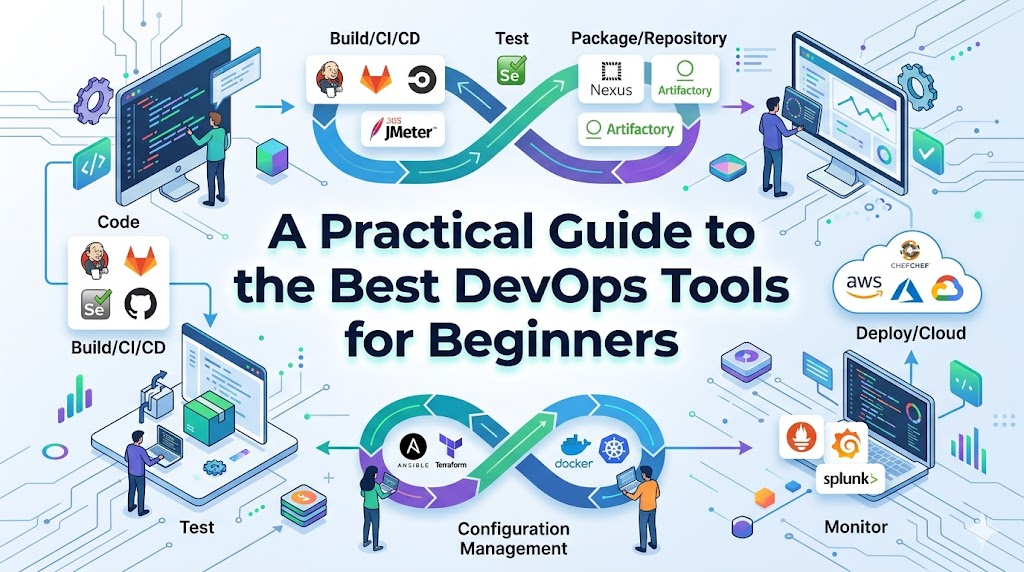
DevOps is a cycle, not a straight line. Every tool you learn serves a specific stage in the software delivery process. Understanding this workflow is critical for any aspiring DevOps engineer.
| DevOps Stage | Common Tools |
| Planning | Jira, Trello, Confluence |
| Source Control | Git, GitHub, GitLab |
| CI/CD | Jenkins, GitLab CI, GitHub Actions |
| Containers | Docker, Podman |
| Orchestration | Kubernetes, Amazon EKS |
| Infrastructure as Code | Terraform, CloudFormation |
| Configuration Management | Ansible, Puppet, Chef |
| Monitoring & Observability | Prometheus, Grafana, ELK Stack |
By visualizing where each tool fits, you can see how code moves from a developer’s laptop to the production environment, and how it is monitored once it is live.
DevOps Tools You Should Master Early
This section breaks down the essential tools every DevOps engineer should know. Do not rush through these. Spend time building projects with each one.
Git
Git is the bedrock of the DevOps world. It is the version control system that enables collaboration.
- Why it matters: You cannot have a DevOps culture without version control. Every line of code, infrastructure configuration, and documentation should be tracked.
- Key concepts: Branches, commits, merge requests, and pull requests.
- Beginner exercise: Create a repository, commit code, create a feature branch, and practice merging it back into the main branch.
Jenkins
Jenkins is the grandfather of CI/CD. Even with newer tools on the market, understanding Jenkins pipelines remains a vital skill.
- Why it matters: It automates the process of building, testing, and deploying code. It teaches you how to structure an automation pipeline.
- Example workflow: Configure a job that pulls code from Git, runs a build script, and notifies you if the build fails.
Docker
Docker changed how we package software. It allows you to run applications in isolated environments called containers.
- Why it matters: It solves the “it works on my machine” problem. It ensures consistency across development, testing, and production.
- Practical use case: Create a Dockerfile for a simple web application. Build the image and run it as a container.
Kubernetes
Once you understand containers, you need to manage them at scale. That is what Kubernetes does.
- Beginner approach: Do not start by setting up a cluster from scratch. Use managed services or local test environments to learn how to deploy a pod, create a service, and scale a deployment.
Terraform
Terraform allows you to manage your infrastructure using code rather than manual clicks in a web console.
- Why it matters: It enables reproducibility. You can tear down and rebuild an entire environment with a single command.
- Fundamentals: Learn how to write resource blocks for cloud providers and understand the concept of state files.
Ansible
Ansible is excellent for configuration management. It pushes configurations to servers automatically.
- Why it matters: It is agentless, making it easy to set up. It is the primary tool for automating repetitive system administration tasks.
- Example: Create a playbook to install and configure a web server across ten different virtual machines simultaneously.
Prometheus & Grafana
You cannot improve what you cannot measure. These tools provide the visibility into your systems.
- Basics: Prometheus collects the data (metrics), and Grafana visualizes it. Learning to build a dashboard that shows CPU and memory usage is a rite of passage for every DevOps engineer.
Suggested Learning Sequence for Beginners
Learning is a marathon, not a sprint. Follow this progression to build your skills logically.
Month 1: The Foundation
- Focus entirely on Linux and Git. If you do not understand the command line, you will struggle with every other tool. Learn basic shell scripting.
Month 2: The Build Process
- Introduction to CI/CD. Set up Jenkins or GitHub Actions. Learn how to package applications into Docker containers.
Month 3: Infrastructure and Configuration
- Learn Infrastructure as Code (Terraform) and Configuration Management (Ansible). Start creating infrastructure on a cloud provider.
Month 4: Orchestration and Monitoring
- Move to Kubernetes. Once you can deploy applications, implement Prometheus and Grafana to monitor your cluster.
Real-World Example: Learning Too Many Tools at Once
Consider a student who tries to learn Kubernetes, Terraform, AWS, Azure, Jenkins, and Python all in their first month. They jump from one tutorial to another, copying and pasting code. When a simple error appears, they have no idea how to debug it because they never mastered the fundamentals. In interviews, they can list the tools on their resume, but they cannot explain how they work together to solve a business problem. This leads to rejection and frustration.
Real-World Example: Structured Tool Learning Approach
Contrast this with a student who spends four weeks mastering Git and Docker. They build five different projects, each slightly more complex than the last. They learn to troubleshoot Docker networking issues and understand how Git branches impact a team workflow. When they finally move to Kubernetes, they already understand the core networking and container concepts. They can explain their projects deeply in interviews because they built them from the ground up. This builds authentic confidence and technical authority.
Common Mistakes Beginners Make
- Chasing trending tools: Do not pick a tool because it is trending on social media. Pick it because it solves a problem.
- Skipping fundamentals: You cannot automate a process you do not understand manually. Master Linux and basic networking first.
- Memorizing commands: Do not just memorize. Understand the logic. If you know the concepts, you can look up the commands.
- Avoiding hands-on practice: Watching videos is not learning. If you are not writing code or building configs, you are just entertaining yourself.
- Ignoring Linux basics: DevOps relies heavily on Linux. If you avoid the terminal, you avoid the core of the profession.
Best Practices for Mastering DevOps Tools
- Practice daily: Even 30 minutes of consistency is better than a 5-hour binge on a weekend.
- Build mini-projects: Instead of just following a tutorial, change the requirements. Try to deploy a different application or add a new layer to the automation.
- Use GitHub repositories: Document your learning journey by keeping your code in public repositories.
- Follow CI/CD workflows: Even for personal projects, treat them like professional software. Use a pipeline, automated tests, and proper versioning.
- Troubleshoot issues independently: Before asking for help, read the logs, search the documentation, and try to isolate the problem. This builds your “debugging muscle.”
Role of DevOpsSchool in Learning Core DevOps Tools
At DevOpsSchool, the philosophy is rooted in hands-on exposure. We believe that reading about automation is not the same as building it. Our programs are designed to bridge the gap between theory and real-world application. Whether you are learning CI/CD concepts or mastering infrastructure automation, the focus remains on understanding the underlying DevOps workflows. We help students navigate the noise of the industry to focus on the tools that have long-term value, ensuring you graduate with the practical skills that companies actually hire for.
Career Benefits of Learning DevOps Tools Early
Mastering these tools opens doors to several high-demand career paths:
- DevOps Engineer: The generalist who bridges development and operations.
- Cloud Engineer: Focuses on infrastructure scalability and cloud services.
- Site Reliability Engineer (SRE): Focuses on system stability, reliability, and performance.
- Platform Engineer: Builds internal tools and platforms for developers to use.
- Automation Engineer: Specializes in removing manual tasks from the software development life cycle.
Industries Using These Tools Daily
The tools mentioned in this guide are not limited to one sector. They are the backbone of modern digital operations across:
- SaaS (Software as a Service): Providing web-based software on demand.
- Banking & Fintech: Securing transactions and maintaining 99.99% uptime.
- Healthcare: Managing sensitive data and compliance automation.
- E-Commerce: Scaling systems during high-traffic events like sales.
- Telecom: Managing massive network infrastructures.
- Enterprise IT: Modernizing legacy applications for digital transformation.
Future Trends in DevOps Tooling
- AI-Assisted Automation: Tools are increasingly using AI to write boilerplate code, suggest infrastructure fixes, and predict system failures.
- Platform Engineering: A shift toward creating internal developer platforms (IDP) to improve developer experience.
- GitOps Growth: Managing infrastructure using Git as the source of truth is becoming the standard.
- Unified Observability: Moving away from separate logs, metrics, and traces toward integrated platforms that give a single pane of glass view of the system.
FAQs
1. Which DevOps tool should I learn first?
Always start with Git. It is the foundation of version control and collaboration, which are core to DevOps.
2. Is Jenkins still relevant?
Yes. While many newer CI/CD tools exist, Jenkins remains widely used in enterprises due to its massive plugin ecosystem and flexibility.
3. Do I need Kubernetes as a beginner?
No. Kubernetes is complex. Master containers (Docker) first, then move to orchestration when you are comfortable.
4. Is Docker enough for containers?
Docker is the standard for learning and local development, but you should eventually understand container concepts broadly, which will help you adapt to other runtimes.
5. How important is Git?
It is critical. You cannot be a DevOps engineer without it.
6. Can I learn DevOps without coding?
You don’t need to be a software developer, but you must be able to read and write scripts (like Bash or Python) to automate tasks.
7. How long does it take to learn these tools?
It depends on your background, but expect 3 to 6 months of consistent, hands-on practice to gain a professional-level understanding of the core set.
8. Should I focus on cloud tools early?
Learn general DevOps tools (Git, Docker, Jenkins) first. Cloud platforms like AWS or Azure are environments where you deploy these tools.
9. Is DevOps just about tools?
No. Tools are just enablers. DevOps is a culture of collaboration, shared responsibility, and continuous improvement.
10. Do I need to be a Linux expert?
You need to be comfortable on the command line. You don’t need to be a kernel developer, but you must be able to manage a Linux server.
11. Which programming language is best for DevOps?
Python is the industry standard for scripting and automation, followed closely by Go.
12. Is it better to learn one tool perfectly or many tools superficially?
Always go for depth. A deep understanding of one tool makes learning the next one significantly easier.
13. Where can I practice these tools for free?
Use your local machine, open-source documentation, and local virtual environments.
14. Are there too many DevOps tools to keep up with?
Yes, the industry changes fast. Focus on the core principles and fundamental tools; the specific technologies will evolve, but the concepts remain the same.
15. How do I prove my skills to employers?
Build public projects on GitHub, write about your learnings, and contribute to open-source if you can.
Final Thoughts
The path to becoming a DevOps engineer is not about memorizing the most tools; it is about mastering the fundamentals. Tools are merely enablers for better software delivery. Do not get distracted by the noise of new, niche technologies appearing every week. Focus on Git, Jenkins, Docker, and the others mentioned here. Build projects, break things, fix them, and learn the methodology behind the automation. Consistency is what builds true expertise. Focus on your growth, stay curious, and build your foundation one step at a time.
