MOTOSHARE ๐Ÿš—๐Ÿ๏ธ
Turning Idle Vehicles into Shared Rides & Earnings

From Idle to Income. From Parked to Purpose.
Earn by Sharing, Ride by Renting.
Where Owners Earn, Riders Move.
Owners Earn. Riders Move. Motoshare Connects.

With Motoshare, every parked vehicle finds a purpose. Owners earn. Renters ride.
๐Ÿš€ Everyone wins.

Start Your Journey with Motoshare

Laravel Passport Error: SQLSTATE[HY000] [1045] – Access Denied for User

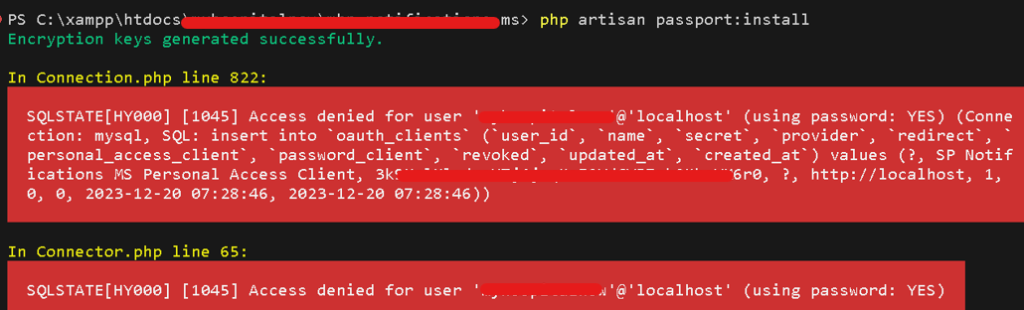
Laravel Passport simplifies the integration of OAuth2 authentication in Laravel applications. However, during its installation or usage, you might encounter errors. One common issue is the “SQLSTATE[HY000] [1045] – Access denied for user” error, indicating a problem with the database user’s access. The error message suggests that Laravel Passport is facing an access denied issue when trying to insert data into the ‘oauth_clients’ table. The error is specifically related to the MySQL database user ‘yourprojectname’@’localhost,’ indicating a problem with the provided credentials.

Incorrect Database Credentials: The database username or password provided in the Laravel configuration does not match the actual credentials for the ‘yourprojectname’ user.

Insufficient Database User Privileges: The ‘yourprojectname’ user does not have the necessary privileges to perform database operations, such as inserting data into the ‘oauth_clients’ table.

Solving the Error:

Verify Database Credentials: Open your Laravel environment file, typically located at .env, and ensure that the ‘DB_USERNAME’ and ‘DB_PASSWORD’ values match the actual credentials for the ‘yourprojectname’ user.

Check Database User Privileges: Use a MySQL client or a tool like phpMyAdmin to connect to your database. Confirm that the ‘yourprojectname’ user has the required privileges. You may need to grant additional privileges, especially for insert operations.

Update .env File: Open your Laravel environment file (.env) and locate the following lines:

DB_CONNECTION=mysql
DB_HOST=127.0.0.1
DB_PORT=3306
DB_DATABASE=your_database_name
DB_USERNAME=yourprojectname
DB_PASSWORD=your_password

Ensure that ‘DB_USERNAME’ and ‘DB_PASSWORD’ are correct, reflecting the actual database username and password.

Grant Necessary Permissions: If the ‘yourprojectname’ user lacks the required permissions, run the following SQL commands:

GRANT ALL PRIVILEGES ON your_database_name.* TO 'yourprojectname'@'localhost';
FLUSH PRIVILEGES;

Test Database Connection: Before running any Laravel Passport commands, test the database connection using Laravel’s php artisan migrate command to ensure the credentials are correct.

More topics:

1How to download and installer php and How to add path in apace and vhost
2How to make a partition in Windows 11 from C drive
3How to do file-level commenting
4Uncaught Error: Syntax error, unrecognized expression: #
5Error: Argument 1 passed to App\โ€ฆ\UploadQuoteRequestFileTestOnly() must be as instance of Illuminate\Http\Request
6List of My Blogs of Oct
7Responsive Layout using Media Queries
8Flutter Error: Fix this issue by adding โ€ฆcompileSdkVersion 33
9Flutter: SDK Version solving failed
10Flutter Project Creating issue (is not a valid Dart package name)
11Flutter: Please correct the pubspec.yaml file at :\Users\โ€ฆ\pubspec.yaml
12Error: MainActivity.java is not on the classpath of project app, only syntax errors are reported
13showing Error on phpMyAdmin โ€œNo space left on deviceโ€
14How to use various types of comments
15Error: HTTP 500 Internal Serverโ€Illuminate\Http\Resources\Json\Resourceโ€ not found
16Error: Call to undefined function str_slug()
17write of 2225 bytes failed with errno=28 no space left on device
18What is use of @yield @extend @section in Laravel
19Resolving FatalError: Trait โ€œIlluminate\Foundation\Auth\AuthenticatesUsersโ€ not found
20Error: โ€œObject of class GuzzleHttp\Psr7\Response could not be converted to stringโ€Error:
21401 Unauthorized response
22Resolving Laravel Passport and GuzzleHTTP Version Conflict
23Managing Outdated Dependencies in Laravel with Composer
24Resolving Composer Dependency Conflict: Laravel Passport and GuzzleHTTP
25Resolving PHPUnit Dependency Conflict: PHP Version Mismatch
26Updating Laravel TrustProxies Middleware after Framework Version Upgrade
27Troubleshooting Laravel: โ€œlaravel.EMERGENCY: Unable to create configured logger. Using emergency logger.โ€
28Resolving SQLSTATE[42S22]: Column not found: 1054 Unknown column โ€˜providerโ€™ in โ€˜fieldโ€™
29Error: In order to use the Auth::routes() method, please install the laravel/ui package
30Resolving SQLSTATE[42S22] Error in Laravel Passport Upgrade

Related Posts

Elevating Data Pipelines: The Complete Guide to CDOM โ€“ Certified DataOps Manager Certification

Introduction The CDOM โ€“ Certified DataOps Manager is a professional designation designed for individuals who aim to bridge the gap between data engineering, operations, and business strategy….

Read More

Mastering the AI Lifecycle: The Ultimate Guide to the Certified MLOps Manager Certification

Introduction The Certified MLOps Manager program is designed for professionals who want to bridge the gap between machine learning development and operational excellence. This guide is crafted…

Read More

Certified MLOps Architect: A Comprehensive Guide to Mastering AI Infrastructure and Career Growth

Introduction The transition from traditional software development to machine learning requires more than just knowing how to build a model. It demands a robust architectural framework that…

Read More

Mastering Machine Learning Operations: A Comprehensive Guide to the Certified MLOps Professional

The gap between developing a machine learning model and deploying it into a stable production environment remains one of the most significant challenges in the modern tech…

Read More

The Definitive Guide to Becoming a Certified MLOps Engineer: Career Path and Roadmap

Introduction The journey to becoming a Certified MLOps Engineer is a strategic move for professionals looking to dominate the intersection of Machine Learning and DevOps. This guide…

Read More

Complete Tutorial: PHP OOP โ€” Class & Object

Introduction to OOP in PHP Object-Oriented Programming (OOP) is a programming style that organizes code into objects, which are created from classes. PHP supports OOP concepts that…

Read More
0 0 votes
Article Rating
Subscribe
Notify of
guest
0 Comments
Oldest
Newest Most Voted
Inline Feedbacks
View all comments
0
Would love your thoughts, please comment.x
()
x