In the past, teams would work in isolation for weeks, sometimes months, hoarding their changes locally. When the time came to merge all that code into the main branch, the result was almost always the same: broken builds, integration hell, and late-night panic sessions trying to fix conflicts that no one fully understood.
This approach was slow, error-prone, and unsustainable. Today, the demands for speed and reliability in software delivery have changed the game. Organizations that cannot release features quickly while maintaining stability struggle to survive. This is where the shift to modern DevOps practices becomes critical.
To solve the challenges of manual testing and chaotic integration, we rely on Continuous Integration (CI). It is not just a tool; it is a mindset and a set of automated practices that ensure code changes are integrated into the shared repository frequently and verified by automated tests. If you are looking to master these skills, DevOpsSchool provides extensive resources to help professionals and students gain hands-on experience in building these workflows.
In this guide, I will break down everything you need to know about Continuous Integration, why it is the backbone of successful DevOps teams, and how you can implement it effectively in your own development life cycle.
What Is Continuous Integration (CI)?
Continuous Integration is a software development practice where developers merge their code changes into a central repository multiple times a day. Each merge is then validated by an automated build and a suite of automated tests.
Think of it like baking in a large, collaborative kitchen. Instead of everyone working on different parts of a wedding cake in separate rooms and hoping they fit together at the end, CI ensures that every ingredient you prepare is weighed, tested, and added to the mix immediately. If someone adds a bad ingredient, the whole kitchen knows within seconds, not days later.
In technical terms, CI removes the “integration” bottleneck. Without CI, integration is an event—something you dread doing. With CI, integration is a non-event—a routine, automated process that happens constantly.
Why CI Became Important
As software architectures moved from monolithic structures to microservices and cloud-native environments, the complexity of managing dependencies grew exponentially. Manual integration is no longer humanly possible in a system with hundreds of microservices. CI became the standard because it provides the safety net required to innovate without breaking the existing functionality.
Why Continuous Integration Matters in Modern Development
In the modern enterprise, software is the product. Whether you are building a SaaS platform, a banking application, or a mobile app, speed is a competitive advantage, but quality is the requirement.
1. Faster Software Delivery
By automating the build and test process, developers get immediate feedback. They do not have to wait for a QA team to manually verify a feature hours or days later.
2. Reduced Integration Bugs
The longer code sits on a developer’s machine, the more “drift” occurs between that local environment and the main branch. Frequent integration prevents this drift, ensuring that issues are caught when they are small and easy to fix.
3. Better Collaboration
CI forces transparency. Because everyone pushes to the main repository frequently, no one is hidden away working on a massive, divergent branch. This fosters a culture of shared ownership.
4. Improved Code Quality
When tests run automatically on every commit, developers are discouraged from pushing low-quality code. The pipeline acts as an impartial judge, rejecting anything that doesn’t meet the team’s standards.
How Continuous Integration Works
The CI process follows a specific lifecycle. When I mentor teams, I emphasize that this cycle must be fast. If the cycle is slow, developers stop using it.
The Step-by-Step Workflow
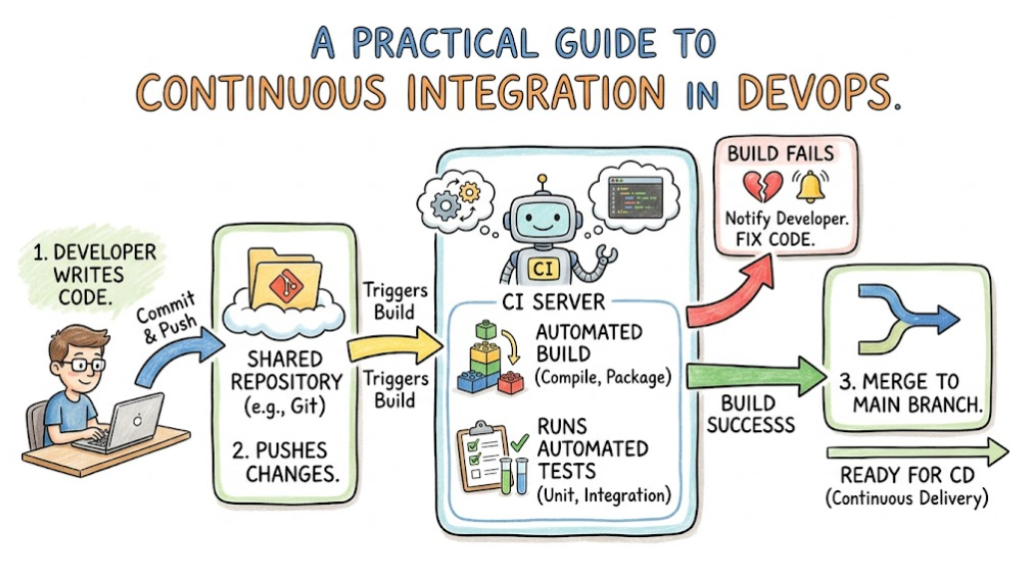
- Developer Writes Code: The developer creates a new feature or fixes a bug in their local environment.
- Code Is Committed to Version Control: The developer pushes their changes to a shared repository (like GitHub, GitLab, or Bitbucket).
- CI Server Detects Code Changes: The CI tool (like Jenkins or GitHub Actions) is “triggered” by the push.
- Automated Build Starts: The server pulls the latest code and compiles it. It resolves dependencies and prepares the application for testing.
- Automated Testing Runs: This is the most critical stage. The server runs unit tests, integration tests, and linting tools to check for syntax and logic errors.
- Feedback Is Generated: If the tests pass, the build is marked as successful. If they fail, the developer receives an immediate notification.
- Build Is Approved or Rejected: A successful build produces an artifact (like a Docker image or a JAR file) that is ready to be moved to the next stage of the delivery pipeline.
Continuous Integration Workflow Diagram
Visualizing the workflow helps understand the data flow:
Developer (Code Push)
|
v
Version Control System (Git)
|
v
CI Tool (Trigger)
|
v
Build Stage (Compile & Package)
|
v
Testing Stage (Unit & Integration Tests)
|
v
Result (Feedback to Developer / Artifact Creation)
Key Components of a Continuous Integration Pipeline
To set up a robust CI pipeline, you need specific components working in harmony.
| Component | Purpose | Example |
| Source Code Repository | Where developers store and version control code. | Git (GitHub, GitLab, Bitbucket) |
| Build Automation | Compiles code and manages dependencies. | Maven, Gradle, npm, Docker |
| Automated Testing | Verifies logic, performance, and security. | JUnit, PyTest, Selenium |
| CI Server | The orchestration engine that runs the pipeline. | Jenkins, GitHub Actions, CircleCI |
| Notifications | Alerts the team on build status. | Slack, Email, Microsoft Teams |
| Artifact Management | Stores the finalized, deployable build. | JFrog Artifactory, Docker Hub |
Benefits of Continuous Integration
When I talk to engineering managers, I focus on the ROI of CI. It is not just about “better code”; it is about business agility.
- Faster Bug Detection: Bugs are discovered within minutes, not weeks.
- Reduced Manual Work: Your QA and DevOps engineers stop doing repetitive tasks and focus on complex improvements.
- Higher Deployment Confidence: If the CI pipeline passes, the team knows the code is deployable. This takes the fear out of releases.
- Shared Ownership: It breaks down silos. Everyone on the team is responsible for keeping the build “green.”
Continuous Integration vs Continuous Delivery vs Continuous Deployment
Beginners often confuse these terms. It is important to distinguish the scope of each.
| Feature | CI | CD (Delivery) | CD (Deployment) |
| Purpose | Validate code changes. | Ensure code is release-ready. | Automate release to production. |
| Automation Level | High (Build & Test). | High (Package & Staging). | Full (Production release). |
| Human Approval | No. | Usually Required. | None (Fully automated). |
| Goal | Catch bugs early. | Prepare for release. | Ship to customers. |
- Continuous Integration is about the developer’s workflow.
- Continuous Delivery is about the release process (getting the artifact to a deployable state).
- Continuous Deployment is the automation of pushing that artifact to production users.
Common Continuous Integration Tools
There is no “perfect” tool. The best tool is the one that fits your team’s size, budget, and infrastructure.
Jenkins
The industry standard. It is open-source, highly extensible with thousands of plugins, but it requires significant maintenance. It is excellent for complex, legacy, or highly customized environments.
GitHub Actions
Deeply integrated into GitHub. It is “configuration as code” (YAML), making it very easy for developers to set up without leaving their repo. Best for teams already using GitHub.
GitLab CI/CD
A complete, all-in-one DevOps platform. It includes the repository, the CI/CD pipeline, and registry all in one place. It is highly efficient for teams that want a single-pane-of-glass experience.
CircleCI
Known for speed and ease of use. It handles complex parallel testing very well and is often favored by startups that need to get up and running quickly.
Comparison Table
| Tool | Best For | Complexity | Enterprise Use |
| Jenkins | Custom/Legacy Apps | High | High |
| GitHub Actions | GitHub Users | Low/Medium | High |
| GitLab CI/CD | Unified Platforms | Medium | High |
| CircleCI | Speed/Performance | Low | Medium/High |
Role of Automated Testing in Continuous Integration
A CI pipeline without testing is just a compilation script. Testing is the heart of CI.
- Unit Testing: Tests individual functions or methods. These must be fast. If your unit tests take 30 minutes, your CI process is broken.
- Integration Testing: Tests how different modules work together. This is where you catch API and database communication issues.
- Security Testing (SAST): Scans your code for known vulnerabilities (like hardcoded passwords or insecure dependencies) during the build.
- Regression Testing: Ensures that new code changes did not break existing features.
Real-World Example of a CI Pipeline
Let’s look at how a standard web application pipeline behaves.
- Commit: A developer pushes a change to the
mainbranch. - Trigger: The CI server detects the commit.
- Build: The CI server pulls the code, installs dependencies (e.g.,
npm install), and compiles the assets. - Lint: The code is checked for style and syntax errors.
- Test: Unit tests are executed. If any test fails, the build stops, and the developer gets an alert in Slack.
- Security Scan: A tool scans the Dockerfile for vulnerabilities.
- Packaging: A Docker image is built and pushed to a private container registry.
- Result: The “Build Success” badge is updated, and the artifact is ready for deployment.
CI Pipeline Example for a Web Application
In a practical sense, your CI configuration file (like a Jenkinsfile or .github/workflows/main.yml) will look like this conceptual breakdown:
- Stage 1: Checkout – Retrieve code from the repository.
- Stage 2: Install – Download libraries (React, Node, etc.).
- Stage 3: Lint/Format – Ensure code meets company standards.
- Stage 4: Test – Execute the test suite.
- Stage 5: Security – Scan for secrets.
- Stage 6: Build – Generate the production build.
- Stage 7: Push – Upload image to the registry.
Continuous Integration in DevOps Culture
CI is a cultural shift as much as a technical one. In traditional environments, developers and testers are separate. In a DevOps culture, the wall between these roles is removed.
- Faster Feedback Loops: Developers know immediately if their code is good.
- Shared Ownership: When a build fails, it is not “the QA team’s problem.” It is the developer’s problem, and the team helps fix it.
- Agile Delivery: CI enables the core tenet of Agile: delivering small, incremental improvements frequently.
CI for Cloud-Native Applications
When working with containers and Kubernetes, CI changes slightly. We aren’t just building code; we are building images.
- Containers: The CI pipeline must handle Docker builds.
- Infrastructure as Code (IaC): The CI pipeline should also test your Terraform or Kubernetes manifests to ensure they are valid before deployment.
- Microservices: Each microservice should have its own independent CI pipeline. This allows you to update one service without needing to redeploy the entire application.
Common Challenges in Continuous Integration
Even with the best tools, you will hit roadblocks.
- Slow Builds: This happens when you try to run too many tests at once or have unoptimized build scripts. Solution: Parallelize your tests.
- Flaky Tests: Tests that pass sometimes and fail other times are a nightmare. They kill trust in the pipeline. Solution: Delete or rewrite flaky tests immediately.
- Poor Test Coverage: If you don’t test enough, you have a false sense of security. Solution: Enforce coverage metrics in your pipeline.
- Team Resistance: Some developers feel CI slows them down. Solution: Demonstrate the time saved by not doing manual testing.
Common Beginner Mistakes
Avoid these pitfalls when you are starting your CI journey:
- Ignoring Failures: If the build turns red, stop and fix it. Do not ignore it or “just run it again” hoping it passes.
- Large Commits: Pushing a month’s worth of code at once makes CI useless. Commit small, logical chunks.
- Complex Pipelines: Keep your pipeline simple. If you cannot explain the workflow to a new teammate in 5 minutes, it is too complex.
- Hardcoding Secrets: Never put API keys or passwords in your build scripts. Use environment variables or secret managers.
Best Practices for Successful Continuous Integration
To get the most out of your CI efforts, follow these principles:
- Commit Often: Push at least once a day to the main branch.
- Fast Builds: A build should ideally complete in under 10 minutes.
- Automated Testing: If it can be tested, it should be tested.
- Pipeline Monitoring: Treat your pipeline code like your application code—version it, review it, and maintain it.
- Fix the Build First: If the build breaks, stop all other development until it is fixed. This is the “Golden Rule” of CI.
Role of DevOpsSchool in Learning CI/CD
Learning CI/CD is best done through hands-on practice. Theoretical knowledge is important, but nothing replaces the experience of configuring a pipeline and seeing it fail and succeed. DevOpsSchool provides a structured environment where you can learn:
- How to configure Jenkins, GitLab CI, and GitHub Actions from scratch.
- How to integrate security scanning into the CI process.
- How to manage artifacts in a professional registry.
- Real-world debugging techniques for broken pipelines.
Engaging with hands-on labs and mentor-led training allows you to bridge the gap between “understanding the concept” and “implementing it in a production environment.”
Industries Benefiting from Continuous Integration
While CI is universal, some industries rely on it more heavily for regulatory and safety reasons:
- Banking & Finance: Automated compliance checks are built into the CI pipeline to ensure financial regulations are met.
- Healthcare: Rigorous automated testing ensures patient data security and application reliability.
- E-Commerce: CI allows for A/B testing and rapid feature rollouts to match market trends.
- SaaS Platforms: The ability to push updates daily keeps the platform competitive and secure.
- Telecom: Managing massive infrastructure requires CI/CD to handle updates across distributed networks.
Career Opportunities Related to CI/CD
The job market for CI/CD skills is robust. Companies are constantly seeking professionals who can automate their delivery processes.
- DevOps Engineer: Focuses on the entire CI/CD lifecycle and infrastructure.
- CI/CD Engineer: A specialized role focused entirely on maintaining and optimizing pipeline efficiency.
- Cloud Engineer: Focuses on cloud-native CI/CD using services like AWS CodePipeline or Azure DevOps.
- Automation Engineer: Specializes in test automation frameworks that integrate with CI.
These roles are high-demand because they directly impact the velocity and stability of the entire engineering organization.
Certifications & Learning Paths
To advance your career, you need to prove your skills.
| Certification | Best For | Skill Level | Focus Area |
| Jenkins Certification | Jenkins Experts | Intermediate | Pipeline Automation |
| CKAD | Kubernetes Devs | Intermediate/Advanced | Cloud-Native App Deployment |
| AWS DevOps Pro | Cloud Architects | Advanced | Cloud CI/CD |
| GitHub Actions Cert | Developer Workflow | Beginner/Intermediate | CI/CD Integration |
Start with foundational knowledge of version control (Git) and then progress to pipeline orchestration tools. Hands-on projects are the best way to earn these certifications.
Future of Continuous Integration
The future of CI is shifting toward “intelligence.”
- AI-Assisted Testing: AI will help identify which tests to run based on the code changes, saving time.
- GitOps Workflows: CI will be more deeply integrated with GitOps, where the state of the infrastructure is defined in Git and automatically reconciled in the cloud.
- Security Automation (DevSecOps): Security scans will no longer be an afterthought but a mandatory “gate” in every pipeline.
- Platform Engineering: Instead of every team building their own CI, Platform Engineers will build “Golden Paths”—standardized CI templates that developers can use instantly.
FAQs
- What is the core purpose of Continuous Integration?The core purpose is to catch bugs early by frequently merging and testing code.
- Is CI only for large teams?No, even a solo developer benefits from CI because it forces good habits and automates repetitive testing.
- Can I practice CI/CD if I don’t have a server?Yes, you can use cloud-based CI tools like GitHub Actions or GitLab, which offer free tiers.
- What is the “Golden Rule” of CI?Never leave the build in a broken state. Fix the breakage before continuing.
- Why do my builds fail randomly?This is usually caused by “flaky tests” (tests that rely on external timing or network) or inconsistent environments.
- Do I need to be a developer to learn CI/CD?It helps, but it is not strictly required. Many DevOps engineers have backgrounds in QA or System Administration.
- What is the difference between CI and Continuous Deployment?CI is about testing; Continuous Deployment is about automating the release to production.
- Is Jenkins dead?No. While modern cloud-native tools are popular, Jenkins is still used in many enterprise environments due to its vast plugin ecosystem.
- Should I use multiple CI tools?Generally, no. Stick to one standardized tool per organization to reduce complexity and maintenance.
- What is an artifact in CI?An artifact is the output of your build process (e.g., a compiled JAR file or a Docker image).
- How long should a CI build take?Ideally, under 10 minutes. If it is longer, developers will lose focus and switch tasks.
- Can CI prevent all bugs?No. CI catches integration bugs and logical errors, but it does not catch design flaws or bad requirements.
- Is CI/CD the same as Agile?They are related. Agile is the methodology; CI/CD is the technical practice that enables Agile to work.
- How do I start learning CI/CD?Pick a small application, set up a GitHub repository, and try to build a basic workflow using GitHub Actions.
- Is CI a good career path?Yes, it is essential for modern software delivery and is a high-growth area in IT.
Final Thoughts
Continuous Integration is not just a trend; it is a fundamental shift in how we approach software development. By moving from manual, sporadic integration to a culture of constant, automated verification, we empower developers to be faster, more confident, and less prone to errors.
The transition to a CI-driven workflow requires effort and a willingness to automate the tasks that we previously performed manually. It requires the discipline to maintain the build health and the curiosity to explore new tools and techniques.
If you are just starting, do not be intimidated by the tools or the terminology. Start simple. Automate your testing, automate your build, and always prioritize the feedback loop. The path to becoming an expert in this field is paved with small, consistent practice. Keep building, keep testing, and keep improving your pipelines.
