Introduction
Modern software development demands unprecedented speed, but agility without stability leads directly to costly production failures, missed deadlines, and damaged customer trust. Traditional quality assurance acts as a bottleneck because late-stage testing isolates feedback loops, forcing teams to perform expensive, stressful hotfixes right before a release. Continuous testing addresses these challenges by transforming quality verification from a final gate into an active, automated component woven deeply into every phase of the CI/CD pipeline. By exposing defects immediately after code commits, this approach reduces release risk, maintains code health, and allows engineering teams to deploy safe, reliable software at high velocity. Achieving this level of delivery excellence requires structured training and expert architectural guidance, which is why leading platforms like DevOpsSchool provide comprehensive educational ecosystems to help organizations master robust automated validation strategies from source control straight through to production.
What Is Continuous Testing?
Continuous testing is the practice of executing automated tests as part of the software delivery pipeline to obtain immediate feedback on the business risks associated with a software release candidate. It is not merely running automated scripts on a schedule; rather, it represents an unbroken process of quality validation woven deeply into every stage of development, build, deployment, and operations.
Automated Validation
At its core, continuous testing relies on an automated test suite that executes without human intervention. Whenever a developer introduces a change, the system runs specific validations—ranging from simple unit checks to complex end-to-end user journeys—to confirm that the modification operates correctly and has not introduced regressions into existing features.
Continuous Feedback
Traditional testing methodologies isolate feedback to specific checkpoints. Continuous testing, by contrast, establishes an immediate feedback loop. By verifying code modifications the moment they are committed, developers learn within minutes whether their changes have broken a feature, violated a security standard, or degraded application performance.
Quality Assurance and Risk Reduction
The ultimate objective of continuous testing is to evaluate business risk. Each test suite acts as a filter, preventing unstable or insecure artifacts from advancing through the deployment pipeline. This systematic validation mitigates the risk of downtime, data corruption, or security vulnerabilities reaching end users.
Faster Releases
When automated validations occur continuously, the delivery pipeline remains in a constant state of deployability. Teams no longer face protracted stabilization phases or manual regression testing cycles that delay deployments. This continuous readiness enables organizations to release new features to production safely and predictably.
Why Continuous Testing Matters in DevOps
Within a DevOps framework, continuous testing serves as the connective tissue between continuous integration (CI) and continuous delivery (CD). Without it, automated deployment mechanisms simply accelerate the delivery of defects to production.
Early Defect Detection
The financial and operational cost of fixing a bug increases exponentially as it moves closer to production. A defect caught during unit testing requires minimal effort to resolve, whereas the same bug discovered in production requires troubleshooting, hotfixes, patch deployments, and root-cause analysis. Continuous testing exposes errors immediately after they are introduced.
Improved Software Quality
Integrating validation into daily routines ensures that the overall codebase maintains a high standard of health. Code debt is managed incrementally, structural flaws are addressed before they become foundational, and regression suites protect established functionality from deteriorating as new features are added.
Faster Feedback Loops
High-performing engineering teams rely on rapid iteration. When a code commit triggers an automated suite that provides feedback within minutes, developers maintain their cognitive context. They can resolve issues immediately, avoiding the disruptions caused by context-switching to address defects discovered days after the original work was completed.
Reduced Release Risk
Deploying software changes always introduces operational risk. Continuous testing mitigates this by subjecting every artifact to rigorous, multi-layered automated checks across simulated staging environments. By the time a build reaches production, it has proven its stability, compliance, and performance characteristics against a battery of automated gates.
Better Customer Experience
Software stability directly impacts user retention and brand reputation. By preventing regressions, functional errors, and performance slowdowns from reaching production, continuous testing ensures that end users enjoy a consistent, reliable digital experience.
How Continuous Testing Works
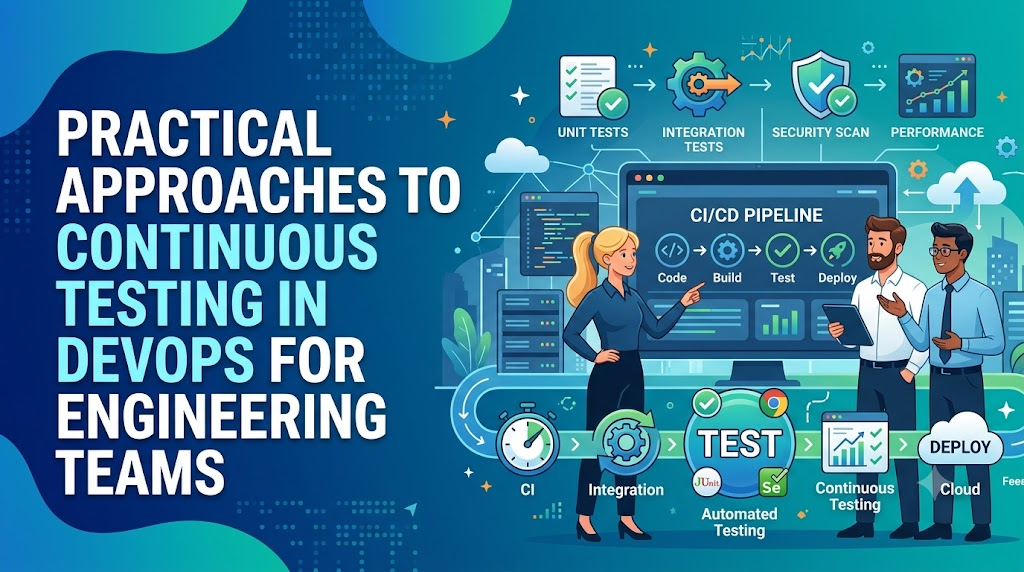
Continuous testing functions as an integrated, multi-stage pipeline where each phase validates specific characteristics of the application before permitting the build to advance.
Code Commit
    ↓
Build Process
    ↓
Unit Testing
    ↓
Integration Testing
    ↓
Security Testing
    ↓
Performance Testing
    ↓
Deployment Validation
    ↓
Monitoring Feedback
Code Commit
The workflow begins when an engineer pushes code to a central version control repository. This action automatically triggers the continuous integration pipeline, initiating the validation sequence.
Build Process
The CI server compiles the source code, resolves dependencies, and creates a deployable artifact (such as a container image or binaries). If compiling fails due to syntax errors or dependency conflicts, the pipeline halts immediately, alerting the developer.
Unit Testing
Once the artifact compiles successfully, the pipeline executes the unit test suite. These tests isolate individual code blocks, methods, and functions to verify their logical correctness. Because unit tests do not rely on external databases or network services, they run within seconds, serving as the first rapid quality gate.
Integration Testing
After verifying individual units, the pipeline evaluates how components interact. Integration testing validates connections between modules, external APIs, database schemas, and messaging queues, catching interface mismatches and communication faults early.
Security Testing
The pipeline next passes the artifact through automated security gates. Static Application Security Testing (SAST) checks source code for vulnerabilities, while Software Composition Analysis (SCA) scans third-party open-source components for known exploits and licensing conflicts.
Performance Testing
To prevent resource degradation, automated performance validation evaluates build behavior under load. These tests measure API response latencies, memory utilization, and throughput thresholds against established baselines, flagging performance regressions before deployment.
Deployment Validation
The validated artifact is automatically deployed to a staging or testing environment. Here, automated functional and end-to-end smoke tests run against the live application instance, ensuring the environment configuration, database migrations, and UI flows operate correctly.
Monitoring Feedback
Once the application passes all testing stages and is promoted to production, continuous testing transitions into continuous monitoring. Synthetic transactions and telemetry systems track real-time behavior, providing operational feedback that informs future development cycles.
Continuous Testing vs Traditional Testing
Understanding the transition to modern quality engineering requires comparing continuous validation with legacy QA approaches across core operational dimensions.
| Area | Traditional Testing | Continuous Testing |
| Timing | Executed as a distinct phase at the end of the development lifecycle. | Integrated continuously throughout every phase of the CI/CD pipeline. |
| Automation | Highly manual, relying heavily on human execution and ad-hoc scripts. | Predominantly automated, triggered by version control actions and pipeline stages. |
| Feedback Speed | Weeks or days, causing delayed defect resolution and context switching. | Minutes, allowing developers to remediate code issues immediately. |
| Defect Detection | Discovered late in the lifecycle, raising remediation costs and delaying releases. | Identified immediately after code commits, minimizing cost and code debt. |
| Release Readiness | Determined by periodic, manual QA sign-offs and lengthy review meetings. | Derived from objective, real-time quality gates embedded within the pipeline. |
Traditional testing relies on manual gates that slow down deployment pipelines. In contrast, continuous testing replaces these gates with automated checks that provide immediate visibility into code quality, enabling faster, low-risk releases.
Types of Testing in Continuous Testing
A resilient continuous testing framework incorporates diverse testing methodologies, each targeted at a specific layer of the application architecture.
| Testing Type | Purpose | Business Benefit |
| Unit Testing | Validates the logic of isolated functions, classes, and components. | Fast execution; fixes issues at the lowest possible cost before they propagate. |
| Integration Testing | Evaluates communication between internal components, databases, and APIs. | Eliminates interface mismatches and integration failures across services. |
| Functional Testing | Verifies application behavior against explicit business requirements and workflows. | Guarantees features behave as expected from an end-user perspective. |
| Security Testing | Scans code and dependencies for vulnerabilities and compliance infractions. | Minimizes structural risks, data breaches, and regulatory compliance issues. |
| Performance Testing | Evaluates responsiveness, load capacity, and resource usage under stress. | Prevents production downtime, resource exhaustion, and application latency. |
| Regression Testing | Validates that recent modifications have not degraded existing functional areas. | Secures platform stability across frequent updates and feature expansions. |
Shift-Left Testing and Continuous Quality
Shift-left testing is the practice of moving quality assurance activities to the earliest possible stages of the software development lifecycle. Instead of waiting for a complete build to evaluate stability, teams introduce testing protocols from the initial design and coding phases.
[Design & Requirements] -> [Local Code/Linting] -> [Pull Request Validation] -> [CI/CD Pipeline]
Early Validation
Shifting left means validating requirements, architectural patterns, and code structure before binaries are compiled. Developers run linters, static analyzers, and unit tests locally within their integrated development environments (IDEs) before committing changes to shared branches.
Developer Responsibility
In a shift-left model, quality becomes a collective engineering responsibility rather than a task delegated solely to a QA team. Developers author unit and functional tests alongside production code, ensuring that new features are inherently verifiable from inception.
Faster Issue Resolution
When validation occurs at the desktop or branch level, defects are remediated before they impact the wider engineering team. Code reviews become cleaner, pull request approvals accelerate, and build failures on trunk branches decrease significantly.
Reduced Technical Debt
Addressing structural anomalies, edge cases, and architectural flaws early prevents the accumulation of technical debt. This proactive approach avoids complex, late-stage refactoring efforts that can destabilize delivery schedules and undermine application health.
Continuous Testing in CI/CD Pipelines
Integrating continuous testing into CI/CD pipelines requires defining automated quality gates that control how code progresses toward production.
[Developer Branch] -> (Pull Request Check) -> [Trunk Build] -> (Quality Gate 1: Unit/SAST) -> [Staging Deploy] -> (Quality Gate 2: Integration/Perf) -> [Production]
Automated Testing Stages
As code moves through a pipeline, the testing stages expand in scope. The pipeline initially runs fast, lightweight unit tests. Once these pass, it executes heavier integration frameworks, UI automation, and vulnerability scanners against deployed environments.
Quality Gates
Quality gates are automated criteria that a build must satisfy to proceed. For example, a pipeline configuration might dictate that a build will fail if code coverage drops below 80%, if a single critical vulnerability is detected, or if integration test success falls below 100%.
Build Validation
Automated build validation ensures that any commit disrupting core functionality is blocked immediately. The pipeline isolates the broken commit, alerts the responsible engineer, and preserves the integrity of the main branch.
Deployment Readiness
By orchestrating comprehensive automated tests across identical environments, the pipeline continuously validates deployment scripts, infrastructure-as-code definitions, and configuration settings. This systematic verification ensures the entire package is ready for production.
Continuous Testing and DevSecOps
DevSecOps embeds security directly into the continuous delivery workflow, ensuring that security validation matches the velocity of automated testing.
Security Automation
Relying on manual security reviews at the end of a project creates severe delivery drag. DevSecOps automates security analysis within the testing pipeline, checking code, containers, and deployment configurations on every build execution.
Vulnerability Scanning
Automated pipelines incorporate Static Application Security Testing (SAST) to discover vulnerabilities in custom code, alongside Software Composition Analysis (SCA) to check open-source dependencies for public CVEs (Common Vulnerabilities and Exposures).
Compliance Validation
Infrastructure-as-Code (IaC) templates, such as Terraform or Ansible scripts, are automatically analyzed against compliance frameworks (such as CIS Benchmarks, SOC2, or PCI-DSS). Any configuration that exposes ports or misconfigures encryption triggers an automatic pipeline rejection.
Secure Software Delivery
Integrating automated security validations directly into the testing pipeline allows organizations to build verifiable security compliance into every release artifact without extending delivery cycles.
Core Tools Supporting Continuous Testing
Building a scalable continuous testing pipeline requires integrating specialized tools across multiple operational categories.
| Tool Category | Purpose | Example Usage |
| Source Control | Manages code variants, branches, and triggers for automation pipelines. | Git, GitHub, GitLab, Bitbucket |
| CI/CD Tools | Orchestrates pipeline workflows, testing phases, and environment deployments. | Jenkins, GitLab CI, GitHub Actions, Tekton |
| Test Automation | Executes functional, unit, and end-to-end user validations. | JUnit, Selenium, Playwright, Cypress |
| Security Tools | Scans codebases, application binaries, and libraries for security flaws. | SonarQube, Snyk, Aqua Security, OWASP ZAP |
| Monitoring Platforms | Tracks post-deployment behavior, resource metrics, and real-time logs. | Prometheus, Grafana, Datadog, New Relic |
| Reporting Tools | Aggregates test telemetry, failure analytics, and coverage trends. | Allure Report, ReportPortal, JUnit Reports |
Measuring Continuous Testing Success
To optimize testing pipelines, organizations must track specific, objective key performance indicators (KPIs) that connect automation metrics with business value.
| Metric | Why It Matters | Business Value |
| Test Automation Coverage | Measures the percentage of business use cases validated via automated suites. | Identifies blind spots, reducing manual QA reliance and regression risks. |
| Defect Detection Rate | Calculates the percentage of defects caught within the pipeline vs production. | Validates the accuracy of the automated test suite in trapping errors early. |
| Test Execution Time | Tracks the time required to run automated validation suites completely. | Shorter execution times maintain fast delivery velocity and preserve developer focus. |
| Deployment Frequency | Measures how often code is successfully promoted to production environments. | High frequency demonstrates solid release stability and consistent execution. |
| Change Failure Rate | Evaluates the percentage of production deployments resulting in service degradation. | Directly measures how effectively testing gates screen out broken artifacts. |
| Mean Time to Recovery (MTTR) | Measures the average time required to restore service during a production outage. | Fast automated testing speeds up validation and deployment of hotfixes. |
Common Continuous Testing Challenges
Shifting to an automated quality model presents several operational and technical challenges that require deliberate remediation strategies.
| Challenge | Impact | Recommended Solution |
| Test Maintenance | Fragile test suites generate false positives, draining engineering time. | Build modular test architectures, apply page-object models, and prune flaky tests. |
| Slow Execution Times | Prolonged test execution stalls pipelines and delays essential feedback. | Parallelize test execution, implement test impact analysis, and optimize unit focus. |
| Environment Inconsistency | Discrepancies between staging and production cause erratic test failures. | Define infrastructure via IaC templates and leverage containerization for environments. |
| Skills Shortages | Manual QA staff may lack the programming experience needed for test automation. | Provide structured training through programs like DevOpsSchool to build automation skills. |
| Tool Integration Complexity | Disjointed tools create siloed data and fragmented pipeline feedback. | Use standardized open APIs, unified dashboards, and native CI/CD integrations. |
| Security Testing Delays | Legacy security tools can stall automated execution paths. | Implement asynchronous security scans and introduce lightweight linting rules early. |
Best Practices for Implementing Continuous Testing
- Automate Early and Strategically: Prioritize the automation of high-risk, repeatable tests. Do not attempt to automate every edge case immediately; start with robust unit test coverage and core business smoke tests.
- Prioritize Critical Test Vectors: Organize test runners into distinct tiers. Fast unit tests must execute on every commit, while long-running end-to-end integration and performance suites can be scheduled for nightly runs or specific release branches.
- Integrate Security from the Start: Embed automated vulnerability analysis tools directly into code validation steps, allowing developers to remediate dependency and code security problems before merging code.
- Maintain Test Code Quality: Treat automated test code with the same rigor as production code. Conduct code reviews for test scripts, enforce clean architecture principles, and actively refactor tests to eliminate flakiness.
- Monitor Post-Deployment Outcomes: Connect testing definitions with live production monitoring telemetry. Use synthetic testing in production to catch infrastructure regressions that staging environments fail to expose.
- Commit to Continuous Optimization: Analyze pipeline telemetry regularly. Remove outdated tests, optimize database seed operations, and fine-tune parallelization strategies to keep test executions fast and reliable.
Real-World Example: Financial Services Modernization
Initial Testing Challenges
A retail banking firm struggled with an engineering delivery cycle that required four weeks of manual regression testing for every minor production update. Environment configurations differed significantly between development systems and staging environments, resulting in frequent production failures. Critical security vulnerabilities were often caught just days before scheduled deployments, forcing stressful rollbacks and delaying value delivery.
Continuous Testing Implementation Roadmap
The firm initiated a structured, 12-month quality modernization initiative:
- Quarter 1: Containerized the application stack using Docker and established version-controlled infrastructure definitions using Terraform.
- Quarter 2: Integrated Jenkins pipelines to trigger comprehensive unit tests and SonarQube code scans on every pull request.
- Quarter 3: Authored modular integration and API tests using Playwright, executing them in parallel against ephemeral test environments.
- Quarter 4: Integrated automated security scanning (Snyk) and lightweight performance validation gates directly into the main deployment pipeline.
Quality and KPI Improvements
Transitioning to automated quality verification delivered clear operational gains across the engineering organization:
- Release Cycle Time: Reduced from 4 weeks of manual validation to an automated, 15-minute pipeline execution window.
- Change Failure Rate: Dropped from 28% down to less than 2% within nine months.
- Defect Detection: 91% of critical software defects were trapped during unit and integration pipeline stages before entering staging environments.
- Mean Time to Recovery (MTTR): Improved from 6 hours down to 18 minutes by utilizing automated canary validation steps.
Lessons Learned
The engineering leadership realized that tool acquisition alone does not change outcomes. The primary driver of success was upskilling traditional manual QA engineers into highly capable test automation professionals, combined with treating automated test code with the same structural discipline as core banking software.
Common Misconceptions
Automation Replaces Manual Testing
Automated validation excels at catching regressions and checking predictable logical paths, but it does not eliminate the need for human insight. Exploratory testing, usability analysis, and UX evaluations require human intuition to assess design quality and complex edge cases.
More Tests Always Improve Quality
A massive test suite filled with redundant, poorly designed, or flaky validations does not improve software health. It simply slows down development velocity and creates maintenance headaches. High quality stems from targeted, reliable, well-maintained tests, not sheer volume.
Continuous Testing Slows Delivery
While building out an automated pipeline requires an initial time investment, it accelerates delivery over the long run. By eliminating lengthy manual regression phases and preventing production defects, continuous testing provides the safety net required for rapid deployments.
Testing Is Only QA’s Responsibility
Quality cannot be inspected into a product after it is built. In a DevOps model, quality is a shared responsibility across the entire team. Developers own code health and unit validation, security specialists own automated policy definitions, and QA engineers design overall automation strategies.
Continuous Testing Is Only for Large Organizations
Small teams benefit just as much from automated quality validation. Startups and lean engineering units cannot afford the operational overhead of manual regression testing or the reputational damage of critical production bugs. Automated testing allows small teams to deliver software at enterprise scale.
Continuous Testing Maturity Model
Organizations progress through distinct structural phases as they evolve toward modern quality engineering practices.
[Level 1: Manual] -> [Level 2: Basic] -> [Level 3: Integrated] -> [Level 4: Continuous] -> [Level 5: Intelligent]
Level 1 – Manual Testing
Testing is treated as a separate phase at the end of the development cycle. Validations are executed manually from written spreadsheets, feedback loops take weeks, and code releases are high-risk events.
Level 2 – Basic Test Automation
Teams begin scripting repetitive functional tests using tools like Selenium. However, these tests are executed manually on local workstations by specialized QA members, and results remain siloed from the main development branch.
Level 3 – CI/CD Testing Integration
Automated unit and basic functional tests are wired into the central CI/CD toolchain. Pushing code triggers automated checks, and builds are blocked if core tests fail. However, environments are still managed manually, and performance and security validation remain separate tasks.
Level 4 – Continuous Testing
Testing occurs automatically across all delivery phases. Environments are provisioned dynamically using Infrastructure as Code, security scanning is fully integrated, and the test suite provides comprehensive visibility into release risk before production deployment.
Level 5 – Intelligent Quality Engineering
The organization optimizes its delivery pipelines using advanced automation. Test execution environments self-heal, test impact analytics automatically run only the scripts affected by a specific code change, and production telemetry feeds directly back into automated test designs.
Future of Continuous Testing
The continuous testing landscape continues to evolve as new technologies shift how engineering teams validate software stability.
AI-Assisted Testing
Artificial intelligence and machine learning are transforming test maintenance. Modern frameworks use self-healing mechanisms to automatically update element locators when front-end UIs change, significantly reducing test maintenance overhead.
Predictive Quality Analytics
Future pipeline tools will analyze historical commit data, code churn, and past production incidents to predict which areas of a codebase are most likely to contain defects. This insight allows pipelines to dynamically run specific test vectors, optimizing execution time.
Platform Engineering Integration
As organizations adopt internal developer platforms (IDPs), continuous testing templates are becoming standardized internal products. Developers can spin up pre-configured, secure, and compliant testing pipelines instantly, ensuring consistent quality standards across all microservices.
DevSecOps Evolution
Security automation will continue to shift further left. Advanced threat modeling, automated identity compliance checking, and live container runtime security validation are becoming standard, built-in capabilities of modern testing frameworks rather than isolated security audits.
Certifications & Learning Paths
Establishing a resilient continuous testing architecture requires upskilling teams across cloud, automation, security, and continuous delivery domains.
| Certification Area | Best For | Skill Level | Testing Relevance |
| DevOps | System Architects, Release Engineers, QA Leaders | Intermediate to Advanced | Establishes the core pipeline frameworks that anchor automated quality gates. |
| Testing Automation | QA Engineers, SDETs, Developers | Beginner to Advanced | Delivers foundational skills in authoring stable, maintainable automated test code. |
| DevSecOps | Security Engineers, Systems Administrators | Intermediate | Teaches teams how to embed automated compliance and vulnerability scans into CI/CD. |
| Cloud (AWS/Azure/GCP) | Cloud Engineers, Infrastructure Teams | Intermediate | Provides the skills needed to manage the dynamic environments used for automated tests. |
| Kubernetes | Platform Engineers, Site Reliability Engineers | Advanced | Enables scalable, parallelized test execution inside microservice environments. |
To help teams master these disciplines, the DevOpsSchool learning ecosystem provides structured, hands-on, enterprise-grade training programs designed to transition professionals from legacy QA methods to modern quality engineering roles.
Continuous Testing Readiness Checklist
- Review Current Testing Processes: Document all manual testing activities, calculate current test execution times, and identify the specific bottlenecks slowing down your release cadence.
- Automate Repetitive Tests: Focus first on high-value, repeatable validations. Convert manual regression scripts into automated unit and API smoke tests that can run reliably without human intervention.
- Integrate CI/CD Tooling: Connect your automated test scripts directly to your source code repository, ensuring that every code commit or pull request automatically triggers your foundational test runner.
- Implement Security Testing Gates: Add lightweight static application security testing (SAST) and open-source software composition analysis (SCA) tools directly into your early pipeline stages.
- Monitor Core Quality KPIs: Establish automated dashboards to track key engineering metrics such as code coverage trends, pipeline build failure rates, test execution times, and production escape defects.
- Continuously Optimize Test Suites: Review test suite performance regularly. Refactor flaky test blocks, remove redundant validations, and leverage parallel execution models to keep your feedback loops fast and reliable.
FAQs (15 Questions)
1. What is Continuous Testing?
Continuous testing is the process of executing automated validations as part of the software delivery pipeline. It provides immediate feedback on the business risks of a build candidate, ensuring quality is verified at every step of development.
2. Why is it important in DevOps?
Without continuous testing, automated CI/CD pipelines simply accelerate the deployment of bugs to production. It balances development speed with operational stability, replacing manual review gates with fast, automated feedback.
3. How does it improve software quality?
It ensures that code modifications are analyzed immediately after they are written. This frequent checking prevents the accumulation of technical debt, surfaces regressions early, and keeps the codebase in a deployable state.
4. What types of tests should be automated first?
Organizations should prioritize high-value, highly repeatable tests. Start with fast unit tests, move to core API integration tests, and then automate critical end-to-end user regression journeys.
5. How does Continuous Testing support CI/CD?
It serves as the automated quality gate within the deployment workflow. It ensures that whenever a build moves through the pipeline, it must pass predefined validation thresholds before progressing to production.
6. What metrics should engineering teams track?
Teams should monitor test automation coverage, defect detection rates, test execution duration, change failure rates, and deployment frequencies to evaluate the health of their testing pipeline.
7. Can small teams implement Continuous Testing?
Yes. Lean engineering teams benefit significantly from automation because it eliminates the overhead of manual regression testing, allowing them to release features safely without scaling head count.
8. How should organizations get started?
Start by shifting testing left. Ensure developers write unit tests for new code, integrate those tests into your source control pull requests, and gradually automate your manual regression test steps over time.
9. Does Continuous Testing completely eliminate manual QA?
No. It automates repetitive and predictable validation tasks, freeing up QA specialists to focus on high-value testing efforts like exploratory testing, user experience evaluation, and advanced architecture analysis.
10. What is Shift-Left testing?
Shift-left testing means moving quality validation activities to the earliest possible stages of the software development lifecycle, catching design and logical issues during the coding phase rather than right before release.
11. How do you handle flaky automated tests?
Flaky tests must be isolated immediately. Move them out of the main blocking pipeline, debug their root causes (such as dynamic timing issues or uncleaned test databases), and re-integrate them only when stable.
12. What are automated quality gates?
Quality gates are automated criteria within a CI/CD pipeline that a build must meet to continue moving forward. Examples include requiring zero high-severity security vulnerabilities or a minimum code coverage percentage.
13. How does continuous testing fit into DevSecOps?
It integrates automated security scanners, container vulnerability checks, and compliance-as-code linting directly into the delivery pipeline, ensuring software is both functional and secure.
14. What is the role of test environment management?
Reliable continuous testing depends on consistent test environments. Teams use containerization and Infrastructure as Code (IaC) to automatically spin up and tear down identical environments for test runs, preventing configuration drift.
15. How do AI technologies impact continuous testing?
AI improves automation stability by enabling self-healing test scripts that automatically adjust to minor UI layout updates, reducing the time engineering teams spend maintaining tests.
Final Thoughts
Transitioning to continuous testing is an operational necessity for any organization looking to balance delivery speed with system stability. High-velocity development requires reliable, automated guardrails to ensure that fast deployments do not result in frequent production failures.
Success does not come from trying to automate every manual task overnight or buying expensive tooling frameworks. Instead, focus on building a sustainable quality engineering culture. Start by automating your core, high-risk testing workflows, embedding validation steps directly into your developer pipelines, and treating your test suites with the same architectural discipline as your core production code.
By scaling your automation practices incrementally, tracking objective KPIs, and continuously refining your testing gates, you can build a resilient, secure, and highly efficient software delivery lifecycle.
