Introduction
In today’s competitive digital landscape, the speed of software delivery has become a critical business differentiator. Organizations are under constant pressure to push features faster, ensure high availability, and maintain system security, all while minimizing operational costs. This has made the traditional, siloed approach to software development and IT operations obsolete. Modern engineering teams now rely on the DevOps lifecycle to bridge the gap between writing code and delivering value to users.
Understanding the DevOps lifecycle is essential for developers, system administrators, and cloud engineers who want to excel in modern tech environments. It is not just about using specific tools like Kubernetes or Jenkins; it is about adopting a culture of continuous improvement, automation, and shared responsibility. By integrating development and operations, teams can reduce deployment risks and respond quickly to user feedback.
For those looking to gain practical experience and master these complex workflows, resources such as DevOpsSchool offer comprehensive training programs designed to bridge the gap between theory and real-world implementation. Throughout this guide, we will break down the DevOps lifecycle, examining each stage to provide you with a clear roadmap for effective software delivery.
What Is the DevOps Lifecycle?
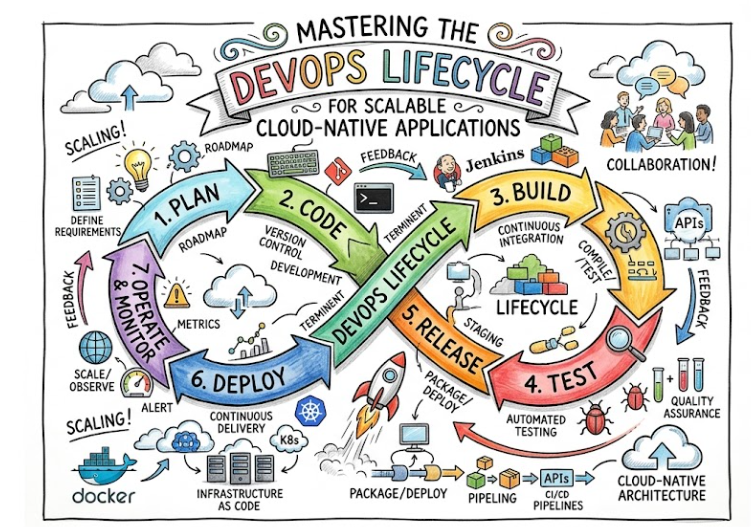
The DevOps lifecycle is a continuous, automated process that enables teams to build, test, release, and monitor software with high efficiency. It moves away from the fragmented Waterfall model, where developers would hand off code to operations teams, often resulting in conflicts and deployment failures.
Instead, the DevOps lifecycle treats software delivery as a cohesive, repetitive loop. It focuses on breaking down organizational silos and fostering collaboration. The core concept is “continuous software delivery,” where small, incremental updates are pushed to production frequently rather than infrequent, massive releases. By using automation at every step, teams ensure that the software is always in a deployable state.
Why the DevOps Lifecycle Matters
The DevOps lifecycle is not just a buzzword; it provides tangible benefits to engineering organizations:
- Faster Software Delivery: By automating the build and deployment process, teams can move from code commit to production in minutes rather than weeks.
- Reduced Deployment Risks: Continuous testing and automated validation catch bugs early, long before they reach the user.
- Better Collaboration: Development, QA, and Operations teams work on the same pipeline, creating shared goals and accountability.
- Higher Reliability: Continuous monitoring and automated recovery mechanisms (like Kubernetes self-healing) ensure that systems stay online.
- Faster Feedback Cycles: Monitoring and user feedback are fed back into the planning stage, allowing teams to pivot quickly based on real-world usage.
Evolution of the DevOps Lifecycle
To understand why DevOps is necessary, one must look at the limitations of traditional delivery models.
In the Waterfall era, development, testing, and operations were sequential stages with distinct barriers. A feature might take six months to develop, only to fail during deployment because the environment configuration differed from the developer’s laptop. Agile helped by introducing iterative development, but it often stopped at the “code is done” phase, leaving operations to deal with the deployment burden.
The DevOps lifecycle evolved to solve this by extending the Agile philosophy into the operations phase. With the rise of cloud-native architectures, microservices, and Infrastructure as Code (IaC), the deployment process became as programmable as the application code itself. This shift allowed for the CI/CD (Continuous Integration and Continuous Deployment) transformation we see today.
Overview of the DevOps Lifecycle Stages
The lifecycle is often visualized as an infinity loop, representing the continuous nature of the process.
| Stage | Purpose | Key Activities | Common Tools |
| Planning | Define requirements | Agile sprint planning, backlogs | Jira, Trello |
| Development | Write code | Coding, branching, PRs | Git, GitHub |
| Build | Package software | Compiling, dependency management | Maven, npm |
| CI | Integrate and test | Pipeline execution | Jenkins, GitLab CI |
| Testing | Validate quality | Unit, integration, security tests | Selenium, SonarQube |
| Release | Prepare for deploy | Versioning, artifact storage | Nexus, Artifactory |
| Deployment | Push to production | Deploying to servers/cloud | Kubernetes, Docker |
| Operations | Run and scale | Infrastructure management | Terraform, Ansible |
| Monitoring | Observe health | Log aggregation, metrics | Prometheus, Grafana |
| Feedback | Continuous improvement | Reviewing insights | Slack, PagerDuty |
Stage 1: Planning
Planning is where the DevOps lifecycle begins. It involves understanding business requirements and translating them into technical tasks. In a DevOps culture, this stage is dynamic.
- Requirement Gathering: Product managers and engineers define the features or fixes needed.
- Sprint Planning: Using Agile methodologies, teams break work into manageable sprints.
- Backlog Prioritization: Tasks are ranked based on business value and technical urgency.
Tools like Jira or Confluence help keep documentation and task tracking synchronized. A well-planned backlog prevents scope creep and ensures the team is focused on high-impact work.
Stage 2: Development
Once the tasks are planned, developers begin writing code. In a modern DevOps workflow, this is heavily supported by version control systems.
- Branching Strategies: Teams use strategies like Gitflow or Trunk-based development to manage features.
- Code Collaboration: Developers push changes to a central repository (e.g., GitHub or GitLab), where peers review the code via Pull Requests.
- Local Environment: Developers use Docker to ensure their local environment mirrors production.
Effective development is about modularity. Writing clean, testable code here makes the subsequent stages significantly smoother.
Stage 3: Build
The Build stage transforms source code into executable artifacts. This is where dependencies are resolved, and the application is packaged.
- Dependency Management: Tools like Maven (for Java), npm (for Node.js), or Pip (for Python) pull in necessary libraries.
- Compilation: The source code is compiled into binaries or bytecodes.
- Artifact Creation: The final output is usually a container image (e.g., a Docker image) or a JAR file, which is then versioned and stored in a repository.
Stage 4: Continuous Integration (CI)
CI is the practice of merging all developer working copies to a shared mainline several times a day.
- Automated Pipelines: Every time code is pushed, a CI server (like Jenkins or GitHub Actions) triggers a build process.
- Early Bug Detection: If the build fails or tests do not pass, the developer is notified immediately, preventing “integration hell.”
- Validation: The focus is on verifying that the new code does not break existing functionality.
Stage 5: Testing
Testing is integrated into the pipeline to ensure that the code is stable and secure before it reaches production.
- Unit Testing: Validating individual components of the code.
- Integration Testing: Ensuring different modules work together correctly.
- Security Testing: Using tools like SonarQube or Snyk to scan for vulnerabilities.
- Performance Testing: Checking how the application handles load.
Automated testing ensures that “quality” is baked into the code, not checked as an afterthought.
Stage 6: Release Management
Once the code passes all tests, it is packaged as a release candidate.
- Versioning: Using Semantic Versioning (SemVer) to track changes.
- Artifact Storage: The image is pushed to a registry (e.g., Nexus, Artifactory, or Docker Hub).
- Release Approvals: Automated gates ensure that only tested and approved code can proceed to the deployment phase.
Stage 7: Deployment
Deployment is the process of pushing the application to an environment. In modern DevOps, this is usually fully automated.
- Infrastructure as Code (IaC): Environments are provisioned using code (e.g., Terraform).
- Deployment Strategies: Teams use Blue-Green deployment (switching between two identical environments) or Canary deployment (rolling out to a small subset of users) to minimize downtime.
- Orchestration: Kubernetes handles the scheduling and running of containerized applications.
Stage 8: Operations
Operations involves managing the infrastructure and ensuring the application runs smoothly.
- Infrastructure Management: Managing servers, load balancers, and network configurations.
- Incident Response: SRE teams manage on-call rotations to handle system outages.
- Scaling: Automatically scaling resources based on traffic demands using K8s Horizontal Pod Autoscaler.
Stage 9: Monitoring and Observability
You cannot fix what you cannot measure. Monitoring provides visibility into system health.
- Metrics: Tracking CPU usage, memory, and request latency using Prometheus.
- Log Aggregation: Centralizing logs from all services using the ELK Stack.
- Distributed Tracing: Following a request across microservices to find bottlenecks.
- Visualization: Creating dashboards in Grafana to visualize data.
Stage 10: Continuous Feedback
The final stage is the loop back to the beginning. Feedback is gathered from monitoring tools, user reports, and post-incident reviews.
- Retrospectives: Teams discuss what went wrong and how to improve.
- User Feedback: Insights from how users interact with the new features inform the next sprint’s planning.
This cycle turns a one-time project into a constant evolution of the product.
CI/CD in the DevOps Lifecycle
CI/CD is the engine of the DevOps lifecycle. It is often misunderstood, so let us clarify the terms.
| Feature | Continuous Integration (CI) | Continuous Delivery | Continuous Deployment |
| Focus | Code integration & testing | Making code deployable | Automating the release to prod |
| Goal | Find bugs early | Ensure software is always ready | Instant user delivery |
| Human Input | Minimal | Manual trigger (approval) | None (fully automated) |
- CI: Automates the build and test process.
- Continuous Delivery: Automates the pipeline up to the deployment to a staging/production-ready environment. A human usually clicks “Deploy.”
- Continuous Deployment: The code goes straight to production if it passes the pipeline. This requires high confidence in your test suite.
Infrastructure as Code (IaC) in the Lifecycle
IaC is the practice of managing infrastructure (servers, networks, load balancers) using configuration files rather than manual hardware configuration.
- Reproducibility: You can recreate your entire environment by running a script.
- Version Control: Infrastructure changes are tracked in Git, just like application code.
- Tools: Terraform is the industry standard for cloud provisioning, while Ansible is excellent for configuration management.
IaC eliminates “configuration drift,” where different environments (dev, test, prod) slowly become different over time, leading to “it works on my machine” issues.
Containers and Kubernetes in the DevOps Lifecycle
Containers like Docker package code and all its dependencies into a single unit. Kubernetes (K8s) then manages the lifecycle of these containers.
- Portability: If it runs in a container on your laptop, it will run in a container in the cloud.
- Orchestration: Kubernetes handles auto-scaling, self-healing (restarting crashed containers), and rolling updates without downtime.
- Microservices: K8s allows teams to break large applications into smaller, independent services that can be updated separately.
DevSecOps and Security Integration
In traditional models, security was a final check. In DevOps, we practice “Shift Left” security.
- Security Automation: Scanners run during the Build/CI stage to check for known vulnerabilities in open-source libraries.
- Secret Management: Sensitive data (passwords, API keys) is never hardcoded. Tools like HashiCorp Vault inject them at runtime.
- Compliance: Policies are enforced as code, ensuring that every deployment meets organizational standards.
Real-World DevOps Lifecycle Workflow Example
Imagine an e-commerce company pushing a new checkout feature:
- Planning: A user story is created in Jira: “Improve checkout flow.”
- Development: A developer creates a feature branch in GitHub and writes the code.
- CI: The developer pushes the code. GitHub Actions triggers a build.
- Testing: JUnit runs unit tests; SonarQube checks code quality.
- Build: A new Docker image is created and pushed to the container registry.
- Release: Helm chart updates are validated.
- Deployment: ArgoCD detects the change and updates the Kubernetes cluster.
- Operations: The new feature is live.
- Monitoring: Prometheus alerts if the checkout success rate drops.
- Feedback: If an error occurs, the team gets a Slack notification and rolls back to the previous stable version.
Benefits of the DevOps Lifecycle
- Faster Time-to-Market: Features reach users faster, giving a competitive advantage.
- Higher Quality: Automated tests ensure that only stable code reaches production.
- Increased Scalability: Cloud-native tools allow the system to handle spikes in traffic automatically.
- Enhanced Collaboration: Teams are aligned, reducing the “blame culture” between dev and ops.
- Improved Customer Experience: Fewer outages and faster updates lead to higher user satisfaction.
Common Challenges in the DevOps Lifecycle
- Tool Complexity: There are too many tools to choose from. Stick to a standard stack and master it.
- Legacy Systems: Older applications may not be container-ready. Use a “strangler fig” pattern to refactor them gradually.
- Cultural Resistance: Moving to DevOps requires a mindset change. It cannot be forced; it must be adopted.
- Monitoring Gaps: Sometimes teams monitor servers but forget to monitor the actual application experience (e.g., latency, error rates).
Best Practices for Managing the DevOps Lifecycle
- Automate Everything: If you do a task more than twice, script it.
- Fail Fast: If a build is broken, fix it immediately. Don’t let it pile up.
- Treat Infrastructure as Code: Do not manually configure servers. Use Terraform.
- Embrace Small Releases: Large changes are harder to debug. Small, incremental changes are safer.
- Prioritize Observability: Invest time in good dashboards and alerting.
DevOps Lifecycle vs Traditional Software Delivery
| Feature | Traditional Software Delivery | DevOps Lifecycle |
| Deployment Speed | Months/Weeks | Minutes/Hours |
| Collaboration | Siloed (Dev vs Ops) | Cross-functional teams |
| Automation | Manual/Scripts | CI/CD Pipelines |
| Monitoring | Reactive (Manual checks) | Proactive (Automated alerting) |
| Reliability | Low (Deployment downtime) | High (Zero-downtime) |
| Scalability | Manual | Automated/Cloud-native |
| Feedback Cycles | Slow | Continuous |
Popular Tools Used Across the DevOps Lifecycle
Planning Tools
- Jira: Excellent for project management and issue tracking.
- Trello: Simple, visual kanban boards.
CI/CD Tools
- Jenkins: The industry standard for flexible, plugin-based pipelines.
- GitLab CI/CD: Integrated version control and pipeline management.
- GitHub Actions: Great for repository-integrated workflows.
Container Platforms
- Docker: Essential for packaging and containerization.
- Kubernetes: The standard for orchestrating containerized apps at scale.
Monitoring Tools
- Prometheus: The standard for metrics collection.
- Grafana: Best-in-class for visualization.
- ELK Stack: For centralized log management.
Infrastructure Automation Tools
- Terraform: For provisioning cloud infrastructure.
- Ansible: For configuration management.
Security Tools
- SonarQube: For static code analysis.
- Snyk: For dependency vulnerability scanning.
| Tool | Lifecycle Stage | Purpose | Difficulty Level |
| Jira | Planning | Task Tracking | Low |
| Git | Development | Version Control | Low |
| Jenkins | CI/CD | Automation | High |
| Docker | Build | Packaging | Medium |
| Kubernetes | Deployment | Orchestration | Very High |
| Terraform | Operations | Infrastructure | High |
| Prometheus | Monitoring | Metrics | Medium |
Industries Benefiting from the DevOps Lifecycle
- Banking & Finance: Needs high compliance and security. DevOps enables secure, automated auditing.
- Healthcare: Requires high uptime and data integrity. DevOps ensures reliable delivery of patient data services.
- E-Commerce: Needs to handle seasonal traffic spikes (e.g., Black Friday). Auto-scaling and CI/CD are vital.
- SaaS Platforms: The “always-on” nature of SaaS requires frequent updates and high availability.
- Telecom: Managing massive networks requires the scale and automation that DevOps provides.
Career Opportunities Related to the DevOps Lifecycle
The demand for DevOps professionals is at an all-time high as companies migrate to the cloud.
- DevOps Engineer: Focuses on the pipeline, CI/CD, and automation.
- Cloud Engineer: Focuses on cloud-specific infrastructure (AWS, Azure, GCP).
- Platform Engineer: Builds internal tools for other developers to use.
- SRE (Site Reliability Engineer): Focuses on system reliability, scaling, and incident management.
- DevSecOps Engineer: Specializes in security automation.
Skills required include Linux, scripting (Python/Bash), containerization, cloud platforms, and deep understanding of CI/CD. Career growth is excellent, with high demand for people who can bridge the gap between development and operations.
Certifications & Learning Paths
Hands-on projects are more valuable than theoretical knowledge. However, certifications provide a roadmap for learning.
- Kubernetes: CKA (Certified Kubernetes Administrator) is the gold standard.
- Cloud: AWS Certified DevOps Engineer, Azure DevOps Engineer.
- DevOps: Various vendor-neutral certifications.
| Certification | Best For | Skill Level | Focus Area |
| CKA | Orchestration | Expert | Kubernetes |
| AWS DevOps | Cloud | Advanced | Cloud-Native |
| Terraform Associate | IaC | Intermediate | Infrastructure |
For those looking to gain structured knowledge, the learning ecosystem at DevOpsSchool provides comprehensive paths for both beginners and experienced professionals.
Common Beginner Mistakes
- Skipping Linux: Trying to learn Kubernetes without knowing how to SSH into a Linux server and check logs is a recipe for failure.
- Learning Tools, Not Concepts: Focus on understanding why you need CI/CD before trying to learn Jenkins inside and out.
- Ignoring Networking: Understanding basic TCP/IP, DNS, and load balancing is mandatory for cloud engineers.
- Not Building Projects: Reading about DevOps is not the same as doing it. Set up a local pipeline using Minikube and a simple web app.
- Over-complicating: Do not start with a complex microservices architecture. Start with a single app and deploy it via a pipeline.
Future of the DevOps Lifecycle
- AI-Assisted Operations (AIOps): Using AI to detect anomalies and suggest fixes before an outage occurs.
- GitOps: The evolution of IaC, where Git is the single source of truth for everything, including infrastructure.
- Platform Engineering: Focusing on building internal platforms that allow developers to self-serve infrastructure.
- DevSecOps Maturity: Security will move from an “add-on” to a core part of the developer workflow.
FAQs
- What is the DevOps lifecycle?It is a continuous process of software development, testing, deployment, and monitoring, aimed at faster and more reliable software delivery.
- Why is the DevOps lifecycle important?It bridges the gap between teams, reduces human error, and speeds up the time-to-market.
- What are the stages of the DevOps lifecycle?Planning, Development, Build, CI, Testing, Release, Deployment, Operations, Monitoring, and Feedback.
- What is CI/CD in DevOps?CI stands for Continuous Integration (merging code frequently), and CD stands for Continuous Delivery/Deployment (automating the release).
- Is Kubernetes part of the DevOps lifecycle?Yes, it is the primary tool for container orchestration in the Deployment and Operations stages.
- Why is monitoring important?Without monitoring, you cannot detect issues, measure performance, or make data-driven decisions.
- Which tools are used in DevOps?Common tools include Git, Jenkins, Docker, Kubernetes, Terraform, Prometheus, and Jira.
- Is DevOps a good career path?Yes, it is high-paying and essential for the modern software industry.
- Do I need to know how to code to be a DevOps engineer?Yes, scripting (Python, Bash) and understanding application code structure are critical.
- How do I start learning DevOps?Start with Linux, then Git, then move to Docker and CI/CD tools.
- What is Infrastructure as Code?Managing infrastructure (servers, networks) through machine-readable definition files.
- What is DevSecOps?The integration of security practices into the DevOps lifecycle.
- What is the difference between Continuous Delivery and Continuous Deployment?Delivery requires manual approval to deploy, while Deployment is fully automated.
- Can I learn DevOps on my own?Yes, but structured training from platforms like DevOpsSchool can significantly speed up the learning process.
- What is the biggest challenge in DevOps?Shifting the organizational culture to embrace collaboration and automation.
Final Thoughts
The DevOps lifecycle is not a destination but a journey of continuous improvement. As technology evolves, so will the tools we use, but the principles of automation, collaboration, and feedback will remain constant. Whether you are a developer looking to deploy your own applications or an operations professional wanting to automate your infrastructure, understanding these stages is the key to mastering modern software delivery.
Do not be overwhelmed by the number of tools available. Focus on the core principles: treat your infrastructure like code, automate your testing, and always monitor your systems. By mastering these fundamental concepts, you will build a career that is resilient, highly valued, and constantly evolving.
